telus
81 Topics
My telus.net email was deleted by Telus yesterday
After cancelling my Norton Online Security account by phone with Telus yesterday I discovered my Google workspace Telus.net email had been deleted. It appears no other service has been affected. I have Internet, iCloud email, Gmail etc still active but I need my historical emails from the Telus.net address. I can't log in to Telus. I had to dial zero and get transferred to an agent yesterday who said it would take 24 to 48 hours to recover my email address. Has anyone had similar issues?64Views1like5Comments
Unable to escalate damaged TELUS infrastructure complaint
I am not a TELUS customer and need assistance escalating a complaint regarding damaged TELUS infrastructure at my property. On Thursday, a delivery truck knocked down TELUS communications lines (installed by previous homeowners), and they are now hanging low over a shared driveway. I spent over an hour with TELUS arranging a repair appointment that evening for the earliest they could offer: this Sunday from 11 a.m.–1 p.m. TELUS sent me appointment reminders on both Friday and Saturday, and I confirmed the appointment. No technician attended today, and I received no cancellation or notification; I even received a notification saying the tech was on their way at 1030am. I then spent about two hours on the phone with TELUS Tech Support trying to find out what happened. I was repeatedly told they couldn't provide information because I am not a TELUS customer, and I was eventually told there was no record of the original ticket, despite TELUS sending multiple appointment reminders and receiving my confirmation. A new appointment has now been scheduled for Wednesday from 4–6 p.m. After that call, I also contacted TELUS's 310-CUTS emergency repair line for damaged infrastructure. They said they couldn't help and directed me back to Tech Support. I have now spent more than three hours on the phone, lost much of today waiting for a technician who never arrived, and the damaged lines remain hanging over our shared driveway. My neighbours need the lines to be repaired ASAP, as they have a large trailer they need to bring through the driveway. I would like to formally escalate this to TELUS Management. However, the online complaint process requires a My TELUS login, which I cannot access because I am not a TELUS customer. TELUS and this situation are running me ragged. Could a TELUS representative please contact me privately so I can provide the ticket/appointment information, screenshots and my full written complaint?76Views0likes3Comments
TELUS TV has a mind of its own
Beyond the fact that TV programming has become mundane and the addition of these ridiculous one show channels are useless, the biggest thing that has me wanting to cancel TELUS TV is that their hardware has a mind of it’s own. The box powers down on its own even after just a few minutes of use. Now it changes to previously viewed channels on its own and today it interrupted my viewing by randomly opening YouTube, unprompted. It can sometimes take several minutes to have the TV turn on or the channel guide to populate. This is on GB Pure Fibre (though I’m paying for that speed I only get 400 up/down). At this point I am ready to cancel and pay the cancellation fee. It’s a huge cost for such horrible service. I can get everything I need from CBC Gem and other apps for a fraction of the cost without having to endure using a faulty product.89Views1like1Comment
A closed account causing a collection on my credit report
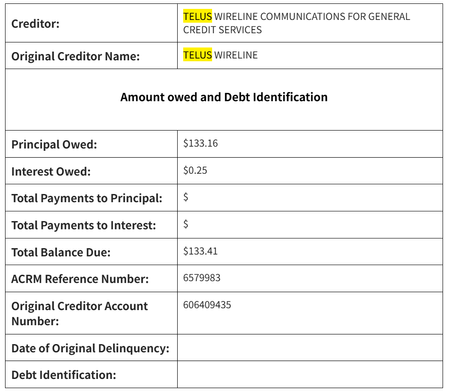
A collection agency is now coming after me for an account that I have closed and payed off. I closed my home internet service account back in Dec 2025, and have been using another provider since then. An email from Telus clearly shows that I have no remaining balance to pay as of Feb 2026. Another post I found on the forum seem to be a similar case: https://forum.telus.com/discussions/my_home_services_and_devices/collection-agencies-acrm--gcsi--gcs/178391 Currently, as I'm not in Canada, I cannot even contact customer service via the chat feature because I have no active account with Telus. If anyone have any clue of how to get in contact with Telus, please let me know. Or if someone from Telus support can help me with this case, it'd be even better.48Views0likes0CommentsReceived a collections notice for an account closed 2 years ago with a $0 balance
I closed my TELUS account in May 2024 and received a final email confirming that my account balance was $0. Now, almost 2 years later, I received: an email from TELUS saying I have a bill credit due to an overpayment on my home services account, and an email from ACRM Collections claiming I owe money to TELUS. I’m confused about how I can both owe money and have a credit at the same time. What should I do in this situation? Would it make sense to email ARM a screenshot of the TELUS overpayment notice and my final $0 balance email to dispute the debt? Also, nothing related to collections is showing on my credit report yet. Has anyone dealt with something similar?Solved418Views0likes4Comments
TELUS Internet Outage: No Service for Several Days
No home internet for the past few days. The service was already spotty before this, and now there is no connection at all. When I check the TELUS Service Status using my address, it shows no service disruption. However, when I call customer service, I’m told that my area is impacted. I’m not sure whether this issue is only affecting my home or is widespread around the 24 Ave NW and University Drive area. Can someone from TELUS please provide an update, at least on what is happening and when we can expect service to be restored? This is extremely frustrating, especially for those of us who are working from home. We'd appreciate an update and an estimated restoration time.181Views0likes2Comments
Property Damage From Recent Cable Installation
We had Telus workes installing the new cables at our house last week. We noticed that they ruined part of our front yard, not only the grass but small plants and bushes. By that day I was upset, but moved on. Today, we had a rainy afternoon around here. We were away from home, and by the time we got back, our basement was flooded. Water was coming from the basement window. It was caused by the new Telus cable that wasnt dig deep enough, and was left behind with a slope coming down to my basement window. Before then, that area around the window would be completely dry after each rain, since we had a slope in the opposite direction and the plants were protecting it. We had to rebuild the slope to avoid more water coming down during the rain, and it was easy to spot Telus’ new cable. I’d appreciate to hear back from you on what you are going to do to remedy this situation.317Views0likes8Comments
Replacing a dead PVR box should be simple
July 23rd our PVR box (UIW8001) stopped functioning and a reboot resulting in a RED X. Use Telus automated tools to try and resolve. It detected a problem and we needed to call support. Our call to tech support took an hour to be answered and the technician determined the PVR was dead and needed to be replaced. He indicated a replacement was being shipped. On July 27th VIP5662W PVR arrived. Plugged in and it stopped at the "Registration / Activation Code required" screen. Rinse and repeat with automated tool. Call to tech support, another hour+ wait time or callback option in two days!! Spoke with agent, who opened ticket with back office to resolve problem. Was told it would take up to 24 hours and we'd receive text or phone call when resolved. July 28th, no call however VIP5662W would properly boot. However it indicated it could not find PVR. Rinse and repeat with automated tool. August 10th. Called, waited an hour or so again and finally got an agent. He confirmed box should act as PVR, did some troubleshooting without success, so another ticket opened. Again wait 24-48 hours and we'd receive text or phone call when resolved. August 12th, Telus called and indicated old PVR still on account, blocking the new PVR from functioning. Now fixed. Instructed to reboot 3 times. Now back at the "Registration / Activation Code required" screen. Rinse and repeat with automated tool. August 14th, called yet again, long wait time (1 hour vs 15 minutes indicated) to speak to support. Representative tried to resolve without success. He even went as far as telling me to hard reset our network access hub. This was problematic for other household members would had to stop working via Internet connection. Also determined after the fact that all our settings in network access hub were lost. Still no success so maybe refurbished box was the issue. Another one to be shipped. August 18th, new to us UIW8001 (marked Refurbished) arrived. Guess what, when booted it again halted at the "Registration / Activation Code required" screen.223Views0likes9Comments
How do I port forward?
aight so im trynna port forward for a Minecraft server and after i login (which i now can do cuz i found the way to sign in a while back) and on the page there is NO WAY to port forward since there is no firewall section no nothing just very basic configuration stuff if i need to i can send a picture of what it looks like and the model is just a wifi boost 7 (and a 6 lite)170Views0likes5CommentsSubject: Request for a Fair Renewal Offer for a Long-Term TELUS Customer
Dear TELUS Customer Care Team, I am writing regarding my TELUS account. Previously, this account XXXXXXXXX was under my wife’s Neha, and it is now registered under my name Vikas account XXXXXXXXX ( Since4 plus year with telus). Our family has been a TELUS customer for many years, and we have consistently paid our bills on time. My current two-year contract ends 18th of August. However, I was informed that TELUS does not have a better plan or any meaningful offer available for a long-standing customer like me. I find this extremely disappointing. After maintaining a loyal relationship with TELUS for so many years, I expected the company to recognize that loyalty by offering a competitive renewal plan. It feels as though the time and commitment we have invested as TELUS customers have not been valued. I respectfully request that you review my account and provide your best available plan, including any loyalty, retention, or renewal offers. If no reasonable option is available, I will unfortunately have to consider transferring my services to another provider. Please treat this matter seriously and respond with a clear written resolution. Sincerely,104Views0likes1Comment