User Profile

DrPacman
Rockstar
Joined 6 years ago

User Widgets
Contributions
Re: Telus Pure Fiber in Bridge mode with modem NH20A
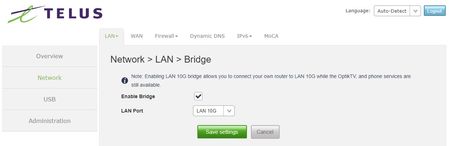
BradM Good day BradM, First thing I would do is factory reset the NAH. Make sure after you plug either a computer or laptop into any of the lan ports, you receive a 192.168 1.X IP address. Navigate to the user interface which is located at 192.168.1.254. The username is admin, and the password is located under the top cover of the NAH. Please note password his indeed case-sensitive. Making sure you have turned on the admin interface. Navigate to the network setting on the left-hand side, then to the LAN tab on the top, you should see the ability to enable bridge mode. You may have set the configuration, and then save the settings prior to being able to go back into those settings for a more granular configuration. This configuration is specifically for the in NH20A, and not the Technicolor FX5000. Technicolor has slightly different menus, however close enough that you should be able to find the bridge setting within that interface as well. The only thing I would note is if indeed you need to make corrections to bridge mode you will be required to factory reset the device, to enable logging into the admin panel. Hope this helps, please let me know. If you find this post useful, please give the author a "Solution", or mark as "Kudo", if it solves your problem, thank you very much.21KViews1like0CommentsRe: Access ONT after bridge mode
tjcstuart Wrote: I can't get into the modem from within my network. Good day… You have run into one of the interesting phenomenon’s of utilizing a NH20A in bridged mode. First off, you’ll find that the TELUS ONT/Modem will grab 2 WAN IP addresses. First one will be issued to the bridged port, and in your case the second on the additional ports. In my case I have the 10Gbps port bridged, and the others end up with the secondary WAN IP. The only way the I have found to access the NH20A while in bridged mode is to connect a Laptop/Computer directly to one of the non-bridged ports, and let it issue a new IP address to that device, and then login as one normally would using the 192.168.1.254 address with the credentials printed on the label attached to the face of the NH20A. (Password is indeed case sensitive as shown). If you find this post useful, please give the author a "Solution", or mark as "Kudo", if it solves your problem, thank you very much.7.5KViews2likes3CommentsRe: FXA5000
mrrob77 Does the Telus FXA5000 have any internal battery backup in case of power outage? Do I lose phone and internet service during a power outage? The long and the short answer is no, the FXA5000 does not contain battery backup of any sort. There are however a couple of solutions. First you could always add a UPS to your system to ensure at least your hardware has power. The caveat of course is if it is a neighborhood wide power outage the likelihood of any signal getting through would be minimal. I always keep a cell phone handy just in case. Regardless if you have or don’t have a phone plan, 911 in case of emergencies is always available regardless of the phone status. Hope this helps, cheers If you find this post useful, please give the author a "Solution", or mark as "Kudo", if it solves your problem, thank you very much.5.6KViews1like1CommentRe: Changing private subnet, how to connect back to admin?
Jo4242 Wrote: I'm assuming I won't be able to access via 192.168.0.1 anymore. Your assumption is absolutely correct, once you move the subnet the only method of reconnecting to the admin GUI interface is a modem/router factory reset. That interface is hardcoded at 192.168.1.254. If you find this post useful, please give the author a "Solution", or mark as "Kudo", if it solves your problem, thank you very much.2.2KViews0likes0CommentsRe: Telus Fibre
vanfibre i had heard that port was for pass threw is that correct? Indeed, that is correct. You have to make sure that the TELUS NAH device is in the 192.168.1.x IP range. Then access the user interface by going to the following IP 192.168.1.254. That then will give access to the above-mentioned User GUI. Under the cover of the NAH TELUS device you will find the user name and password for access. You may have to remove a little set screw at the base of the cover if the TELUS installer installed one. https://imgur.com/a/G5fw8Vc Move through the various settings pages, make sure you have the advance settings visible. For the pass-through setting, you are looking for the “Bridged Mode” settings. That’s where you can make those changes. Port forwarding will be found under another page. Note… Any advance changes that you make to the NAH GUI may result in you locking yourself out f your own network, the only solution would be to factory reset the NAH and start all over. Factory resetting will of course remove any of your custom settings. If you find this post useful, please give the author a "Solution", or mark as "Kudo", if it solves your problem, thank you very much.2.9KViews1like0CommentsRe: How do I change secondary DNS on Fibre Modem FXA5000?
ydesai There is only one field which is the Primary DNS. How do I add a secondary DNS? Try to seperate the server IP addresses with a comma and see if that enables what you may be looking for... If you find this post useful, please give the author a "Solution", or mark as "Kudo", if it solves your problem, thank you very much.5.5KViews2likes2CommentsRe: NH20A - How to disable full bridge mode?
BuddyBren Wrote: How hard could it be to simply be to shut off bridge mode on a device.... ? In your case my friend, seems like it's very difficult indeed. Which again seems more than ridicules and I understand your frustration. I would be livid by now, if the situation was on my end… I know this does not sound like a good answer to your problem. However, the only one that I can think of… When you reset the NH20A with the paperclip. Did the device go into any sort of reset mode? i.e., LED’s blinking etc? As well I know that sitting on hold with TELUS can be one of the most frustrating situations in the world. However, if you are willing to go it again. Try as soon as your connected to a human to get elevated to the PureFibre team. I wish I could offer a direct number, but alas I don’t have one. They may be the last resort to get this corrected for you… I can tell you that resetting NH20A can be done remotely so that info is not to be believed. I know it’s not much, however, with all you have done the best I’m able to offer… Cheers… If you find this post useful, please give the author a "Solution", or mark as "Kudo", if it solves your problem, thank you very much.8.4KViews1like0CommentsRe: NH20A - How to disable full bridge mode?
BuddyBren Wrote: Now that it is in full bridge mode I am assuming all ports are no longer accessible for the 192.168.1.254 Good day, You are indeed correct the 192.168.1.X range would be nonassessable from a bridged point. You did hit the nail on the head when you reset the NH20A to factory settings. This is the only way that you will be able to get back to the standard IP range. Now not that I doubt that you really did get the device to reset, my question would be what method you utilized to do that? Paperclip in the reset hole of the front of the NH20A? webapp from your phone? this would be helpful to know. I do know that the paperclip in the reset hole foe 20 or so seconds seems to be the best that I have found to do it... failing that you could always call support, they have the ability to remotely factory reset the device from that end, if all else fails... If you find this post useful, please give the author a "Solution", or mark as "Kudo", if it solves your problem, thank you very much.8.5KViews2likes0CommentsRe: Inquiring About Possible Solution for TELUS PureFibre Installation Issues
Shawnama Colour me increadibley surprised, in a very good way... You managed to find the Unicorn of installers... Convincing a tech to step outside the boundeies of the norm is very rare.. However, I've seen it more, and more all the time that TELUS will try to go beyond the bounds to assist, despite the negative comments we all see online. Hope you keep us all updated as to the stibility and preformance of your install. I know for one I'm going to be very interested in the longterm results... Cheers...9.5KViews0likes0Comments