User Profile

Dimo-X
 Moderator
Joined 13 years ago

User Widgets
Contributions
Re: Is this Telus or scammers
That's definitely sound advice. I know I had to coach my folks in similar fashion when it came to messages or communications that seemed suspect. In these types of circumstances it's definitely better to play it safe and call the Home service customer care team to verify the communication and whether it applies to said individual's account.31KViews1like0CommentsRe: Chat with live agent - does anyone get a response?
Thank you for sharing your experience with us Amelia. We apologize for the wait time you encountered. It is odd that you had to wait that long and we understand that waiting for a response can be frustrating. If you ever need help in the future, please send our TELUS_Support handle here a private message so we can assist you promptly. 😊46Views0likes0CommentsRe: Over billing, not cancelling
Sorry to hear you're having a tough time with the billing and cancellation process, Jturko. That sounds frustrating, and we'd like to help you get this sorted out. First, could you log into your TELUS account through Self Serve at TELUS.com and check your current billing status? This will show if the cancellation request has been processed and if there are any outstanding charges that might explain the continued billing. Just a heads up, that it usually takes one to two billing cycles after a cancellation request for the billing to completely stop, so that might be part of what's happening here. If you find any discrepancies or if the cancellation isn't reflected, please let us know. .87Views0likes3CommentsRe: AI endless loop
Thanks for the update and your patience stonehorse. We’ve responded to your PM and want to assure you that a member of our team will be in touch with you soon. We apologize for any inconvenience caused by the missed call and appreciate your efforts in leaving a detailed message.150Views0likes0CommentsRe: AI endless loop
Hey Stonehorse, our apologies and understandably frustrating. We're real people here and definitely get it. We do have our numbers listed at https://www.telus.com/en/support/contact-us but we'd be more than happy to look into helping you here. Please send us a PM so that we can assist.207Views0likes1CommentRe: Door to door sales
That's not acceptable behaviour from any sales representative. I would definitely report them once you get their name and ID number. You can message us over on our Facebook with the details via a Private message so that we can launch an investigation into this agent's unacceptable behaviour. In regards to the promotion and offers, you can setup a call back directly from the TELUS site via this page https://bit.ly/2WdDGYV and a TELUS home security expert will call you and go over options with you.38KViews0likes0CommentsData Optimization Tips for iOS Devices
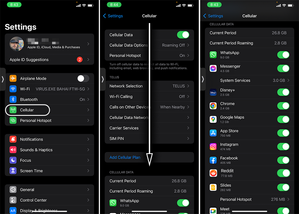
Whether you're on an unlimited data plan and just burned through all your high-speed data, or have a limited bucket of data and need to micro-manage your usage, these tips will help you get started and stay on top of your usage on your iOS device. What's using my data? First, we'll want to get an overview of what is using up all that data via the following steps: Go to Settings Tap on Cellular Scroll down You should now see an overview of all the apps using mobile data on your device and you can then adjust your usage patterns accordingly. For example, if a video streaming application is using most of your data, then restrict your streaming to only when you're connected to Wi-Fi or pre-download the shows/movies you want to watch on the go. Disable Background App Refresh Many apps continue to use data even when you've moved on to another app. This is referred to as background data usage and it can easily add up as you pile on the apps running in the background. Disabling Background App Refresh stops all that. Here's how to disable it: Go to Settings Tap on General Tap on Background App Refresh Select WiFi or Off. Turning Data Off If you can't afford to have a single extra megabyte more using up data then this will put an immediate halt on all Mobile Data usage until you say so. Go to Settings Tap on Cellular Swipe the Cellular Data slider to the off position Additional Steps In addition to the above here are a few other things to consider: Disable Auto-Play for videos on your Social Media platforms. (Facebook, Instagram, etc.) Pre-download your music, tv shows, or videos when on Wi-Fi. Be very vigilant with your usage when using your phone as a Hot Spot! Try to close apps when your done with them. When it comes to apps & system upgrades, only update over Wi-Fi. Turn off Wi-Fi Assist! Check out this article on how to go about doing that and learn more about the feature. EN version