optik tv
168 Topics
Telus TV Mini Issues
Had our 3 old Telus Optik boxes replaced with the minis. What a downgrade: The feed often freezes or just goes blank, particularly when pausing live TV Periodic notifications that the remote has "disconnected" and the whole system becomes non-responsive Severe lag when using the skip forward or backward feature - just feels unstable Cannot extend recordings beyond the pre-determined time (make recording sporting events almost useless) Any suggestions for work arounds - or can we just request that our old (but functional) boxes get returned?2.2KViews5likes65Comments
Optik TV Upgrade
I received an email saying that I qualified to update my Telus digital box. I thought oh great filled out the form and hit send me new boxes with the warning the old boxes will stop working two weeks from shipping date. They arrived quickly next day by Purolator. I hooked up one of the boxes and started browsing and quickly noticed changes that I am not fond of. No channel preview in the guide just a picture, so you can't see if you are switching in to a commercial Channel information in the guide used to show actors and year show/ movie was made/aired. Now it just shows a brief description. Search used to be able to search live TV and demand for easy series record. Now it just shows on demand. Record now only stores for 90 days. None of my recorded stuff switched over (which I did see that it said it might not but I figured I would cross my fingers and hold my breath) I also had Christmas movies saved for years for easy holiday watching. Overall I think the boxes are a huge downgrade and if your current box is working properly don't bother with the upgrade.4.6KViews5likes6CommentsNew 2026 Optik TV Box woes
First take on our new Telus Optic TV box. We received our new boxes last week to replace the current 4 that we have. We were told by a friendly tech services rep in the Philippines that everything would be the same or better and that we would still have our recorded programs and I assumed scheduled settings. No such luck. Not only have we lost recordings, but we need to reschedule programs for recording. Accessing the recordings now involves one extra step. Furthermore, there are no menu options for Play, Save, Delete, Series record info, Cancel series, Change settings, series priority, and Delete recordings. The screen is often cluttered with windows of other offerings and options; particularly when the TV is first turned on. Finally figured out to hit the back button to clear the detritus. The Guide no longer shows live video previews of the channels; just a still of the show or channel. The pause, skip, and fast forward modes are quirky. Am I a happy camper? Far from it. Anyone love the new boxes?1.7KViews2likes9Comments
Showing "My favourite channels" suddenly doesn't work
Hello, All my favourite channels still have hearts on the "Edit favourites" screen, and all my subscribed channels are there, but on the Telus TV 21T box, as well as in the Firestick app, the guide only shows 7 channels (149,351..) when filtering for "My favourite channels", none of which have hearts. The favourite channels are properly filtered on the website telustvplus. This happens for multiple "who's watching" sign-ins and the same 7 channels are the only ones listed in the guide. Has this happened to anyone else? What can I do to get it to work again -- it had been working for the past year without problem? I have reboot and tried toggling new channels as favourites, but nothing fixes it. Thank you.Solved1.4KViews2likes25CommentsTELUS TV+ Is Now on Smart TVs - Your Favourite Shows, Your Way
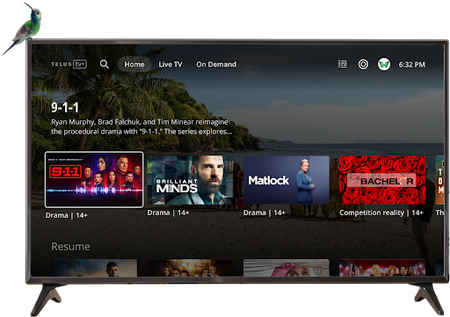
Big news! Your favourite shows, movies, and live TV channels are now just a click away on your LG and Samsung Smart TVs Streaming just got even more convenient! The TELUS TV+ experience you know and love is now available on your LG and Samsung Smart TVs, giving you yet another seamless way to enjoy entertainment right from your living room. What This Means for You No more switching between devices or dealing with complicated setups. Your entire TELUS TV+ library is now accessible directly through your Smart TV's interface. It's the same great experience, just more convenient than ever. Before You Start Make sure you have these requirements covered before diving in: Active Subscription: You'll need an active subscription to Optik TV, Stream+, or Pik TV (including live TV channels) Account Access: Have your My TELUS or Koodo login details ready Location: TELUS TV+ app is exclusively available in Canada Internet Connection: Some channels require TELUS home internet due to licensing restrictions Getting Started On your LG or Samsung Smart TV, go to the home menu and select "Apps" Use the search bar to find "TELUS TV Plus" and click to download and install Open the app, sign in with your My TELUS or Koodo credentials, and start watching! Don't have a My TELUS or Koodo account yet? No problem! You can register for a My TELUS account or Koodo account directly through the app to get started. FAQs: Everything You Need to Know Which Smart TVs are compatible? LG Smart TVs (2020 models and newer) Samsung Smart TVs (2021 models and newer) What features can I access on my Smart TV? You get the full TELUS TV+ experience: Live TV streaming On-demand content library 4K channel access Cloud recording management (local recordings require other devices) Can I purchase content directly on my Smart TV? On-demand purchases and rentals aren't yet available directly through Smart TVs. However, you can buy or rent content on another supported device and then watch it seamlessly on your TV. Are all my TV channels available? Absolutely! All 4K channels available through TELUS TV+ can be accessed on your Smart TV, giving you the complete viewing experience. Ready to Upgrade Your Streaming Experience? With TELUS TV+ now available on LG and Samsung Smart TVs, your entertainment setup just got a major upgrade. Grab your remote and start streaming your favourite content right from your living room. It's never been easier to enjoy TELUS TV+! Remember: TELUS TV+ is designed to work seamlessly across multiple devices. Explore other compatible options to enjoy your favourite shows and movies in even more ways, wherever you are!897Views2likes0Comments
Optik Evolution Surround Sound Problem
After a couple of weeks with the new Telus Evolution, I noticed that I was getting little to no surround sound and even having to change my receiver to simulated surround mode just to get my sub amps to output. Using the Netflix app on the Telus box, I tested with a Dolby Atmos movie (war scene from All Quiet on the Western Front) and there is almost no sound out of the surround speakers - I can hear it a little if I put my ear to the speaker. If I resume the movie via Apple TV 4K through the same amp, which sends all signals to the TV via the same active 8K HDMI cable, I'm fully immersed in a war zone. I just ended a tech call to essentially be told that there is a known issue with the output of 5.1 and that there is no repair date noted yet. As I search online, I find complaints from 4 months ago for the same issue. They even advertise that the new Optik supports Dolby Atmos. How can Telus market this feature when they are well aware that it is not working? Totally deceptive. Every day that passes, I have come to realize that Telus is using us to beta test a system that is plagued with issues and a tech support team that appears to have little training on supporting the new gear. Come on Telus, get your act together. I didn't sign up to be a product tester.4.1KViews2likes2CommentsTELUS TV has a mind of its own
Beyond the fact that TV programming has become mundane and the addition of these ridiculous one show channels are useless, the biggest thing that has me wanting to cancel TELUS TV is that their hardware has a mind of it’s own. The box powers down on its own even after just a few minutes of use. Now it changes to previously viewed channels on its own and today it interrupted my viewing by randomly opening YouTube, unprompted. It can sometimes take several minutes to have the TV turn on or the channel guide to populate. This is on GB Pure Fibre (though I’m paying for that speed I only get 400 up/down). At this point I am ready to cancel and pay the cancellation fee. It’s a huge cost for such horrible service. I can get everything I need from CBC Gem and other apps for a fraction of the cost without having to endure using a faulty product.124Views1like1Comment
Mount for Telus 24S box (3D print)
I got a Telus TV Digital Box the other day and decided I wanted to mount it behind my TV. So I created and printed a mount for it based on some other designs. It's a nice snug fit with a few variations. Hope this helps someone else, it was a fun exercise for me: https://makerworld.com/en/models/2398187-telus-tv-box-mount-24s (For some reason it won't let me upload photos, but there's some at the link)139Views1like0Comments
unable to watch any of the cbc channels on telus tv plus?
i'm trying to watch the olympics on my telus tv plus on the computer.. every single cbc channel shows a home icon with a slash on it.. and when i click on it it'll say this channel can only be viewed on telus home internet??? i'm sitting at home connected to the telus home internet on my computer?? so what am i missing.. the channel works on my tv box but doesn't work on any of my device using the telus tv app1.5KViews1like16Comments