optik tv
168 Topics
Advice on how to fix Optik TV signal
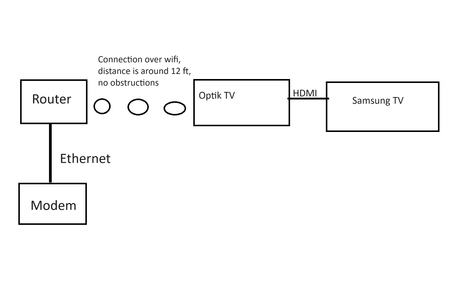
My optik TV keeps pixelating or artifacting, and I am running out of ideas on what to do. I have detailed what I have done, and more details below. Attached is also a youtube link showing the glitching in effect Glitching Video: https://youtu.be/swjphcPBAhA This is our current optik tv setup: Here is a list of what we have done for troubleshooting: 1. Contacted Telus Support, who fixed "multiple errors" with the first box. The issue went away for a few days, and then returned. 2. Got the first box replaced, which now is replaced with the VIP5602W box 3. Tested 3 different HDMI cables 4. Tested different HDMI ports 5. Restarted the boxes 6. Tested different channels Furthermore, the TV itself is a smart TV, and all content on it is displayed normally. The TV is also connected to an Xbox, which displays all of its information correctly Both the TV and the Box are over wireless because we do not have an ethernet port there It will do cycles of working for a little bit (<10 minutes) and then glitching (also around 10 minutes) On some days it works normally but those are few and far between We have a second cable box in the upstairs master bedroom, and it works normally. PVR recordings look fine. Thanks.Solved18KViews1like14CommentsHow to connect wireless 4k box to wifi booster?
My T3200 router's wireless signal is too weak for my living room wireless 4k box. So, I added a Telus wifi booster, connected my 4k box and it works great. I've now added a second booster in the office (T3200 router's wireless signal is too weak to reach her too). So I added a 2nd Telus wifi booster (plugged into an ethernet wall jack), but I cannot connect my VIP5602W 4k box to the newly added 2nd booster. How can I connect my VIP5602W 4k box to my newly added 2nd booster?Solved11KViews0likes6Comments
Telus TV+ on Chromecast with Google TV not playing video
Hi, I just got Optik TV and installed the Telus TV+ App on my Chromecast with Google TV and it won't play anything. I have tried Live TV, On Demand, and from the Guide and it always loads for 1 minute and then gives me error code ERR_PLAYER_P001. Other video apps work and do not have any issues. Any idea on how you fix this? Thank you for any help.Solved7.1KViews0likes11Comments
Telus TV+ remote
The new TV+ remote doesn’t have several features of the old one, which makes it so much more difficult / more work to navigate. Missing: PVR button, delete button, info button, stop / fast forward functions (either its a 30 sec skip or holding it down makes FF go way too fast with no screen preview?) Why is there no PVR button to jump right to my recordings… Do I have to go through the home screen - several steps every time? I’m 30 years old (not a senior or anything) and find the new system way worse and more difficult to navigate!!Solved6.4KViews1like4Comments- 6KViews0likes1Comment
Return Your TELUS Equipment in 3 Easy Steps
Have you recently moved, cancelled, or upgraded your services? You may have unused TELUS residential equipment sitting at home. If so, here's what you can do: PACKAGE THE EQUIPMENT - Find any appropriately sized box. - Include the first page of your most recent bill if you have it. If not, just grab a piece of paper and clearly write the following info on it: First and last name of the account holder. TELUS account number and full service address. Phone number associated with the service(s) (if applicable). - Seal the box securely. TAKE THE PACKAGE TO ANY CANADA POST OUTLET - Visit any Canada Post outlet and let the clerk know you're returning residential equipment to TELUS. - Quote the Return ID number PR142924. - Canada Post will provide you with a prepaid waybill, with the TELUS address already printed on it (no charge). (PLEASE NOTE: For any TELUS Mobility and wireless equipment returns, including the TELUS Smart Hub, please call our team directly at 1-866-558-2273 to arrange a return.) KEEP TRACK OF THE WAYBILL NUMBER - Please keep track of the waybill number you received from the Canada Post clerk until the package is successfully returned to our warehouse. - For convenience, take a picture of the waybill so you have it easily accessible on your phone! If you have any further questions, please comment below or reach out to us over at our Twitter/X or Facebook pages and we'll be there to help! FR version5.5KViews0likes0Comments
Optik TV and Internet Issues
We have been seeing and increase in the frequency of our optik tv and our internet connection "freezing" this started several months ago and was happening every two weeks or so. This "freezing" now happens daily, even though i have been restarting and re-initializing the Optik TV boxes at least once per week. The TV boxes are direct Ethernet connections to the Telus modem. Most internet users in the home are wireless but the freezing also occurs on the wired PC(s). We have a doubled ADSL connection as Telus has Zero plans to install Fiber to our neighborhood. Has anyone experienced this and if so, was there a remedy? To date online customer service Techs have not been able to replicate the issue and have only recommended that i periodically restart the modem and set top boxes. Given the amount of money my household is paying to Telus each month this has become a waste of money.Solved5.3KViews0likes1CommentGoogle Play Store and Downloading Apps
When I go into Google Play Store, I can only use the search to try to find new apps, and none of the ones I am searching for are found, always says no results. I’ve tried Amazon music, Britbox… I do have a google account so unsure why this isn’t working. Any advice or support would be appreciated!Solved5KViews0likes2Comments