TELUS TV+
44 Topics
ERR_AGL ACN_3545 trying to log in to Telus TV+ iPad App
I get the login error: ERRAGL ACN3545 when I try to log in to the Telus TV plus iPad Application. According to a search I found this recommendation: To help the support agent understand, ask them specifically to "re-sync the provisioning between the My TELUS portal and the TELUS TV Plus backend. I called Telus support and after about an hour of repeating this the support agent has made a request to have this done - says it will take 24-24 hours to have this done. All other Telus web and mobile applications (My Telus, Telus log in etc) work fine except for this or using the browser to login. As per other recommendations, I changed the password and reinstalled the application but so far nothing. Just waiting to have Telus notify me when they have done the synch. There has to be a better way...51Views0likes7CommentsRecordings and Restart Apple TV Playback Error
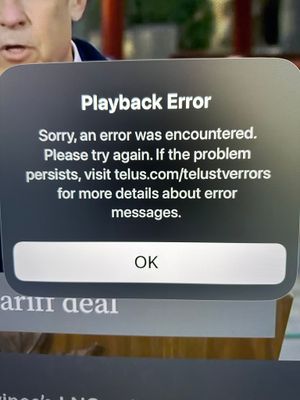
When I use the Restart show feature in TelusTV+ app on Apple TV, I will receive a "Playback Error" and this will also happen when watching recordings. Why? I've noticed I'll keep receiving this error every 40 seconds or so. This has been happening for some time and there is no resolution. I have tried deleting the app, restarting the device, removing the TV Provider option in Apple TV. I've rebooted the ONT (NH20A) and the Booster. Nothing works. Internet seems to always work, just seems to be a playback issue with TelusTV+ app and recording. Any reasons why?168Views0likes4Comments
Telus AndroidTV Box issue (Model: UIW4054TLU)
My TelusTV - 21T broken again. I have to reset to factory setting 2-3 times a week now. The TV box will hang with no signal (yes i check the HDMI cable). To temporary fixed it, i have to insert a paperclip in the reset hole and hold it for 10 seconds but the white light on the button will not blink or turn off. Which then i have to unplug the power cord for 10 seconds and plug it back in. a few times, i can see it boot up but still no signal then i have to repeat the same process. i can watch TV for a night then turn off the TV. the next morning, i have to reset again with the same procedure above. so annoying. I have replaced 3 of my TV box for more than 3-4 times now over the years. What to do?87Views0likes1Comment
PSA to everyone having tech difficulties
Please dont waste your time waiting for a callback or sit on hold for an hour to speak to someone. If you're experiencing constant audio and channel problems. Just follow these simple steps: Restart your wifi and TV box once a month. This will save you a headache trust me (dont trust me). Call them and speak to the manager72Views0likes1Comment
Lagging channel changing +... on Optik TV
Anyone else experiencing a 7+ second lag when changing channels, switching between apps and other such functions. It's also accompanied by a blank screen with a green rotating circle in the bottom right corner. Appears to have started and become a regular pain over last few weeks.243Views0likes11Comments
Can't login to Telus TV+ on web browsers
New subscriber to Stream+ which is supposed to include Telus TV+. Spent over and hour myself and another hour on the phone with Telus support yesterday, after waiting for a call back, trying to login to Telus TV Plus on a web browser. Logging into app works just fine. Tried three different computers and five different browsers - no luck. Restarted the modem, cleared histories, restarted computers, enabled location on all computers/browsers, allowed all permissions, no VPN's etc. Message pops up each time saying "Error, The email address or password entered is incorrect. Please contact customer care." No resolution with Telus support as, after an hour, the call was disconnected. Despite, twice, providing my call back number (which is the same number they called me on to initiate the call), I did not receive a call back. I received a text message this morning directing me to the Telus webpage entitled "How to use TELUS TV+ on your browser". Completely unhelpful. Hoping someone can help. Would be nice to have one Telus service/app working properly, as we're into month four or the Telus Connect app not working properly either.41Views0likes1CommentTELUS TV+ app not showing recording info from TELUS TV Digital Box
Recently I upgraded from my TELUS PVR to the TELUS Digital Box. A few days later, the recordings and schedules from the PVR were copied to the cloud and made accessible on the Digital Box. Going forward, I have made new recordings and scheduled future recordings from the Digital Box. However, on my Android tablet and smart phone, the TELUS TV+ app displays the message "no recorded content" under the Recorded tab. Under the Scheduled tab, there are no entries shown for recording single shows. There are several entries for recording series but they all show the recording time as 4PM and the message "No episodes available in the next 12 days". I have reset the Digital Box a couple of times. On my Android devices, I deleted the cache and data before uninstalling the TELUS TV+ app and re-installing it. I have done this multiple times without success. Does anyone have any ideas on how to get the TELUS TV+ app on my Android devices to reflect the same recording information that's showing on the Digital Box?Solved296Views0likes5Comments
Closed Captions on Digital TV Box
I have multiple times opened settings, turned on closed captions, opened display settings and set caption preferences the way I would like: small font, 25% opacity on background. The example shown in settings would be perfect, IF the settings were applied when returning to live TV. Default of large font, white font on opaque black background interferes with decent program viewing. How to get the captions settings as set to apply to live TV? Is this a feature still under development? If so when will this be rolled out? I consider this a high priority for my TV viewing.Solved524Views1like18Comments
Video Playback Speed
Dear TELUS Product & Customer Experience Team, I am writing to formally request the addition of adjustable playback speed (e.g., 1.25×, 1.5×, 2×) for TELUS On Demand content and recorded programming on the TELUS TV+ Android TV platform. Playback speed control is now a standard feature across most modern streaming platforms and digital media applications. Many customers, including myself, have become accustomed to watching content at increased speeds for reasons including time efficiency, focus optimization, and accessibility. For individuals with ADHD and other neurodivergent conditions, the ability to adjust playback speed is not simply a convenience — it meaningfully improves engagement and comprehension. Currently, TELUS TV+ does not offer this capability, which creates an inconsistent experience compared to other digital platforms. I believe introducing playback speed control would: • Improve accessibility and inclusivity • Modernize the TELUS TV+ platform • Increase customer satisfaction and retention • Align TELUS with evolving industry standards This feature does not alter content ownership or licensing; it simply provides user-side playback flexibility that is already widely implemented elsewhere. I strongly encourage TELUS to consider adding playback speed options within the player interface for On Demand and recorded content. Thank you for your consideration. I look forward to seeing continued innovation on the TELUS TV+ platform. Sincerely,50Views0likes1Comment
Mount for Telus 24S box (3D print)
I got a Telus TV Digital Box the other day and decided I wanted to mount it behind my TV. So I created and printed a mount for it based on some other designs. It's a nice snug fit with a few variations. Hope this helps someone else, it was a fun exercise for me: https://makerworld.com/en/models/2398187-telus-tv-box-mount-24s (For some reason it won't let me upload photos, but there's some at the link)54Views1like0Comments