User Profile

SamSamSam
Organizer
Joined 6 years ago

User Widgets
Contributions
Re: Eero Pro router with Nokia ONT
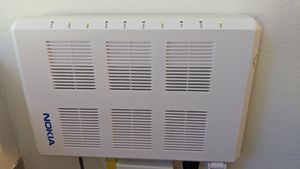
Thanks for your reply! The Eero installation app (which connects to router via phone/bluetooth) says no internet detected and to restart the modem. I restarted the ONT, but keep getting same result. Here are a couple of photos of my peculiar setup in case it helps: at current, the data cable is routed outside again to hook up to the old copper line (which enters the house in another place and that I'm trying to "cut out" by installing the new router directly at ONT and do away with T3200).11KViews0likes1CommentEero Pro router with Nokia ONT
Hello, I've recently been advised in this forum that I could use a 3rd-party modem instead of the T3200. (The reason for the change is a rather complicated setup that still relies on an old copper line between the ONT and Actiontec). Here is the thread: https://forum.telus.com/t5/Internet-Home-Phone/Got-Fibre-how-to-replace-Actiontec-modem-that-is-still-connected/td-p/108862 I've just received the Eero Pro but seem unable to connect it to the ONT. It simply does not recognize internet. Does this mean that I have to use the Actiontec in bridge-mode (which was exactly what I was trying to avoid), or is there a way to configure the Eero for data input directly from the ONT? Thanks so much for your help! SamSolved11KViews0likes8CommentsGot Fibre: how to replace Actiontec modem that is still connected on old copper line?
Hi all, I recently got upgraded to fibre, but I'm not happy with the way the tech has set it up. I'm looking for your advice on how best to fix it. THE SITUATION Fibre enters the house at a far corner, where it is met by Nokia ONT. From there, it goes into another small white box (wall-mounted), and leaves the house again to connect to the old copper wire. The Actiontec 3200M legacy modem is hooked up to that old copper. The reason for this is that the wire travels through dropped ceilings and could not readily replaced. The modem is in a more central place in the house, and is connected by ethernet devices -- home phone base; Arlo camera hub; Wifi booster base -- that would not work anymore if they were all relocated near the ONT. THE PROBLEM I have a few of the TELUS boosters set up, and while the WiFi is generally stable it is not fast. The quality of the what the boosters provide seems to have deteriorated lately. THE DESIRED SOLUTION Install a more powerful mesh-able WiFi-6 router at the ONT, and extend with a booster (the house isn't that large). Run ethernet cables to better location for the other wired devices/hubs. MY QUESTIONS Is it possible to connect a 3rd-party router directly to the ONT? Or do I need to keep using the Actiontec modem as a bridge? (In which case, are there good step-by-step instructions on how to set this up?) Or is there a better solution altogether to bypass the copper bottleneck? Thanks so much for your help/advice! We've come to rely so much on good home WiFi with everyone working/schooling from home, but I don't want to purchase any new equipment without having been able to think through the entire setup... Sam10KViews0likes6Comments