User Profile

Foonus
Ambassador
Joined 10 years ago

User Widgets
Contributions
Re: Liftmaster 84501 - not detected by security pannel.
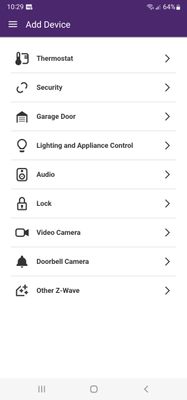
Thanks for the reply The user guide has zero information about pairing the unit to a security system, only to their proprietary app, though it is listed as supported hardware for ADT without any additional hardware needed. https://answers.alarm.com/Customer/Website_and_App/Home_Automation/Garage_Doors/Add_a_new_LiftMaster_garage_door_device These are fairly new openers and though there are multiple sites guiding the setup for ADT there is no mention of Telus anywhere.. When I originally set up this system it was ADT gear using alarm.com, since then Telus has changed it to their proprietary management instead of using alarm.com (ADT). Its looking as though just because something new is supported by ADT it no longer means that it will be supported by telus home security. I ran into a similar situation with my door locks. I had 2 of the smartlock 30 code units set up, again the ones sent to me were Z-wave.. Trying to buy a 3'rd one at the local Lowes or Home depot and everything out there now is WIFI, not z-wave any more and you can't get the wifi locks to detect either. With both devices the current port of the app only allows you to select the specific device name from the preset list, if its not in the list the only "scan for all" option at the end of the page ONLY lets you add Z-Wave devices in Telus's ported version, not WiFi standard Devices. Telus's Instructions: Select Add Devices in the top-right corner of the screen Select Garage Door Select your device that matches the image and device name in the drop-down list and select Next Select Register Gateway As mentioned earlier when you click on "garage door" only the "liner z-wave" door opener is on the list and it is pre selected for you with no option to change it. In the ADT setup guide (linked above) there is a pull down selection in ADT's version of the app allowing you to select the correct opener.. Note the add device option only specifies z-wave now.. Telus's Port of the alarm.com app - Note Add Device limited to Z-Wave only Original Alarm.com app. Yes, My security package is supposed to include garage door support. Though I did find this bit on alarm.com " 1. Enable the LiftMaster integration. A MyQ Garage Door Controller is paired with Alarm.com using the LiftMaster integration. This integration can only be enabled by your alarm monitoring company. Contact your provider, and ask them to enable the feature, if they haven't already. Please note that Alarm Grid customers who use Alarm.com for automation control can have this feature enabled at no additional cost."3.8KViews0likes0CommentsRe: Telus My home concerns
If you are renting the basement, many city bylaws will state that it legally needs to have a separate (B) address with a safe fire exit. If you have a "B" appended to the mail you receive at your address the landlord is doing it right.. this means you can get your own Telus hooked up downstairs. If you've got access to the modem itself, resetting it will also reset all of the login information. Not sure how stable your rental agreement is if you want to start messing around with your landlords stuff... If there are outages due to power offer to put a cheap battery backup for them, as they would be experiencing them as well. Unfortunately as long as someone else is administering your Internet setup you are at the mercy of both their knowledge and generosity.2.3KViews0likes0CommentsRe: Blocked Port 21
You will need to set up your router and the FTP client to use non standard ports, Telus blocks most of the known ones. When i had a FTP server running locally on the fibre a few years ago it was necessary to set port forwarding on a third party router (PfSense) and have it connecting through a port that Telus wasn't blocking, think it was port 8081 I used. Had no issues with it, as a bonus you can set up a dynamic DNS service as well on the router so you don't need to keep changing the IP address when you get a new DHCP lease. As Nighthawk mentioned the standard FTP isn't the most secure. If there is only one user or a handful of them connecting to the server, it may be wise to add a Whitelist of their IP addresses on the firewall as well, blocking anyone else that isn't on that list from hitting your FTP server. Note that most all residential providers do this to some extent. You mentioned looking into another ISP, beware any mobile ISP's or Starlink which use CGNAT.. this makes even the above process impossible, forcing you to pay for the business plan which is considerably more expensive.3.8KViews0likes0CommentsRe: is telus speed test the same as google speed test?
The telus speed test by default connects to the closest telus server on the telus network before they have to deal with external internet routing. The goal of this page is mainly for installers and tech support to be able to point you at a page that shows your connection is fast and get you off the phone with your speed complaints. Bandwidth throttling and long routing delays don't affect your speeds as drastically to that site. I have my suspicions that the traffic to the telus speed test sites is also prioritized, but it remains a suspicion. Next time you try the telus speed test use the pull down menu to manually select the furthest server away from you (they show the distance) it will requires more hops routing there and you should see similar numbers to your real world performance.6.2KViews1like3CommentsLiftmaster 84501 - not detected by security pannel.
Been trying to get my Liftmaster 84501 working with the Telus alarm app with no success. This model has both the MyQ bluetooth and WIFI onboard, and looking on ADT's website it shows that there are no additional devices needed for it to be compatible with their system. I had set up the opener using the MyQ app, which worked just fine. Since going through multiple support documents telling me not to use the app, i deleted the device from the app and attempted to set up the telus app to use it. First issue I noticed was both the app and the website don't allow you to specify anything at all in the garage door menu. When you select >Add device>Garage Door, they both have no choices in that menu and speed you through it automatically selecting "Linear Z-Wave Garage Controller". Needless to say the setup process does not work as the garage door opener is a WiFi device and not Z-Wave. Additionally the selection to add "other" at the bottom of the list has now also been changed to "Other z-wave device", also not working. The Telus support article https://www.telus.com/en/support/article/add-chamberlain-liftmaster-myq-smart-garage-hub-821lmb-to-your-home tells the user to select the correct device under "Garage Door" to proceed. How do you install this opener when there are no options to select anything in that list and automatically forces the selection of the Linear z-wave controller.. Another website here telling users how to configure the device with ADT requiring no additional hardware. https://zionssecurity.com/new-equipment-and-features/how-do-i-connect-my-liftmaster-garage-door-opener-to-adt-control-or-alarm-com/ Is this a limitation with Telus's "port" of the ADT system or whats going on here?4KViews0likes2CommentsRe: Eero Pro router with Nokia ONT
Its irrelevant if the hardware you plug the SFP into flat out doesn't support it. I have used various switches, NIC's and routers with this exacts SFP for the past 3 years at different locations. Disagree all you want but it is what it is, I don't see you with a working solution ATM so perhaps put the EGO aside and take some advice from people that actually have it running. Would suggest you let google do some research for you. Many devices need hardware modification to work with this SFP ONT, some work out of the box, and others will not work no matter what you do to them. Here is an example of community trying to get the Nokia SFP's running with a third party router fibre in / fibre out setup, yes I am one of the few documented as modding it and verifying it running on Telus. https://www.dslreports.com/forum/r32230041-Internet-Bypassing-the-HH3K-up-to-2-5Gbps-using-a-BCM57810S-NIC Don't Hate... Educate.11KViews0likes1CommentRe: Actiontec t3200m - Advanced Features - DHCP & IPv6 DNS
*T3200M ... spelling As far as solution goes, best you can do with this setup is bypass the internal routing on the thing by bridge port 1 and hook your router up there. If you are lucky enough to be on Fibre and they set it up with a SFP directly to your 3200M its as simple as removing the SFP from the 3200 and putting it into a switch that supports it and hooking up your home router directly to that switch.6.7KViews2likes0CommentsRe: Actiontec t3200m - Advanced Features - DHCP & IPv6 DNS
Actiontec allows you to disable DHCP in the vendor release firmware, however a few firmware updates ago Telus crippled the firmware they push out to the T3220M's on the Telus network to block you from doing this unless you sign into the device with a Telus tech support ID. Consensus is that they have done this so that people actually return them instead of keeping them as WiFi access points behind their own higher powered routers.6.6KViews0likes1CommentRe: Internet usage
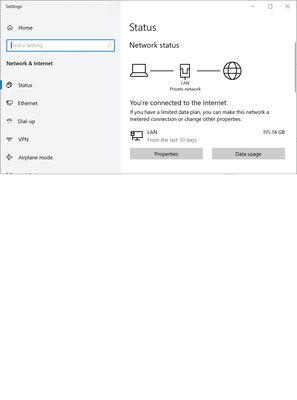
Windows 10 allows you to see exactly which processes are using data, how much, and also allow you to set a global limit. If you find that your Windows PC is not using data, log into the modem and make sure that no other WIFI clients are connected to it, as a precaution you may want to change the password and see if your data usage stops.4.7KViews1like0Comments