telus
137 Topics
Advice on how to fix Optik TV signal
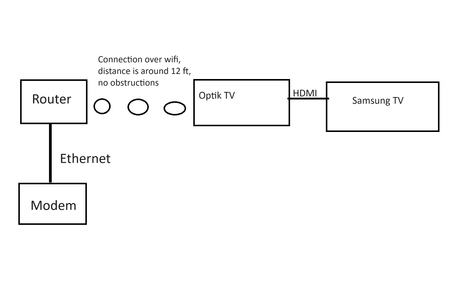
My optik TV keeps pixelating or artifacting, and I am running out of ideas on what to do. I have detailed what I have done, and more details below. Attached is also a youtube link showing the glitching in effect Glitching Video: https://youtu.be/swjphcPBAhA This is our current optik tv setup: Here is a list of what we have done for troubleshooting: 1. Contacted Telus Support, who fixed "multiple errors" with the first box. The issue went away for a few days, and then returned. 2. Got the first box replaced, which now is replaced with the VIP5602W box 3. Tested 3 different HDMI cables 4. Tested different HDMI ports 5. Restarted the boxes 6. Tested different channels Furthermore, the TV itself is a smart TV, and all content on it is displayed normally. The TV is also connected to an Xbox, which displays all of its information correctly Both the TV and the Box are over wireless because we do not have an ethernet port there It will do cycles of working for a little bit (<10 minutes) and then glitching (also around 10 minutes) On some days it works normally but those are few and far between We have a second cable box in the upstairs master bedroom, and it works normally. PVR recordings look fine. Thanks.Solved18KViews1like14Comments
TELUS & SHAW NIGHTMARE
TLDR: Canadian ISPs need to get their crap together. Telus did not inform me I could no longer have internet until I called in on install day. The excuse they provided is either BS. If SHAW is not giving Telus permission to use the SHARED conduit, the CRTC should mandate that ISPs can not deny their competitors using the only conduit available. SHAW should provide their tech with better fish tapes and offer better pricing for internet. A SHAW contractor himself said he uses purefiber at his house… Preliminary stuff: We were moving to a new house. Using the Telus pure fiber map and calling in, I was told I could get fiber to my house. I also checked with shaw, and they too could provide internet. The house is new, so it has ethernet wired everywhere and places to mount APs on ceilings. From my media panel, there is a fiber cable running to the Telus termination box outside. Here is where my troubles start… Telus! I used to love you guys, but you guys royal f***ed me… Initially, I got a gig internet for 55 dollars from an in-store rep. But the representative who gave me this deal accidentally created two move requests—one with the regular gigabit pricing and one with the 55 dollar pricing. When I called Telus, the first person could not override the appointment and transferred me to the manager. Here is where the manager goes oh no… The instore rep gave me too good of a deal, including gigabit for 55 + $350 bill credit + 10 dollar mobility discount and two new boost 2.0 AP's. The manager informed me they couldn't do this as it violates the company policy of not discounting more than 40%. He said the instore rep, to get me 350 bill credits, signed me up as a new customer, and I would have to pay 200 dollars for the early cancelation. Whatever, I will pay it because I am getting a killer deal. But it's a no-go, so after 2 hours on the phone, we come to a gig for 60 dollars plus a 100 bill credit. We also managed to book the move/install date for the day we move into the new house. Whatever is still a good deal, but I am annoyed I had to spend so much time on a mistake on their part. A day before moving incomes, I ring up Telus to ensure everything is still in place because with online exams and siblings working from home, it must be up. This is where my annoyance turns to anger… The person on the phone tells me he doesn't see any install. I tell him I have an email saying it will be installed and give him the number associated with the install. He tells me there is a note saying it can not be installed. He says this note was added on April 12th. It is now the 18th. WHY WAS I NOT INFORMED?? It was planned for the network to be set up on the 19th. The manager said he would be there to help me through the process and keep me updated as he knew how critical it was to have internet, but that was a lie. I ask to be transferred to a supervisor as I am frustrated, and he says the manager who handled my case should have informed me. Well, duh, but if I can get an email for an installation date. Should I also receive one for the cancellation no? He informs me nothing can be done because the shared conduit is owned by shaw, and they are not giving Telus persimmon to run their lines through it. There is pure fiber overhead servicing houses across the street. But they can not run it to our house as it's an underground service. I find this BS. I can see the fiber cabinet three houses up my street. Furthermore, I don't think a single company should have access to a "shared" conduit. We will touch back on this topic later on. Now I have to go to shaw, which is in every which way an inferior ISP. They do not have same-day install, so they come on the 20th. It's now one day without internet, so we go to the library to study and work. The shaw person comes and while pulling the cable through the conduit. The coax cable slips off the pull string. So now he tries feeding his fish tape into the underground cable box, but he can not and leaves. He says he called in a special drop team who will come today. Surprise, the drop team can not make it the same day, so they come tomorrow. Thus another day without internet. They pull the cable themselves, but they do not have the modem. I asked if they could terminate the cable, and I could go to the mall, pick up the modem, and self-install. (All in-house wiring is terminated). He says no can do. I even offered him 20 bucks and soda. I recall shaw, and they said sorry, no tech can come today as we have to book one day in advance. So in total, I end up with three days without internet while dealing with studying for finals and writing online exams in the library vs. my house. All this could have been avoided has Telus informed me once they found out they couldn't run the cable if the initial shaw tech had a longer fish tape if the second tech could've terminated the coax, and I picked up the modem myself. Another note is that the shared conduit stuff is bull**bleep**. Imagine buying a car, but you can only drive it if you put shell gas because shell owns the car's fuel tank. How does the CRTC allow this to happen? I tried to help the first tech with pulling the cable, and we spoke regarding Telus pure fiber. He said the shared conduit stuff is bs because Telus has conduit installed from the fiber cabinet into the underground bunker thing.13KViews0likes8CommentsHow to Enable Bridge Mode on TELUS Gateway for Custom Router Setup
Bridge mode allows you to use your own router with TELUS internet by disabling the built-in router functions of your TELUS gateway. Follow these steps to set up bridge mode on compatible TELUS gateways. Compatible Gateways T1200H (single-line) T2200H (copper-bonded) T3200M Complete Setup Process Access your gateway settings: Open a web browser on a device connected to your TELUS network Enter http://192.168.1.254 in the address bar Log in using your gateway username and password Enable bridge mode: Click the "Wireless Setup" icon Select "Advanced Setup" Choose "Port Bridging" Enable "Port1 Bridge" Click "Apply" to save the changes Expected results after enabling bridge mode: The gateway's Wi-Fi will be disabled Your custom router will now handle network management The internet connection will remain active through the TELUS gateway If This Doesn't Work Double-check that you've selected the correct options and that your gateway model is compatible. If issues persist, try restarting both the TELUS gateway and your custom router. When to Contact TELUS Contact TELUS support if you experience any of the following issues: Login credentials for the gateway settings don't work The bridge mode option isn't visible in the gateway settings Your internet connection fails after enabling bridge mode Your gateway model isn't listed as compatible with bridge mode FR version11KViews0likes0CommentsUnion Bay Estates / Kennsington Developements Fibre Connection?
Im just going through past announcements ect and it suggest that union bay will have 14,000 new single family units when they construction of all the residential is over. You can see the groundwork for all this playing it self out now with street lamps, roadway and the leveling of dirt in order to prepare for more condos, and residentials. My question is that according to this fibre would be needed to expand and connect the killmarnock district etc for kennsington properties etc for union bay estates nearly 2000 acres I believe. To make a long story short I signed up to be one of the expansion homes on fiber list and wondering if you wouldn't mind just connecting me first on the way to union bay estates. Thanks.8.5KViews0likes9CommentsHow To Track The Status of a Device Return
Did you get a phone through the TELUS Bring-It-Back program, and now you've returned the device to us? Learn how to track the status of a device return by following these easy steps: 1. Log in to the My TELUS app 2. Select the Device tab near the top of your screen. 3. Tap on Order Processing under the Return tracker heading. It's that easy! The status of the order will update throughout the return process, so keep checking back to stay on top of things. Version FR6.7KViews0likes0CommentsReturn Your TELUS Equipment in 3 Easy Steps
Have you recently moved, cancelled, or upgraded your services? You may have unused TELUS residential equipment sitting at home. If so, here's what you can do: PACKAGE THE EQUIPMENT - Find any appropriately sized box. - Include the first page of your most recent bill if you have it. If not, just grab a piece of paper and clearly write the following info on it: First and last name of the account holder. TELUS account number and full service address. Phone number associated with the service(s) (if applicable). - Seal the box securely. TAKE THE PACKAGE TO ANY CANADA POST OUTLET - Visit any Canada Post outlet and let the clerk know you're returning residential equipment to TELUS. - Quote the Return ID number PR142924. - Canada Post will provide you with a prepaid waybill, with the TELUS address already printed on it (no charge). (PLEASE NOTE: For any TELUS Mobility and wireless equipment returns, including the TELUS Smart Hub, please call our team directly at 1-866-558-2273 to arrange a return.) KEEP TRACK OF THE WAYBILL NUMBER - Please keep track of the waybill number you received from the Canada Post clerk until the package is successfully returned to our warehouse. - For convenience, take a picture of the waybill so you have it easily accessible on your phone! If you have any further questions, please comment below or reach out to us over at our Twitter/X or Facebook pages and we'll be there to help! FR version5.7KViews0likes0CommentsHow To Process A Certified Pre-Owned (CPO) Device Repair
Does your certified pre-owned (CPO) device need a repair? Here is some info to help you get that done. In-warranty CPO device - Do not take your device to the brand's store. Visit the nearest TELUS store to discuss with our team, as only TELUS locations can process your iPhone repairs if within the 1 year CPO warranty. *If the device is through Koodo or Public Mobile, please visit the nearest respective store for assistance. Expired CPO warranty or physical/water damage exists - Visit the nearest TELUS or Mobile Klinik store to speak with our team. *If the device is through Koodo or Public Mobile, please visit the nearest respective store for assistance. Version FR5.7KViews1like0Comments
Complaint Regarding Customer Service Experience and Billing Issues
Dear Telus Management, I am writing to express my deep dissatisfaction with the customer service I received while attempting to clarify the details of my new contract and discounts. My recent experience has left me feeling frustrated, undervalued, and concerned about your team's overall quality of support. Summary of Issues: • I was bounced between multiple agents, my calls were disconnected, and I received inconsistent information regarding my contract and discounts. • I initially renewed my contract after speaking with an agent named Abdul, who gave me a deal that I accepted, although it couldn’t match an offer from Rogers. However, after reviewing the contract, I noticed it didn’t reflect the discounts or plan details discussed, such as the 500GB of data and additional discounts for pre-authorized payments. • When I called to clarify, Eunice from the BCX Wireless Car team told me that the discounts had been applied. However, she copied and pasted Abdul’s notes, which did not clarify the discount details. Additionally, I was disconnected multiple times when trying to speak with support and even left on hold with no resolution. • A friend who is also a Telus customer showed me his plan details, and he is receiving a similar plan for significantly less without needing to purchase devices, which contradicts what Abdul told me. • I spoke to multiple agents, including Maria and Regal, who could not provide clarity or escalate my case as requested. I was finally given case number 21911243 and told that a manager would call me back within two hours, which did not happen. Instead, I was informed that I needed to wait 24 hours. • In my conversation with Juan from the loyalty team, I was falsely accused of being discriminatory when I referenced another department, which was highly offensive and uncalled for. Juan later apologized, saying that the experience was utterly unacceptable. • At this point, I feel I am being misled and mistreated. Despite multiple calls and escalations, I still do not have clarity on my discounts or a fair resolution to my concerns. I left Rogers to come to Telus because I believed in the promise of better service and fair treatment, but this experience has been anything but. If my concerns are not addressed, I will be forced to escalate this further, including to the Office of the President, the media, and the Better Business Bureau. My Request: I am requesting a clear breakdown of my contract, including all applicable discounts, and a fair resolution to the issues I’ve experienced. Additionally, I ask that someone review the call recordings to understand the poor treatment I received from various agents. Thank you for your attention to this matter. I look forward to a prompt and satisfactory resolution. Sincerely, Benold [Mod Edit: Removed Last Name] Telus Customer5.4KViews1like6CommentsWi-Fi Assist
Wi-Fi Assist Wi-Fi Assist is a feature that optimizes the handoff between a Wi-Fi network and your carrier's cellular data network. In the past, when your device left the effective range of a Wi-Fi network, it would try to maintain connection to that network as long as it could, even when the network's signal became too weak to be effective. Then, you'd have two choices: either turn Wi-Fi off or wait until your device was completely out of range and it would switch over to the cellular data network. How does Wi-Fi Assist work? Wi-Fi Assist regularly checks your device's Wi-Fi connection to determine signal strength. If the Wi-Fi signal performance drops, Wi-Fi Assist automatically switches to a cellular data connection until the Wi-Fi signal improves. By doing so, the handoff between your Wi-Fi and cellular data connections would be automatic and smooth. How can Wi-Fi Assist impact me? As this feature may increase the amount of time spent on the cellular data network, there is potential for higher data usage, and the Wi-Fi signal may disconnect more frequently if your device's Wi-Fi connection drops below a specific strength. How to turn Wi-Fi Assist ON or OFF Wi-Fi Assist is usually turned on by default. Once enabled, it operates in the background automatically. You can turn it on or off anytime by following these steps: Apple/iOS 1. Tap Settings. 2. Tap Cellular. 3. Scroll down to find the Wi-Fi Assist toggle. 4. Tap to turn the feature ON or OFF. Android 1. Go to your Start screen and swipe up or down to open the menu. 2. Tap Settings. 3. Tap Connections. 4. Tap Wi-Fi. 5. Tap to enable Wi-Fi. 6. Choose the Options symbol and select Advanced. 7. Tap to disable Switch to mobile data. Important Notes Wi-Fi Assist does not activate for some third-party apps that might use large amounts of data. For example, apps with audio or video streaming functionality, or email apps with features such as attachment downloads. If you are data roaming outside of Canada, Wi-Fi Assist will not automatically switch to a cellular data connection. For device specific data management tips, you can also check out our articles for iOS and Android. Version FR5.3KViews1like0CommentsTransfer Your Phone Number to TELUS
Moving your existing phone number from another carrier to TELUS preserves your contact information and ensures uninterrupted service. The transfer process completes in 2-3 hours. What You Need Before Starting New TELUS SIM card Current provider's SIM card (must remain active during transfer) Previous provider's account number OR your device's IMEI number Device you'll use with TELUS Find Your IMEI Number Dial *#06# on your current device to display the IMEI number instantly. Complete the Transfer Visit www.telus.com/transfernumber and log in to your account Choose whether to provide your previous account number or IMEI number Click "Get Started" and enter the requested information Review all transfer details for accuracy, then click "Submit" Wait for an SMS confirmation from your old provider (arrives on your current SIM card) Reply "YES" to the confirmation message within 90 minutes Insert your new TELUS SIM card into your device Wait for the TELUS welcome message confirming the transfer is complete (takes up to 2.5 hours) Important Transfer Requirements Keep your current phone number active throughout the entire process. Canceling service with your old provider before the transfer completes will result in losing your phone number permanently. If You Need Assistance Contact TELUS through Facebook or visit the Mobility community forums for transfer support. You can also watch the step-by-step video tutorial on the TELUS YouTube channel for visual guidance. Version Fr4.9KViews0likes0Comments