phishing
6 TopicsThey prey where kids play: how gaming phishing scams now target kids
Written by Amanda Lee - Senior Program Manager, Tech For Good & TELUS Wise® By the end of 2025, Roblox had 144 million daily active users (26.1 million in Canada and the US), and 56% of those users were under the age of 16. That’s a lot of young people spending a lot of their time immersed in the game and the culture that exists around it. With such a loyal following and growing popularity, it’s only natural that games like Roblox have become prime targets for hackers. They use phishing and malware to steal accounts, valuable in-game items (known as beaming) and real money. When the scams are successful, the losses are real – progress gone, prized items stolen and unauthorized charges on linked cards. So how do you keep gaming safe and fun? Know how to spot the scams, avoid the temptation to act (even if the offer is hard to resist) and trust your gut. Gaming scams are growing In its H1 2026 Update to the Top Frauds Trends Report, credit reporting agency TransUnion highlighted that video gaming has seen a sharp rise in fraud activity in Canada. In 2025, the suspected digital fraud attempt rate in gaming was 11.7%. Suspected digital fraud volume rose 53% from 2024. In addition to gaming fraud, there has been a rise in overall fraud. The Canadian Anti-Fraud Centre saw 112,000 reported frauds in 2025, with $704 million in reported losses. Spotting a gaming scam Gaming scams follow a familiar formula. Here’s how they typically work: Hackers contact gamers through the platform’s chat They make great offers of free in-game currency (Robux on Roblox or V-bucks on Fortnite), exclusive skins or project management jobs They provide a link to fake log in pages (typically third-party sites) Those sites contain malware, which allows them to steal account credentials and stored credit card details or completely take over accounts In-game currency is coveted by most gamers. When someone messages with “free” offers, it’s exciting and tempting. Hackers also pile on the pressure to “act now.” That urgency coupled with the possibility of getting something for nothing lures a lot of gamers (especially young ones) right into the scam. Jovan’s story Canadian-based Jovan Rai is a 15-year old Roblox developer. The game they developed was generating approximately 10,000 Robux daily and had 1,100 concurrent users. It was their primary and only source of income. One day, Jovan got a message from someone at “Cheesy Studios.” The studio wanted to recruit them as a project manager for their game “The Shadow Network.” To accept the offer, Jovan had to run a file. It turned out to be malicious. By running the file, Jovan enabled the hackers to take control of his Roblox and Discord accounts. They changed their two-step verification and passkey. And then they transferred Jovan’s “Overcoding Overseers” group to another user. There was also a recent story out of the Ukraine about an arrest of Roblox hackers. Between October 2025 and January 2026, three individuals, aged 19, 21 and 22, used phishing and malware to access 610,000 high value, elite Roblox accounts. They offered players in-game bonuses and then stole usernames, passwords and tokens. Once they accessed the accounts, they stole valuable items and sold them on Russian websites in exchange for crypto payments totalling $225,000. Staying safe Gaming is supposed to be fun. It inspires creativity. It helps kids build community with others with similar interests. But hackers infiltrating the platforms are ruining the fun. If you’ve got gamers in your life, how can you make sure they can protect what they’ve built, earned and care about? Know how in-game currency works – it can’t be bought or accessed on any third-party platform Be suspicious of in-game messages from strangers offering free access to currency or skins Don’t click on any links to third-party sites sent to you on in-game chat or messaging platforms Resist the urge to act fast on offers that seem too good to be true – they usually are Take a pause, ask questions and think before acting, so you don’t get caught up in the excitement hackers are trying to engineer The fun and friendship of online gaming is worth protecting. Kids love these games and get a lot out of them socially and creatively. The scams may exist, but that doesn’t mean they’re taking over. They only work if you’re not paying attention. Spotting the scams, knowing when something feels off and thinking critically are the surest ways to help you keep playing and focus on the fun. FR version21Views0likes0CommentsCall Related Scams: Types, What to Look For, and What to do
This class of scams is generally perpetrated by organized or lone callers over the phone. Remember, this information is intended to inform you of possible scams. Please use your best judgement to determine if the scenario applies to you. Call Forwarding Scam Scammers pose as legitimate business reps including “bank” or other “service providers.” They'll ask you to dial *21 followed by a ten-digit number, which forwards your phone number to them. Doing so will enable fraudsters to make changes to your services or create new accounts with your information. Hang up and call the support numbers found on the company’s official website to confirm if they called you. Number Spoofing This common scam involves changing the phone number that appears on your call display to appear familiar or local. The intent is to hide the originating number from scrutiny (often overseas). If you do answer, the fraudster will possibly attempt to utilize any of the other scams on this list to acquire your personal or account information. This is known as caller ID spoofing. What you can do: Do not give out your personal information. No other action is required. Spoofed numbers are generated randomly by a computer, and no account was compromised. We still recommend reporting the call to the Canadian Anti-Fraud Centre so that it can be tracked. Any legitimate businesses can have their numbers spoofed, so it's a good idea to not give out your personal information. Instead, call them back with a contact number found on their official website. Vishing A voice phishing attack using phone calls and recorded voice messages that leverage social engineering to convince you to reveal your private info. The objective is to convince you to give up personal information they can use for financial gain. What you can do: never give out your personal information. You may feel pressured by psychological tactics targeting different aspects of your emotions but keep calm, don’t let your guard down and hang up. Toll Fraud You may get a call from an overseas number that rings once or twice. If you call back, you'll reach a premium-rate number with high charges. What you can do: Don’t respond or call back. Report the call to the Canadian Anti-Fraud Centre with the date and time of the call, and phone number it originated from. Fraudulent call asking to confirm your Wireless Number and/or PIN You may receive a call with an automated message with a recording such as "Is XXX-XXX-XXXX your number? If so, press 1 and enter your PIN number to speak with an agent." The recording may say it's from a legitimate entity such as the Canada Revenue Agency. In these cases, fraudsters are spoofing different numbers and may even appear as 1-8XX numbers to try to appear real. What you can do: Do not give out any personal information or enter any PIN numbers; simply hang up. Scams like this can be common, and TELUS is working every day to have these fraudulent calls stopped. International Call Replay There have been reports of people not hearing live audio from the party they're speaking with during an international call. Instead, audio played back from earlier in the conversation is heard. What you can do: Contact TELUS with the following information: Time of the call Originating number and destination number of the call Who originated the call itself Description of the experience If you believe you are a victim of fraud or worry that you may have been targeted, please report this activity to TELUS Customer Care. Dial 1-866-558-2273 or *611 from a TELUS handset Your safety matters to us. Because scammers never stop, we're dedicated to providing you with information on the latest tactics used by them so that you can stay informed. For more on various scams and how to protect yourself, explore these other articles: Prize/Promotion Scams Brand Impersonation Scams Digital/Online Scams Identify Theft SIM Swap Fraud FR Version2KViews0likes0Comments
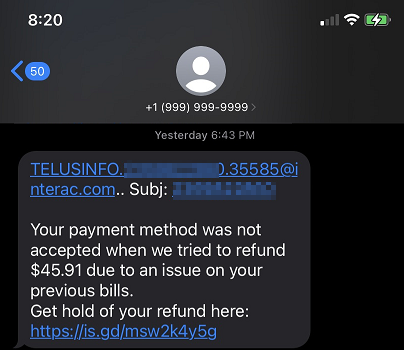
Phishing text just after joining Telus
Within a month of joining up with Telus for home internet, etc. during which I provided my cell number, I received this phishing text message. I hope Telus is not vulnerable (or sharing our account details with parties who are vulnerable) to having them stolen by bad actors.4.1KViews0likes2CommentsReporting Spam
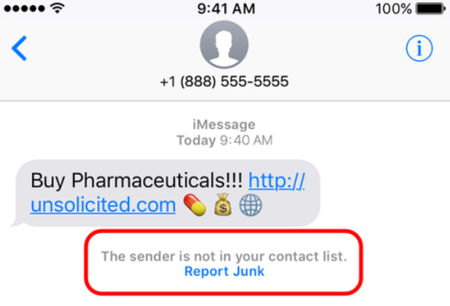
Here at TELUS we are constantly working to prevent spam texts and other fraudulent communications from reaching our customers. There are actions you can take as well to not only spot a spam message but to report it to our team for investigation. The main things to remember if you receive a spam text message are: Forward the spam message to the shortcode 7726 (SPAM). If you're receiving more than one, we recommend putting 7726 into your contact list so it's easily remembered. Don't respond directly to the number that sent you the spam text. This will alert the spammer that your number is genuine and active. If you're not able to view the number or if it's email spam, forward us the entire message (along with the subject header if it's an email). How To Forward a Spam Text From Your Phone To 7726 iPhone 1. Touch and hold the message 2. Select More 3. Select the message you want to forward, then select the arrow in the bottom right corner 4. Enter 7726 5. Select Send Android / Windows 1. Press the message (be careful not to activate / tap on a link) 2. Choose Forward (from the menu) 3. Forward to 7726 *Reporting spam to 7726 is free. Messages forwarded to 7726 don't count toward your data or Messaging bucket iMessage Spam Reporting The key difference between an iMessage and an SMS message is the colour of the text. An iMessage text appears in a blue bubble, whereas an SMS message appears in a green bubble. If the spam text you receive appears in green, you may need to report it using the steps above. If the spam is an iMessage and comes from someone not saved in your contacts, you'll see a message stating that "the sender is not in your contact list" and you'll have the option to Report junk. Alternatively, you can send an email to [email protected] with this information: A screenshot of the message The email address or phone number that sent you the iMessage The date and time you received the spam iMessage Android Spam Reporting To report a spam message on your Android device: On your Android phone or tablet, open the Messages app Touch and hold the conversation you want to report Tap Block --> Report Spam --> OK You can also open a conversation and report it as spam. From the conversation, tap More Options --> Details --> Block & Report Spam --> OK Please note: This is for SMS/MMS spam only. If you receive email spam, it can be reported directly by forwarding it to [email protected] If you have further questions about spam messaging or any other messages you receive, don't hesitate to ask the community at our Neighbourhood Forums or reach out to us over at our Facebook page as well. FR version8.8KViews4likes2Comments