mobility
157 TopicsReporting Spam
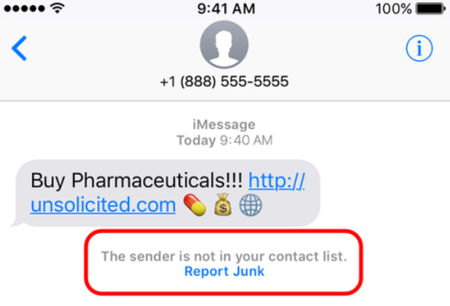
Here at TELUS we are constantly working to prevent spam texts and other fraudulent communications from reaching our customers. There are actions you can take as well to not only spot a spam message but to report it to our team for investigation. The main things to remember if you receive a spam text message are: Forward the spam message to the shortcode 7726 (SPAM). If you're receiving more than one, we recommend putting 7726 into your contact list so it's easily remembered. Don't respond directly to the number that sent you the spam text. This will alert the spammer that your number is genuine and active. If you're not able to view the number or if it's email spam, forward us the entire message (along with the subject header if it's an email). How To Forward a Spam Text From Your Phone To 7726 iPhone 1. Touch and hold the message 2. Select More 3. Select the message you want to forward, then select the arrow in the bottom right corner 4. Enter 7726 5. Select Send Android / Windows 1. Press the message (be careful not to activate / tap on a link) 2. Choose Forward (from the menu) 3. Forward to 7726 *Reporting spam to 7726 is free. Messages forwarded to 7726 don't count toward your data or Messaging bucket iMessage Spam Reporting The key difference between an iMessage and an SMS message is the colour of the text. An iMessage text appears in a blue bubble, whereas an SMS message appears in a green bubble. If the spam text you receive appears in green, you may need to report it using the steps above. If the spam is an iMessage and comes from someone not saved in your contacts, you'll see a message stating that "the sender is not in your contact list" and you'll have the option to Report junk. Alternatively, you can send an email to [email protected] with this information: A screenshot of the message The email address or phone number that sent you the iMessage The date and time you received the spam iMessage Android Spam Reporting To report a spam message on your Android device: On your Android phone or tablet, open the Messages app Touch and hold the conversation you want to report Tap Block --> Report Spam --> OK You can also open a conversation and report it as spam. From the conversation, tap More Options --> Details --> Block & Report Spam --> OK Please note: This is for SMS/MMS spam only. If you receive email spam, it can be reported directly by forwarding it to [email protected] If you have further questions about spam messaging or any other messages you receive, don't hesitate to ask the community at our Neighbourhood Forums or reach out to us over at our Facebook page as well. FR version8.9KViews4likes2Comments
Mobile Internet Problems - Vancouver area
For the last three days, myself and many others in the Vancouver are have been having problems with mobile data at specific times. From about 2:30 PM Pacific time until sometime after 6:00 PM, certain sites will not load at all and many other sites (including this one) are slow to load. Every day, it's the same set of websites that are affected, and it seems that it's possible that a piece of hardware is refusing connections from Telus network devices. Anyone in my area also having this?3.4KViews2likes5CommentsFake Cell Towers in Canada: How to Block 2G Downgrade Attacks & Protect Your Phone
TL;DR: Criminals are using portable devices known as "SMS blasters" to force nearby smartphones onto outdated 2G networks. This 2G downgrade allows them to send convincing "smishing" (SMS phishing) texts pretending to be legitimate brands like Canada Post or 407 ETR. You can significantly reduce your risk by disabling 2G connectivity on your device. What is an SMS Blaster? An SMS blaster, often called a False Base Station (FBS) or IMSI-catcher, is a device that mimics a legitimate cell tower. When you are in range, your phone may automatically connect to this rogue signal instead of a secure TELUS tower. Once your device is connected, the attacker can: Force a 2G Downgrade: Most modern phones (LTE/5G) are designed to fall back to older networks if necessary. The fake tower exploits this by broadcasting a strong signal that tricks your phone into dropping its secure connection for the unencrypted 2G network. Send Smishing Texts: They use this unencrypted connection to push fake SMS messages (e.g., "URGENT: Outstanding toll fees for 407 ETR"). Cause Temporary Interruptions: You may notice your phone briefly loses signal or cannot place calls/use data while connected to the rogue tower. How to Block 2G Downgrade Attacks The most effective defense is to manually restrict your phone from connecting to 2G networks. Android Devices Steps vary by manufacturer, but you can typically find the toggle here: Device Path Samsung Galaxy Settings > Connections > Mobile Networks > Allow 2G (Set to OFF) Pixel Settings > Network and Internet > Mobile Network Security > Enable 2G network protection Other Android Settings > Network and Internet > SIMs > TELUS - StaySafe > Allow 2G (Set to OFF) iPhone (iOS) Apple does not currently offer a simple "Turn off 2G" toggle. If you are concerned about targeted threats, the only built-in method to restrict these network types is Lockdown Mode. Go to Settings > Privacy & Security. Scroll to the bottom and select Lockdown Mode. Tap Turn On Lockdown Mode. Note: Lockdown Mode is an extreme security setting. It rejects 2G/3G networks but also limits some browsing features, blocks many message attachments, and restricts FaceTime calls from unknown numbers. What to do if you receive a suspicious text If you receive an unexpected message regarding urgent payments, toll fees, or delivery issues: Do Not Click Links: These are often designed to steal your credentials or financial information. Verify Directly: If you are unsure if a message is legitimate, contact the organization directly using a phone number or website you have sourced independently never use the contact info provided in the suspicious text. Report It: Forward any suspicious text messages directly to 7726 (SPAM on most mobile keypads) so we can investigate and notify the network. Contact Authorities: If you believe you have fallen victim to fraud, please contact the Canadian Anti-Fraud Centre (CAFC) immediately. FR version157Views1like0CommentsGoogle Play Charges to my Telus Bill
Hello, I got a Google Pixel 3 watch when I renewed my mobility contract back in March 2025. In June 2025 I started getting random Google Play charges added to my Telus bill, apparently through my watch 'phone number'. I have never setup Google payments through Mobile Carriers on my Google account, transactions are always through my bank. I checked my Google transaction history, my payments and subscriptions, payment methods etc and these transations do not show up ANYWHERE! When I first contacted Telus they told me they could not tell which vendors the charges were from, but they were able to provide a corrolation ID for each purchase. I submitted a Unauthorized Charge Claim to Google and they came back with the automated message: 'After reviewing your claim, we were unable to confirm fraudulent activity in this case, so no refund will be provided by Google at this time. If you would like to pursue the matter further, you can reach out to your financial institution.' The problem with that response is, my bank can't help because these charges weren't through my bank. I then contacted Telus again via phone, and this time they were able to tell me the charges were for Snapchat, and Audible (I don't purchase anything through either of these apps). I asked for the corrolation ID's for the newer charges and the woman said she couldn't provide them. Yet when I contacted them again through live chat they were able to provide the IDs. I then submitted another claim and received the same response. To reiterate, these charges have not appeared anywhere else across my accounts; Google, Snapchat, Audible etc, they only show up on my Telus bills! I do not have Mobile Carrier set up as a payment method! The charges are now up to $32.15. I don't know what else I can do so I am hoping to see if anyone else has had a similar situation. Thanks for reading!1.8KViews1like30Comments
Bill overdue errors
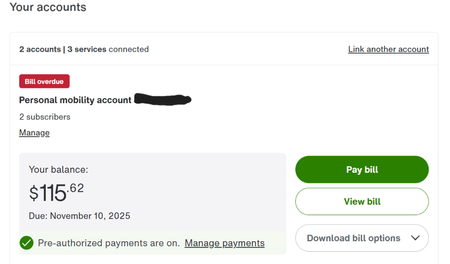
I've noticed a pretty concerning trend with my telus mobility and internet bills, where my account will show my account is overdue just as a new billing cycle commences. I've tried the good ole log-out log-in trick, but alas I am stressed out of my mind that I am late for a payment I have already made every month. This overdue error is doubly confusing as I use pre-authorized payments. Here is my anxiety-inducing dashboard (still showing October's bill, despite Nov 15th being the new bill cycle): and here is my very contradictory transaction history, showing the bill was paid on the 31st (and the existence of a November bill that I do not have a statement for): Any fixes for this? I've called in before and have just been told to wait a few days and to check again, and by then it is usually resolved (just at the expense of my sanity). I can't help but feel that if the shoe was on the other foot Telus's payment department wouldn't exactly accept me paying them out of whack with the excuse of "just trust me bro".685Views1like1CommentI was a customer...
But now I'm not and haven't been for years. Recently, I discovered that I have an outstanding balance of $6 that has been harming my credit score for years. I thought I paid the balance when I closed the account as I received no paperwork or phone calls to tell me I still had a balance of $6. I don't know the phone number. I don't know the account number but I think I will have the information needed to access this account if I could kindly speak to a person. The chat agent AI is unhelpful and the phone queue is 1hr+ wait time. I just wanna pay the $6 so it can stop hurting my credit.363Views1like3Comments
Business Mobility Account Suspended Abroad – Seeking Advice
Hi everyone, I switched two business lines from Rogers to Telus Business Mobility a few days ago. Both lines suddenly went into SOS mode and my account appeared suspended in MyTelus while I’m abroad on a work trip. I cannot access SMS on my primary business number of 15 years, which means I can’t log in to many services that rely on SMS authentication. My business partner, back in Canada with a newborn, also lost service. His phone is in SOS mode with no landline, meaning no 911 access. He is now scrambling to buy an eSIM just to have data for work. I’ve called Telus support 3–4 times. I’m told the account is still “processing” and that Fraud must review documents. I sent the requested IDs, Hydro bill, and incorporation papers immediately, but I have had no response back from the fraud department. I asked why verification wasn’t completed before activating, porting, and issuing eSIMs. Even the agent admitted that was a “good question.” I’ve been a Telus Home Fiber customer for over 6 years, always in good standing, and I linked the new mobility account under the same My Telus profile with the same payment card. I assumed that history was part of why my account was approved quickly. At this point I feel powerless. I’m a 20-hour flight away, my business partner has a newborn, and both of us are stranded without working numbers. Has anyone else experienced this? What is the fastest way to escalate inside Telus? Should I go directly through [email protected], or is there a better way to get this unblocked urgently? Any advice would be greatly appreciated.Solved408Views1like3CommentsGet To Know The My TELUS App
Get To Know The My TELUS App Did you know we have a highly rated app that allows you to check your bills, usage, and much more at the tip of your fingers? We know that your time matters, and the My TELUS app has got you covered! Let's take a look at everything you can do with the app. The benefits of using the My TELUS app Making changes to your plan & add-ons Viewing your bill & usage details Setting up data notifications & limits Checking/keeping track of your data usage Reduced wait times on the phone How to create & access your account 1. Download the My TELUS app on your iPhone or Android device or text “app” to 54555 to download. Alternatively, you can also access the web version here. 2. Once downloaded, you’ll have the option to sign up for My TELUS or log in (if you’ve already created an account in the past). 3. Log in and you’re ready to go! You can now make changes to your services & view your usage details. If you have any questions, reach out to us over on our Facebook page or Xaccount, or send a private message to our TELUS_Support handle and we'll be around to help! FR version7KViews1like0Comments