Forum Discussion

mopudding
4 years agoOrganizer
Telus Booster
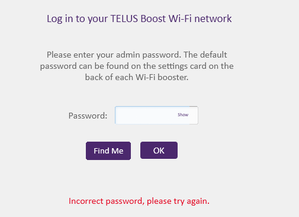
I see my booster in the Telus Connect app, but now I want to login to its admin interface using my browser. The password on the back of the booster unit doesn't work - any ideas?

Esporey
4 years agoNeighbour
Make sure you are using the admin password.
- mopudding4 years agoOrganizer
I assume the password on the back of the booster unit is the Admin password. Am I incorrect on this?
 newuser14 years agoNeighbour
Toady I just get the Boost Wi-Fi 6 modem, and has same problem when I login at 192.168.1.254, always says Invalid Username or Password.
after talking with a telus technician, fix this problem, the correct login IP is192.168.1.45, not 192.168.1.254
 Anonymous3 years ago
Its a typo, some letters are upper case and some letters are lower case.
Another way to find the ip address of the wifi 6 router or hub is to login with the NAH (Network access hub) modem , clicking on devices and select devices list tab and the ip address of the wifi 6 booster, router, hub named booster 2.
- Tech_Guy4 years agoOrganizer
That is correct! Can you send a picture here?


