Forum Discussion

Phil_Harmonic
6 years agoOrganizer
Replacing old home telephone wire?
I have VDSL internet on a 50 Mbps plan and I'm only getting 38 Mbps. After checking with my ISP and doing all the testing of my line and modem over the course of a week, I'm pretty convinced my slow ...

Phil_Harmonic
6 years agoOrganizer
My modem is a TP Link TD W-9980. It's rated for 100 Mbps, and is only about 5 or 6 years old. I've never had a problem with it, and like I said, I tried moving the modem really close to the wall outlet and connected a short 3 feet cable, but it didn't make any difference to the speed.
There is a whole mess of wires and cables in the ceiling of the laundry/boiler room, so I am not sure which one would be the telephone line. I was thinking there might be a way of replacing the old telephone wire without ripping out the drywall. The wall plate could be removed, and the inside telephone line behind the wall plate unconnected from the terminals. Then attach a new line to the very end of the old line, and then pull both wires through from the laundry/boiler room side. Once the new wire is pulled all the way through, it can then be hooked up to the NIB box. The only problem is, if the old telephone line happens to be stapled to a stud somewhere, you wouldn't be able to pull it through (unless it's really loosely stapled, I guess).
The only other solution I can see is to move the modem into the laundry/boiler room and connect it right up to the demarc. Then run a long ethernet cable from the modem to my PC in the living room. However, this means running the ethernet cable through the laundry/boiler room doorway. I would have to drill a hole for the ethernet cable in the header near the ceiling. Not something I want to do except as a last resort.

Nighthawk Community Power User
6 years agoCommunity Power UserI don't think the length of the cable will have anything to do with it.
Is your PC connected through wifi or through ethernet?
As I asked earlier, what's connected to the phone lines in the house? You didn't answer that question yet. If the internet was installed and there wasn't a VDSL POTS splitter installed to isolate the one jack for DSL only and there are other unfiltered devices connected to the phone jacks elsewhere in the house, that has the potential to create interference on the line and result in you seeing slower speeds.
I'm also wondering if it could be the modem itself. While it may support up to 100mbps on VDSL, I can't find which profiles that modem actually supports. There are several and not all modems or providers support all of them. If the modem doesn't support one of the Telus supported profiles (8b, 17, and I believe 30a?), it may drop back to ADSL2+. 35-38mbps is about the peak download speed I got on an unrestricted ADSL2+ connection years ago. Finding compatible third party VDSL modems isn't an easy task.
When you log in to your modem and look at the Basic Status section, what does it show you under the DSL section?
- DSL Modulation Type:
- Annex Type:
- Current Rate:
- Max Rate:
- xray6 years agoHero
You said you used a 30 foot phone cable from the wall to your modem. Assuming there isn't anything wrong with that cable can you connect the modem to another jack and then a longer Ethernet cable to connect from the modem to your competer? That way you don't have to move the computer. Or use a laptop to do the test if one is available to you.
- Phil_Harmonic6 years agoOrganizer
Do I check the other phone jacks to see if I'm getting any signal on my modem? Or am I checking for speed? If the latter, it means dismantling everything and moving my entire PC setup over to the jack. That's going to be a huge PITA.
I will post more photos soon.
 polecat6 years agoAll-Star
Phil_Harmonic Your best bet is get some one that knows tel wiring that is a mess. The tel wire from the 80s is still used today. I see 2 tell wires stapled with a 90 degree bend in it could be the problem. Only one tel wire will go to the demarcation box should be nothing wrong with it. Also one loose tel wire going somewhere? There are 4 wires in tel cable you only need 2 but you can bond them together to have more copper wire to feed outlet.
- polecat6 years agoAll-Star
Phil_Harmonic Xray gave you list of things to do. You could look at the connections in your outlet box ------ make sure they are not corroded clean them up. Phone lines are sometimes daisy changed bad setup not single runs to demarcation point. Check all outlets and try a different outlet and check your up down speeds on all of them. Still no change get electrician and cut the rock. You should be able to open up the tel cable close to the demarcation point and hook up your new tell wires. . If get your speed up with the new wires you could leave it at that or call tel and have tech install new wires at the point of entry. Possible charges
- xray6 years agoHero
In the second picture there a spot in between the two breaker panels with a punch panel and junction box. Can you post a close up of that?
- Nighthawk6 years ago
Telus owns the NIB/Demarc box so electricians likely won't touch it. Do you have just the NIB/Demarc outside the house or is there a box inside as well?
Nearly all houses have a line coming in and there will be somewhere inside the house where that line is split to the other jacks. Some houses are wired in daisy chain style where the line runs from one jack to the next. Others can have independent runs to each of the jacks. Some are a mix of the two.
Do you know for certain that the wire from the NIB/Demarc outside runs directly to that specific jack?
What is the Obihai ATA device connected to?
If no splitter was installed, definitely try moving the modem to another phone jack to see what happens.
- Phil_Harmonic6 years agoOrganizer
1. Already answered. No other devices (apart from the ATA) connected to the PC or to the phone line. No fax machine, no caller ID box, no other phones, no alarm system, no splitters (that I'm aware of). My upstairs neighbor doesn't use a landline phone and has no computer.
2. There is no phone jack in the laundry room. There is one in the bedroom (beside the laundry room) and one in the kitchen. Haven't tried to connect the modem to either of these jacks.
3. Laundry/boiler room showing where all the lines come in:
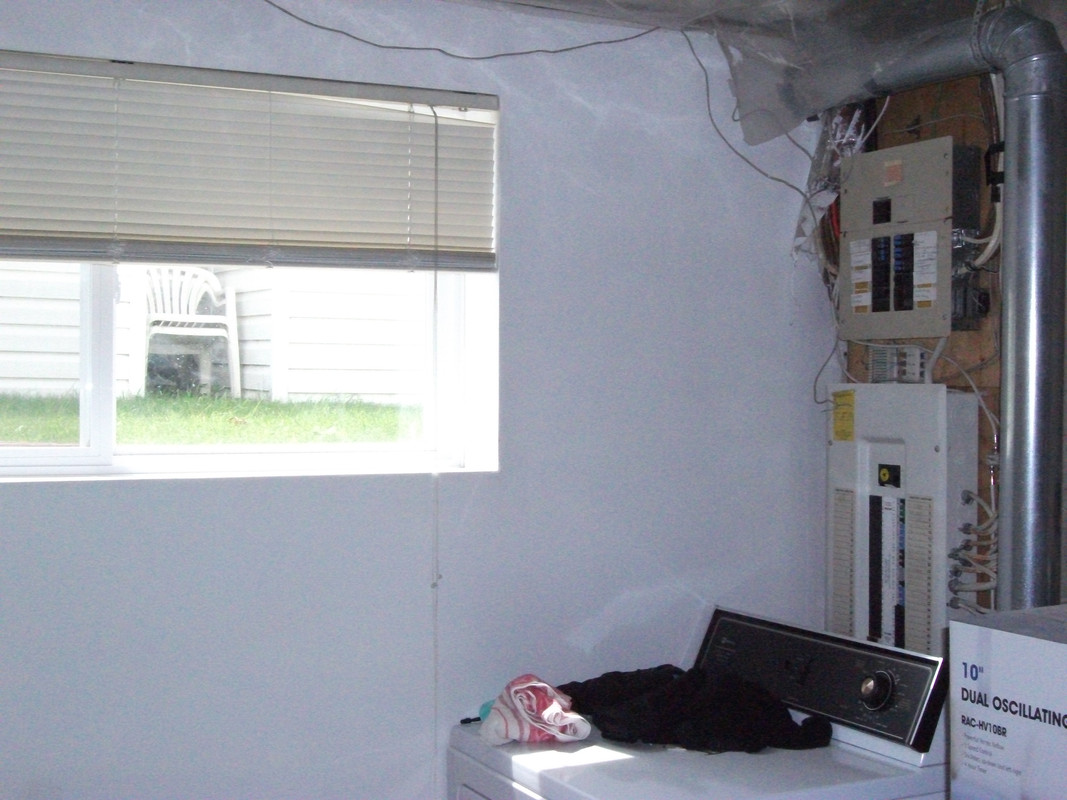
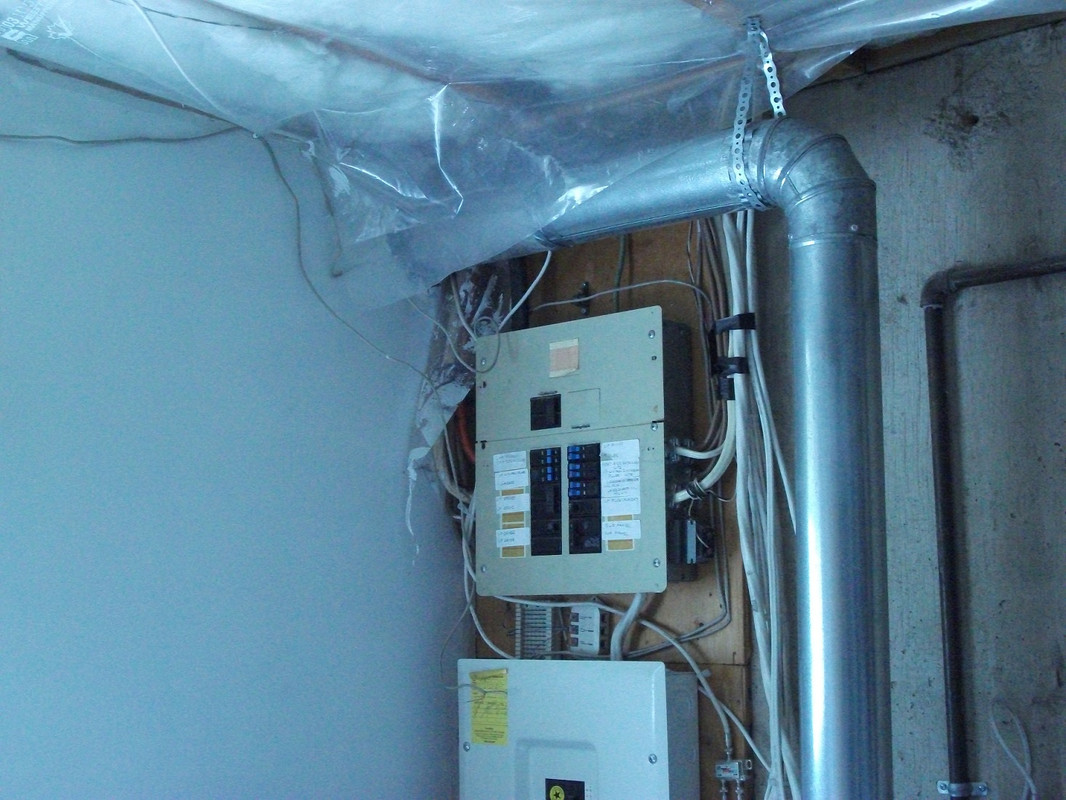
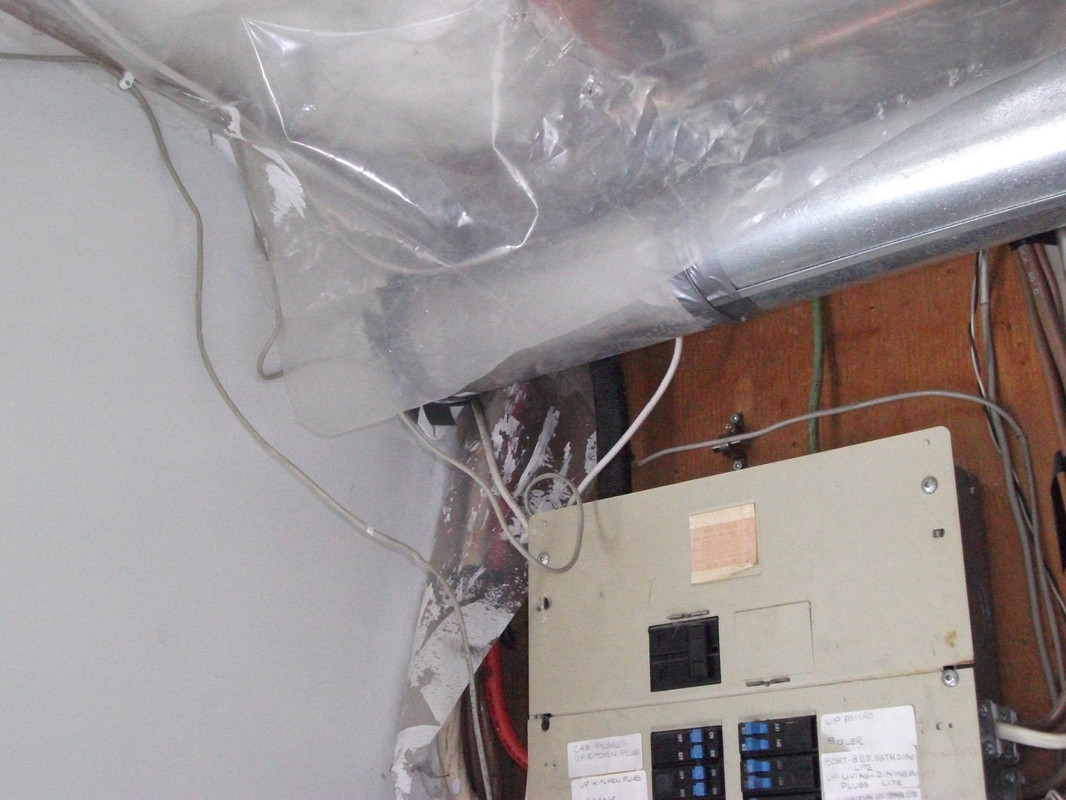
Close up:
- Phil_Harmonic6 years agoOrganizer
Ok, but if you can't change or alter the wiring inside the house without disconnecting the wire at the NIB box (which is locked, and I presume only Telus is permitted to unlock it?), then do I call both Telus and an electrician?
- xray6 years agoHero
Correct me if I'm wrong but I didn't read anywhere in this thread answers to the following questions:
- What else is connected to the phone lines in your house? Nighhawk asked several times but I don't see an answer. Not the network, the phone lines. Answering machines, alarm systems, caller ID boxes, fax machines, phone extention cables, splitters, etc. I would unplug everything and do a test.
- Did you do any tests by moving your modem to locations to see if the suspected wiring problem can be isolated?
- Is there a phone jack in the laudry room? That's the first place I'd try.
- Phone jacks in other rooms if there isn't one in the laundry room
- What does the telephone wiring look like in the laudry room?
- Do you see a junction box on the wall where the phone lines are split out?
- Do you see any filters or splitters?
- Post a picture if you don't understand the wiring.
- polecat6 years agoAll-Star
Phil_Harmonic Wiring Inside a house or suite belongs to the owner. Long time ago the telephone company would wire a house for a price.when hard wired phones went by the wayside they quit trouble shooting the wiring. For a while they did at a about a $100 an hour. If you are renting it is the landlords call to fix the cable.
- Phil_Harmonic6 years agoOrganizer
I've already been through the whole complaint and testing process with my ISP, that's why I am on here. My ISP said there is always some throughput loss at the modem. But there shouldn't be a whole 17 Mbps loss on a relatively low speed plan, especially since the tech was getting 56 at the demarc. I'm not really expecting the exact full 50 speed on my plan. But 45-48 would be nice, given that I always got 25 Mbps on my 25 plan.
This is why I came here for wiring advice, since I am pretty sure it's the wiring of my suite.
I don't know who is responsible for which wiring where, and if Telus can do inside wiring, or only the demarc.
- Nighthawk6 years ago
The link about the modem syncing at 15 instead of 50 is often just a profile issue and typically can be fixed pretty easily. In your case though, that isn't the issue.
The modem is only connected at 43mbps. The connection itself appears to be barely capable of 50mbps and most modems won't sync up at the full line speed. Devices connected to the modem won't get the full 43mbps so seeing a bit less wouldn't be unheard of. It's odd the tech could get the full 50 at the NIB. It's possible there could be an issue with the connection between the outside of the house and the phone jack but even if it was perfect, there is no guarantee you'll get the full 50. Most ISPs will assume anything within 80% of the advertised speed is acceptable. I'd mention the 43mbps connection speed to your provider and see what they recommend.
- Phil_Harmonic6 years agoOrganizer
Thanks.
- My PC is connected to my modem via ethernet cable.
- I have an Obihai ATA device connected to the modem and PC via ethernet cable for my VOIP phone. Even without the ATA device connected there is no difference in speed.
- No other devices
- I hardly ever use wifi, except occasionally for updates on my smart phone
TP Link TD W-9980 Profiles 8a, 8b, 8c, 12a, 12b, 17a. The strange thing is, I can't find the profile specs anywhere in the user manual or on the TP Link product website. It doesn't say anything about profiles. So I don't know where this website is getting it from. https://kitz.co.uk/routers/tplink_TD-W9980_review.htm
I've always associated the higher profile number with higher speed? e.g. 17a would be up to 100 Mbps. But I could be wrong.
I notice the TP Link TD W-9980 is now End of Life: https://www.wootware.co.za/tp-link-td-w9980-n600-wireless-dual-band-gigabit-vdsl2-adsl2-modem-router.html
I also noticed this complaint about syncing speed on the TP Link forum: https://community.tp-link.com/en/home/forum/topic/102513
Here is the basic settings screen grab:

DSL Modulation type: VDSL2
Annex type A/B/L/M
Current rate: 43064 Kbps downstream 12288 upstream
Max rate: 51205 Kbps downstream 23240 Kbps upstream


