Forum Discussion

Ming
3 years agoOrganizer
PureFibre 1.5 GB but speed remains 1GB
Hi Community, I upgraded my home network to 1.5GB and all my hardware to get the 1.5 GB download speed, but no success. I reviewed some posts on the internet (Reddit, Telus, Unifi), but haven't f...
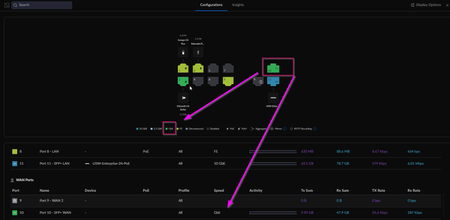
 3 years ago
Ming Wrote: Pure Fibre ==> SFP+ ==> NH20A(Bridge mode) ==> 10GbE RJ45 port ==> Cat8 ==> 10 GbE RJ45 transceives (Amazon) ==> UDM SE(port11) ==> Enterprise 24 ports (2.5GB) ==> my PC
In this case, I should get 1.5 GbE download speed.
If you are able to convince Telus to upgrade you to a NA20A, as you say, RJ45 from the 10Gbps port to the SFP+ WAN port on your UDMPro SE. (You should lock that port at 10Gbps in the controller). I have utilized the SFP+ to RJ45 Transceiver that you mention above with some success. I have had better success with the MikroTik S+RJ10 in my Unifi stack. More expensive that the one you mentioned, however, I know it works with all the Unifi devices that I've plunged them into.
Hope this helps.... Cheers
If you find this post useful, please give the author a "Solution", or mark as "Kudo", if it solves your problem, thank you very much.
DrPacman
3 years agoRockstar
Ming Wrote: I upgraded my home network to 1.5GB
I would be curious to know what Telus device you replaced with the UDMPro SE? The reason I ask is this could be a rather easy fix/solution if they installed either the NH20A or the Nokia XS-250X-A. Place that device into bridged mode and connect your 10Gbps port on that device to the WAN port on the UDMPro SE. That should solve the problem.
The problem of course is the fact that your UDMpro SE is connected at 1Gbps to Telus. Your bottleneck...
Now failing that I have seen a solution that works as well if your were left with a T3200M modem that requires an additional piece of equipment to replace the modem itself.
Cavate included here... This method is less stable, and sometimes fails to work. As well you will receive no tech support from Telus if you employ any of these non standard methods of connecting.
I have seen the installation of a MikroTik - CRS305-1G-4S+in switch/router included in installs. The trick here is to make sure the device is in switch mode, place the SFP module into a port, and then uses a DAC cable between the MikroTik device and your UDMPro WAN port. Make sure that the UDMPro WAN port is locked at 10Gbps. I have seen instances that if the port is in Auto it may fail.
Other solutions that I have seen to alleviate the problem is utilizing a pfSence box with a Broadcom 10Gbps Nic card installed, however that would remove your UDMPro SE form the equation altogether. I'm guessing not desirable.
Now I assure you that contacting Telus to have them upgrade anything on there side if going to be a waist of time. The corporate line is that to achieve the full 1.5Gbps download speed you may be required to have multiple downloads simultaneously running. They really never supported a single 1.5Gbps connection.
If you find this post useful, please give the author a "Solution", or mark as "Kudo", if it solves your problem, thank you very much.


