Forum Discussion

felixnrf
4 years agoNeighbour
Network adapter stuck at 100mbps
Just got Telus internet setup, paying for 940mbps. Running cat6 cables from telus router to the wall jack, then cat5e from the wall into a gb pcie card in my computer. My internet speed has been limi...
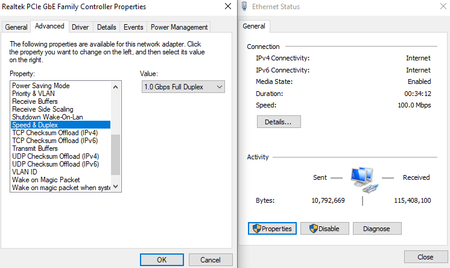
- 4 years ago
Cat5e cables should work with gigabit perfectly fine. I use them with my gigabit connection to a few of my devices without issue. The Telus routers default to gigabit which is why you won't see any settings for it.
Do you have another spare ethernet cable you could try in place of the Cat5e? It's not impossible for an ethernet cable to be a problem, though it is usually very rare. If you look inside the ethernet port on your PC are all 8 wires aligned and visible? Are you able to test the ethernet connection with another device like a laptop? If at all possible check the connection on the Cat5e cable end and also go to the router and test the connection from the Cat6 cable to the wall.
Another consideration would be a physical issue with the house. One issue my brother ran into with his home was that one of the Cat6 cables in the walls had been damaged, likely by a drywall screw during construction, that resulted in a max connection of 100mbps to one of the jacks. Another possibility is that one of the wall jacks wasn't wired correctly where one or two of the wires are either not connected or are connected incorrectly (wrong order). I had one jack that was wired incorrectly by the builder's electrician but was easily fixed.
Which router did Telus give you? The T3200 () or the Wifi Hub ()?

Nighthawk Community Power User
4 years agoCommunity Power UserCat5e cables should work with gigabit perfectly fine. I use them with my gigabit connection to a few of my devices without issue. The Telus routers default to gigabit which is why you won't see any settings for it.
Do you have another spare ethernet cable you could try in place of the Cat5e? It's not impossible for an ethernet cable to be a problem, though it is usually very rare. If you look inside the ethernet port on your PC are all 8 wires aligned and visible? Are you able to test the ethernet connection with another device like a laptop? If at all possible check the connection on the Cat5e cable end and also go to the router and test the connection from the Cat6 cable to the wall.
Another consideration would be a physical issue with the house. One issue my brother ran into with his home was that one of the Cat6 cables in the walls had been damaged, likely by a drywall screw during construction, that resulted in a max connection of 100mbps to one of the jacks. Another possibility is that one of the wall jacks wasn't wired correctly where one or two of the wires are either not connected or are connected incorrectly (wrong order). I had one jack that was wired incorrectly by the builder's electrician but was easily fixed.
Which router did Telus give you? The T3200 () or the Wifi Hub ()?
 felixnrf4 years agoNeighbour
Was as simple as changing the wall jack :^) thanks for the help
- xray4 years agoHero
Gb speed requires all 8 wires, 100 Mb only requires 4 wires. An improperly wired jack with less than 8 wires connected properly may fall back to 100 Mb if the right 4 wires happened to be connected correctly.

Related Content
- 7.9KViews19Comments


