internet
215 Topics
Possible missing equipment: can't set up fibre internet
Hi everyone, I'm having a problem setting up internet in my apartment. On August 29, I signed up for Telus Fibre internet; earlier this week, my equipment arrived. In the box was a Telus Boost Wi-Fi Lite. The problem is that I have no way of connecting this device. I followed the setup guide, but the first question it asked was whether I had a network access hub or a Wi-Fi jack. I have neither--just the jack where the fibre cable comes into the wall (see attached photo--it's the uppermost box). This, of course, won't accept the Ethernet cord that came with the Boost Wi-Fi Lite. I spoke to a customer service representative, who said it was possible that the apartment's previous tenant had taken away equipment they should have left in the apartment at the end of their tenancy. I'm certainly no internet expert, but it seems that the Boost Wi-Fi Lite doesn't work without at least some supplementary equipment (possibly a network access hub?), none of which is anywhere in my apartment. I had a support callback scheduled, but I never got it for some reason. I called today, and I spent several hours on hold before the system hung up on me, so I'm reaching out on here. I'll keep calling the support line, but if anyone here has any solutions, I would really appreciate it. I'm a student and need internet now that classes have started. Thanks in advance for any help you can offer! FB67Views0likes1Comment
A closed account causing a collection on my credit report
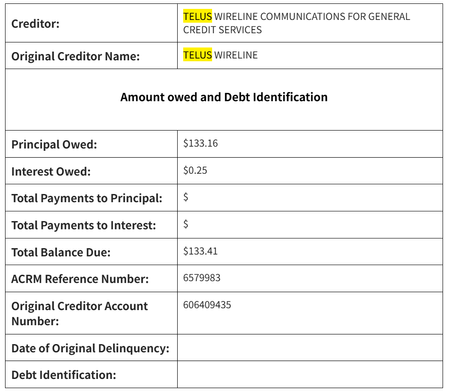
A collection agency is now coming after me for an account that I have closed and payed off. I closed my home internet service account back in Dec 2025, and have been using another provider since then. An email from Telus clearly shows that I have no remaining balance to pay as of Feb 2026. Another post I found on the forum seem to be a similar case: https://forum.telus.com/discussions/my_home_services_and_devices/collection-agencies-acrm--gcsi--gcs/178391 Currently, as I'm not in Canada, I cannot even contact customer service via the chat feature because I have no active account with Telus. If anyone have any clue of how to get in contact with Telus, please let me know. Or if someone from Telus support can help me with this case, it'd be even better.16Views0likes0Comments
RJ11 Internet Wire
I'm one of those few people that lives in a condo without fibre installed. Instead, I have RJ11 telephone wire running from a modified phone jack to my digital box/modem. The length is about 12 feet long but I need to find something longer. The problem is that this RJ11 cable is two wire into the connector whereas ones you buy are 4 wire connectors. I've tried linking these two and the internet crashes. Does anyone know where you can get 25 foot lengths of RJ11 cable with 2 wire connectors?Solved63Views0likes3Comments
Connect to network access hub: external hard drive
I have a external hard drive connected to my router which have all my movies and TV shows on which I can access via samba share on my home network. Telus recently upgraded me to a network access hub and WiFi 7 booster, tried to connect my hard drive to the network access hub via the USB port just like I did before with my old router, and I login into the admin settings for the network access hub and It doesn't see the external hard drive in the samba share settings. Do you know what I'm doing wrong thanks181Views0likes9CommentsTroubles with bridging Fibre hub to TP-Link Deco
Just moved into a new place and signed up for Telus Fibre for the first time. Got the fibre hub installed, and it came with a Boost box, but I’d prefer to run my own router to handle my wifi and hardwired devices (NAS, smart home, etc). At first it was all going great, I plugged the Deco router into one of the 1G ports, and everything worked great. Boost was still connected to the 10G port as a backup while I finalized things. Then I realized that I was getting some conflicts, particularly for Plex, which couldn’t do remote access. Realizing my mistake, I connected into the fibre hub, and set the 10G port to bridge mode, moved the Deco to the 10G port, the Boost to the 1G port, and everything worked, Plex was happy, easy. Except suddenly now the Deco is dropping internet connection every hour or so, and requires a reboot each time to get it back online. After the fourth drop out, I decide to move bridging to the first 1G port, put the Deco there and the Boost back on the 10G. Hour later, another crash. Finally turn off bridging entirely, and the system is stable. But now Plex can’t connect remotely, and the conflicts are back. Hoping someone here can help me figure out where to go next, I’m banging my head against the wall talking to ChatGPT about it and getting nowhere, and I’m at the outer reaches of my networking knowledge here. Would really appreciate any guidance! Deco model is XE75, connected to the hub via CAT5E (roughly 25-50’ of distance). Fibre hub is Arcadyan NH20A. Boost is B30A model.84Views0likes3CommentsMoving a Modem
I currently have a modem, connected via a telephone jack connection, and I'd like to move it to another bedroom, which also has a telephone jack. I'd forgo all of this if my desktop didn't require a cable connection to the modem (my preference for speed and security). My desktop is needed in the other bedroom. I recognize that the technician did some magic to make the current telephone jack work when he initially set up the modem. How do I get someone to come in and move this modem? Will Telus?68Views0likes5Comments
TELUS Internet Outage: Any Update for University Drive, Calgary?
Does anyone have an update on when TELUS internet will be fixed in the University Drive, Calgary area? It has been weeks without internet, and the customer service response has been extremely frustrating. At this point, TELUS gets zero stars from me.82Views0likes2CommentsTELUS Internet Outage: No Service for Several Days
No home internet for the past few days. The service was already spotty before this, and now there is no connection at all. When I check the TELUS Service Status using my address, it shows no service disruption. However, when I call customer service, I’m told that my area is impacted. I’m not sure whether this issue is only affecting my home or is widespread around the 24 Ave NW and University Drive area. Can someone from TELUS please provide an update, at least on what is happening and when we can expect service to be restored? This is extremely frustrating, especially for those of us who are working from home. We'd appreciate an update and an estimated restoration time.169Views0likes2Comments