booster
15 Topics
**Internet Connectivity Mystery After Power Outages - Seeking Insights**
Hello fellow forum members, I've recently encountered a baffling internet connectivity issue in the Cedar Hills Surrey area, particularly following power outages. I'm reaching out to see if anyone in our community has faced a similar challenge or can provide valuable insights. **Description of the Issue:** - **Website Accessibility**: When connected to Wi-Fi, certain websites like telus.com and walmart.com don't work at all, while others like apple.com function normally. The issue remains consistent and doesn't have a discernible pattern. - **Smart Device Dilemma**: Alongside this, my smart home devices exhibit mixed results when connecting to the network. While some devices can establish a connection, others, including those from LG.com, Wyze.com, and Kasasmart.com, face connectivity issues. Additionally, I can't access the websites linked to these non-connecting smart devices while connected to Wi-fi. - **Selective Connectivity**: Among my smart switches, only one Kasa smart switch successfully connects, while the rest remain unable to establish a connection. - **Access Point Anomaly**: In my network, I utilize three TP-Link EAP225 access points. Two of them function correctly, but one refuses to connect. This issue persists despite numerous attempts to resolve it. - **Vonage VoIP Phone**: My Vonage VoIP phone worked seamlessly before I initiated troubleshooting with Telus support, but it has since lost its connection. **Troubleshooting Attempts:** - I've reached out to Telus technical support, and they've escalated the issue to their senior tech team. - We've undertaken a series of troubleshooting steps, including IP address resets and hardware checks. Unfortunately, these efforts haven't yielded a solution thus far. - **Hub Replacement**: During a previous occurrence of this issue, the technician replaced the hub, even though the problem resolved itself before their arrival. They left me with the old hub as a precautionary measure, but this hasn't resolved the problem either. I've even tried swapping the new hub with the old one, but the issue persists. It's also noteworthy that my PC, which is hardwired to the network, experiences no connectivity issues and can access all websites seamlessly. I'm eager to learn if anyone within this forum has encountered a similar challenge or possesses insights to offer. If you've had interactions with Telus support or have any relevant information, please don't hesitate to share. Your contributions can play a pivotal role in determining whether this is an isolated incident or a matter affecting a broader group of users. I'm profoundly grateful for your assistance!16KViews1like35CommentsHow to connect wireless 4k box to wifi booster?
My T3200 router's wireless signal is too weak for my living room wireless 4k box. So, I added a Telus wifi booster, connected my 4k box and it works great. I've now added a second booster in the office (T3200 router's wireless signal is too weak to reach her too). So I added a 2nd Telus wifi booster (plugged into an ethernet wall jack), but I cannot connect my VIP5602W 4k box to the newly added 2nd booster. How can I connect my VIP5602W 4k box to my newly added 2nd booster?Solved11KViews0likes6Comments
Internet stops working every 10 hours
It has been happening for 3 days now, I've already had my booster replaced and it didn't fix it. Every 10 hours the internet stops working and I have to reboot the modem in order for it to work later. I need help with this, support isn't giving me a reason or an actual solution for this issue. Several people are having the same problem with no reason or solution.6.4KViews1like14CommentsFiber 300
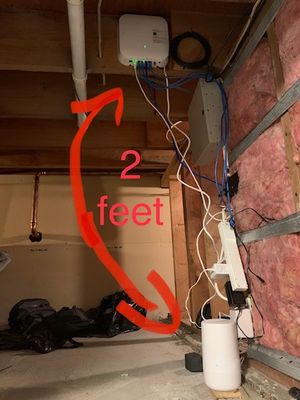
Your modems don't have their own wifi? You also conveniently have a service where I can pay an additional $10/month for more boosters.... This is straight extortion, I now have the booster sitting next to the modem which is RIDICULOUS (see picture). I only need one more booster to cover the house properly (again, only because your modems dont have wifi abilities) and after waiting 2 hours to talk to someone the guy says he can do nothing for me. Very pleased with the service once a device which provides wifi is within range, definitely not worth it if its a floor and 4 rooms away.2.9KViews0likes1Comment
How To setup my Wifi Boosters to broadcast only 1 network
I live in Toronto. I have 100MB home internet from Koodo. I also have Telus Smart Home Security. My WAN modem is Sercom Modem DM1000. It connects to a B21A WiFi Booster from Telus. This device is defaulted to broadcast 1 network ID (SSID). I have 2 additional (DWS) booster (Range Extenders\) from Telus Smart Home Team. These devices have their own network that’s different from the main B21A booster. Instead of having multiple networks broadcasting, I want all these devices connected to same one network that will also work with my Smart Home Equipment. I’ve got conflicting information from the support team about what these boosters are capable of …. I was told I couldn’t connect any devices to these B21A boosters, except for Security devices. Then, I was advised I could add additional devices, however everything needs to be connected to the factory default settings. After I set everything to default, and it still didn’t work, I was advised that is my ISP that blocking it. Since we live in Ontario, and need to use Koodo, it’s not possible after all. Then I was told it’s the Sercom modem that’s not capable for what I want, and other models could do it, but they couldn’t say which ones. It's been frustrating experience and could really use some guidance. Thanks!!1.7KViews0likes2Comments
Connecting Arcadyan PRV65B to TP-Link Deco AX3000 X50
Hi all, I’m setting up my Telus Arcadyan PRV65B Wi-Fi hub with my Deco X50 mesh. With bridge mode off, the Deco works perfectly, I get strong, fast wifi throughout the house. I want the Deco to manage routing, so I switch the Arcadyan to full bridge mode. When I do, wifi drops completely on the Deco: the light flashes blue and yellow during setup but ends up solid red. I’ve set VLAN ID 35, priority 0, and tried cloning the Arcadyan’s MAC to the Deco. My in-wall Ethernet ports work fine. Tried power cycling and hard resetting both. Tried wiring the Deco into all 4 ports. The top light on the Arcadyan (Wi-Fi) is red, but the front internet light is green so bridge mode to be works correctly. I can attest to this as my smartTV is hardwired and connected with no issue. What am I missing, and how can I get the Deco to handle routing correctly to get the wifi working?100Views0likes2CommentsSetup Boost Wifi 6 Lite as an access point to extend existing LAN?
Hey all, got fibre installed 10 days ago and finally getting to cleaning up what the tech left me with. He was great, but custom lan setups aren't his job. Currently my NAH connects to my router (Asus RT-AC86U) that is aptly handling all my family's routing needs, including 2 Telus TV Digital Boxes over ethernet. Documentation (online or otherwise) is quite light as I suspect Telus wants it to be the centre of the universe and not really tinkered with by most users. Can I just factory reset it, connect it to a Lan port on my existing router, and it will figure out that I want it to be another AP to extend my existing SSIDs? Thanks99Views0likes1CommentTelus WiFi intermittent
Has anyone in the lower mainland bc had an issue with telus wifi being intermittent. It sometimes disconnects for more than ten minutes at a time and stays this way back and forth for more than an hour. What was your solution? The agent came by and replaced all the modems and boosts. Asked me to go buy a new router and I am still having an issue. Is this a setup issue? we have not had problems in the past and these last two weeks it’s been horrible connections. nothing changed in our end. We work from home so we looking for any advice. the agent mentioned maybe replacing outside fibre at our cost not even sure what that means.99Views0likes8Comments