Voicemail
7 TopicsApple Live Voicemail for iOS 17
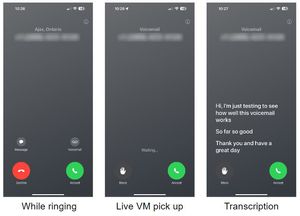
Apple Live Voicemail for iOS 17 With iOS 17, Apple introduced Apple Live Voicemail. This feature gives iPhone users the ability to see real-time transcription as someone leaves a voicemail, and the opportunity to pick up while the caller is leaving their message. Live Voicemail will be toggled ON by default when a compatible device* has been upgraded to iOS 17. To turn Live Voicemail ON or OFF: Settings > Phone > Live Voicemail > On / Off For more information regarding Apple Live Voicemail for iOS 17, please visit our Support pages: ENGLISH FRENCH Compatible devices include the iPhone XS family and newer. Notes: Live Voicemail only works in Canada while the device is powered on (otherwise calls will default to regular TELUS voicemail service). Live Voicemails are stored on the device and not on TELUS' voicemail service. Live Voicemail will currently only work if iPhone language is set to EN. FR Version258KViews0likes0Comments
Voicemail 25 vs Advanced Voicemail included in plan.
I have a couple of questions. First, what voicemail features come with a standard "unlimited" plan? For example, how long do the messages stay in your inbox, what is the message length maximum, how many messages can you save at once, etc. Also, when I looked at optional features, there is an addon called "Voicemail 25" for $5/month. What is included in Voicemail 25 that isn't included in the standard voicemail included with the plan?11KViews0likes2Comments
Advanced Voicemail vs Visual Voicemail
I have a phone that supports Visual Voicemail, and I'm on the Unlimited 25 5G+ plan, which includes Advanced Voicemail. What is the difference between the two, and would the Visual Voicemail be an addon? Also, why does Telus charge for this feature instead of including it in its plans like in the past?Solved8.1KViews0likes1Comment
Access to mailbox from abroad with talk & text
Hi, for a project, I got a separate talk and text 100 prepaid sim card. The website and the sales clerk said it works internationally, but this is not the case (it can only receive talk and text from abroad). I'm traveling right now (I'm in Europe) and I need urgent access to the voice mailbox of my account. I can't figure out how. Is there any way to dial in from another phone? Thanks!Solved3.8KViews0likes3Comments
Voice mail to text… audio attachment?
I recently re-joined Telus after being with Rogers for 20 years. (I was previously a Clearnet customer before they were bought by Telus.) One feature I had on Rogers was voicemail-to-text. With Rogers, you would get a transcription of the voice message in a text message, AND they would include the voice mail as an audio attachment. I never had to log into my voice mail at all, and I could save the attachments if I needed to keep them. I signed up for voicemail-to-text with Telus, and the transcription is VERY good, but there are no audio attachments. If I want to hear the message, I have to log in to my voice mail. I'd really rather not have to do that. Does anybody know if voice recording attachments are a feature that can be enabled?3.7KViews0likes2CommentsChange Number of Rings Before Voicemail Picks Up
Your phone rings a set number of times before calls go to voicemail. You can customize this timing to give yourself more or less time to answer. Setting Your Ring Duration Two activation methods are available. Try Method 1 first, and if it doesn't work try Method 2. Method 1 Open your phone's dial pad Enter: *61*[your voicemail access number]**[ number of seconds]# Press Send or Call Wait for confirmation message Example: *61*16045953000**20# This sets a 20-second delay (4 rings). Note: Timer value must be in increments of 5 seconds to a maximum of 30. To turn off this feature, dial #61# and press Send. Method 2 Open your phone's dial pad Enter: *004*[your voicemail access number]**[number of seconds]# Press Send or Call Wait for confirmation message Example: *004*16045953000**15# sets a 15-second delay (3 rings). Note: Timer value must be in increments of 5 seconds to a maximum of 30. To turn off this feature, dial #004# and press Send. Device Limitations This feature does not work with Smart Hubs or Wireless Home Phone devices. Samsung phones do not support ring duration customization. When to Contact TELUS If both methods fail to activate, or you're unsure of your voicemail access number, contact TELUS support. They can verify your device compatibility and provide your specific voicemail access number. Version FR1.6KViews0likes0Comments