User Profile

BrandonT
 TELUS Team Member
Joined 6 years ago
Hey there! My name is Brandon, and I am a TELUS Employee, TELUS Customer, and Neighborhood Volunteer in my spare time. I have a passion for helping others, technology, and learning new things...some might say I'm a nerd :)

User Widgets
Contributions
Re: Payment method for prepaid plan $150/180 days.
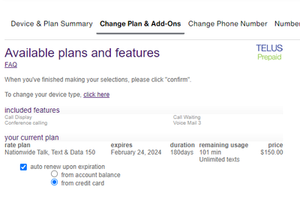
A Prepaid plan can be renewed one of two ways. Renew plan from account balance. This option require you to choose from the $10, $25, $50, $100 pre-sets. The remaining balance not used to renew your $150 plan can be used to make long distance calls, use additional minutes, messaging, or data not included in your plan as pay-per-use. Renew plan from credit card. This option will directly renew your plan, for the exact cost of your plan, in your case $150. You will receive the exact minutes, messages, and data included in the plan. With this option, your account balance will remain at $0, and Pay-Per-Use features such as long distance, additional minutes, messages, data will not work since there is no balance to charge. Which option should you pick? Each of these options have their uses cases. A hybrid option is best for the most flexibility. For example If you choose the $150 plan auto-renew from my credit card, and a $10 auto top-up from my credit card. You can now make long distance calls to the USA at $0.60/minute (for a total of 16 minutes/month). How to setup automatic plan renewal from credit card (without top-ups) Login to your self-serve account. Manage Prepaid Change plan & add-ons Select your phone type Check "Auto renew upon expiration" Click "from credit card" Confirm Bonus: Make sure your automatic top-ups is disabled to avoid being charged a top-up & your plan cost. Account Overview Automatic Top-Up And if you see this, your all set. Otherwise select the option to cancel the top-up. I hope that helps 🙂4.3KViews1like1CommentRe: Optik TV Added After Suspicious Call; Legit?
Hi BCPublicServant , I share the same concerns regarding sharing my SIN outside of the legally required areas, and use extreme caution myself. But I will have to contradict myself as a TELUS Employee since its much easier for us to prevent fraud if we have more forms of ID on file. Fraudsters are getting very clever with using AI/phishing/social engineering to the point its very easy for them to obtain enough valid ID to open accounts with cellphone providers which can have a damaging affect to their credit, and time canceling/replacing cards, auditing their statements, and so on. Just to make some clarifications: A SIN number is not mandatory to run a credit check through TELUS. If a customer chooses to decline the other methods of identification, or does not have multiple pieces of valid ID available, a SIN is an alternative solution if the customer chooses, otherwise they can visit a TELUS Store and verify their identity in person without a SIN. Reference to https://www.telus.com/en/support/article/checklist-for-activations-and-renewals for more information on valid forms of ID In reference to the The Social Insurance Number (SIN) Code of Practice Section 2.1 Key duties of SIN holders (1) it states: "You can share your SIN outside of legally prescribed uses. However, in doing so, you may expose yourself to a heightened risk of fraud or identity theft. You should only do so if you are willing to assume that risk.", followed by: "subscribing to cellular telephone, internet or television services".257KViews0likes2CommentsRe: Got Call from Telus (866) 558-2273
Hi cpxu , Yes the phone number & email are from TELUS. Great job at being proactive in protecting your personal information! I suggest calling the number back, tell the automated system the reason for your call "Please transfer me to EPP Care". EPP Care is the only department than can assist you with your specific request. Here is some further information if your interested. The phone number (866) 558-2273 is a valid number, and is shown on the official Telus.com website. However, fraudsters can still use something called "phone number spoofing". Spoofing is when a fraudster hides their real number, and makes your caller ID display a different number (like an official TELUS number). The only way you can trust a company number is if you call it yourself. So in your situation where you felt uncomfortable sharing personal information, you can always call that number back, and know you are speaking to the official TELUS. The email [email protected] is using the trusted TELUS.com domain ([email protected]"). Sending emails to this address is safe. Fraudulent Emails will look similar to this: [email protected] (notice the domain completely different) [email protected] (notice the ".net" instead of ".com") [email protected] (notice the "1" instead of an "i") Regarding personal information & credit checks Asking for ID such as Drivers License, Date of Birth, Credit Card, SIN is essential when activating a new account, and or verifying the account before making a sensitive change. Asking for ID is especially important if the change can affect your credit. Refer to: https://www.telus.com/en/support/article/checklist-for-activations-and-renewals for more details about valid types of identification. Fraudsters can be sneaky with what information they can obtain, so we make sure to ask for information they are less likely to have to ensure we are speaking to the real you. With that being said, still use caution with releasing your personal information when answering a phone call (which could be spoofed). Instead, I personally recommend calling the official number shown on the official website. Alternatively you could visit a TELUS/Koodo store near you. I hope that helps 🙂13KViews0likes0CommentsRe: Super Slow and unreliable LTE & 5G
Hi TKO604 If you are using the same phone with TELUS that was previously used on Rogers, you can try the following... A) Make sure your phone is up-to-date. iPhone: Settings > General > Software Update Android: Settings > System > System update. B) You can reset your Network Settings. This simple fix can solve many issues relating to network quality. A Network Reset Will... Erase all saved Wi-Fi passwords. Your other saved passwords will not be erased. Erase all saved Bluetooth connections. You will just need to manually connect to your WiFi and Bluetooth devices one time using the password/pin and your phone will automatically re-connect like normal. How to do a Network reset iPhone: Settings > General > Reset > Reset Network Settings Android: Settings > System > Advanced > Reset options > Reset network settings *Android settings may be different depending on the devices make and model. If the above steps do not work for you, open settings, use the search bar at the top and type "Reset" and you should see an option there to Reset Network settings. I hope that helps 🙂9.8KViews0likes1CommentRe: [Megathread] TELUS Rewards
Hi katrina8 , When you redeem the TELUS Reward - Tim Hortons eGift Card you will be provided a unique code at the time of redemption. You should also find a copy in your email inbox. When I go to the TELUS Rewards page, and select the Tim Hortons eGift Card option, I see the following instructions: "This is a digital gift card that can be used in the Tim Hortons mobile app. If you don't have the app, print your unique code link and bring into any Tim Hortons restaurant and present at time of payment." I would suggest using the app. Open the Tim Hortons App. Profile icon (top right corner) Payment Methods Manage Tim Gift Card Transfer balance from another Tims Gift Card Enter the code you received from TELUS, and include the PIN. Continue Now your redeemed balance is loaded on your app. Hope that helps! 🙂14KViews0likes0CommentsRe: Optik TV Added After Suspicious Call; Legit?
Hi Kupa, Do they usually ask customers for their SIN numbers? As a TELUS employee, I can confirm that yes, there are specific times where we may request a SIN, Date of Birth, Drivers License Number. For example, we always request 2 pieces of ID when activating new accounts, and processing credit checks. Source: TELUS Website - Checklist for activations and renewals. To prevent unwanted activity on your TELUS account, we want to make sure its really you. So we may still ask existing customers of TELUS to provide types of identification for specific scenarios and or triggers. Regarding the phone numbers you mentioned: 833-390-3721, 844-962-1419 These are not listed on the TELUS website, and I am unable to find any internal directories that use this numbers either. I have seen rare occurrences where an official TELUS sales team uses a unique number, or a 3rd party marketing agency offering TELUS services uses a number we are not familiar with. With that being said, I personally would not trust those numbers due to the limited information on them. I would just call into TELUS using the numbers shown on our website. Regarding the emails you mentioned: [email protected] , [email protected] These are real TELUS emails. The first one is used for quotes. The other one I cant find any specifics on, but it uses the offical @telus.com domain which is trusted. Regarding the number that texted you: 777222 This number is used when an appointment is created for new service, or an installation for home services. --- I do suggest that you give TELUS a call, request that they review recent changes made on your account so you can see if you recognize all of them. Then have them check to see if there are any new accounts opened with your information. If you recognize all changes, and you recognize all of the accounts open under your details, there is no active concerns to worry about. If you have concerns with the details you shared over the phone, and you want to be proactive in protecting yourself, you could call Equfax and Transunion. Request they review any recent credit checks, and also request they add a Fraud Alert on your file. This will prevent anyone, including yourself from having getting a credit check. If a credit check is requested, Transunion/Equfax will notify you that an attempt was made, and you will then have to manually approve or decline it. I hope that helps clarify some things for you.262KViews2likes5CommentsRe: Wifi Pin
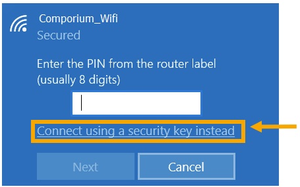
Hi Shannonj, It appears your older laptop is trying to use WPS for authentication, But your TELUS router is using WPA2. Do you see any option that says "Connect using a security key instead"? If you don't see this option, can you please provide us with which Modem/Router/Gateway you are using?2.3KViews0likes1CommentRe: Rewards
Hi 4930, There is no need to advise TELUS. I have just flagged this issue on your behalf. I decided to test out the Rewards Portal to see if I can replicate your issue (and what others have addressed recently). I was able to successfully order an Amazon Gift Card just now 02/20/2024. So with that being said, It may be a localized issue on your device. This is quite common for lots of websites and is likely just a cache or cookie issue. If you would like to troubleshoot with me, here are some questions which will help me help you. 1. Are you using a computer or a phone? 2. Is the operating system Windows, Apple, Android? 3. What web browser are you using? 4. Are you getting an error message when logging into the Rewards page?2.6KViews0likes0CommentsRe: Rewards
Hi 4930 To access your TELUS Rewards, please visit telus.com/rewards then click the Green button Access your rewards. Please let me know if that link works for you. If not, I will help you with some troubleshooting 🙂 TELUS Employee & Neighbourhood Volunteer Found this post helpful? Let others know by clicking [❤️ Like] or [Accepted Solution].2.6KViews0likes2CommentsRe: Stream plus
Hi Brk14, Disney+ is available on the Stream+ Basic, and or Stream+ Premium options which were launched early 2024. To answer your question accurately, we first need to know which version of Stream+ you have. Here are the versions and what streaming services are included with each. Once you confirm which version you have and notice one of the streaming services is not yet working, all you need to do is activate or link it within your TELUS Online Account (using the web browser) Versions The original Stream+ includes: Netflix Apple TV+ Discovery+ TELUS Films and Series Stream+ Basic includes: Netflix Standard w/ ads Disney+ Standard w/ ads Amazon Prime TELUS Films & Series Stream+ Premium Includes: Netflix Premium Disney+ Premium Amazon Prime TELUS Films & Series How to Activate / Link Existing streaming services within the scope of your Stream+ package. Once Stream+ is added to your account, a welcome email will be sent to you. In this email contains instructions and a link to either activate or link and exiting streaming service. If you cant find this email, you can also activate/link services from your TELUS Online Account (using your web browser, not the app at this current time). Log in to My TELUS Select the Plans & Devices tab On the Plans & Devices page, select the Services tab to see your new Stream+ service Select Activate for Netflix or discovery+ You will be taken to the streaming service’s landing page to activate or link your account Follow the account setup instructions Repeat steps 4-6 to activate the other streaming service (if needed) Once completed, select Start streaming and enjoy the benefits of Stream+ It may take up to 24 hours for the Activate button on the Services tab to change to Start streaming. Source: https://www.telus.com/en/business/support/article/add-manage-streaming-services What is the difference between Activating & Linking an account? Activating is when you do not have an existing subscription to Netflix, Apple TV+, Discovery+, or Disney+. Linking is when you do have an existing subscription to Netflix, Apple TV+, Discovery+, or Disney+. For example, If you paid for Netflix prior to getting Stream+, you will want to link your Netflix account to TELUS, so Netflix will stop billing you separately. I hope this helps 🙂 TELUS Employee & Neighbourhood Volunteer Found this post helpful? Let others know by clicking [❤️ Like] or [Accepted Solution].3.6KViews0likes0Comments