User Profile

Lotus99
Organizer
Joined 7 years ago

User Widgets
Contributions
Can I shorten the maximum length for voicemail messages?
I have an iPhone 12 Pro Max with visual voicemail, and I understand that the maximum length the system allows for voicemail messages is 5 minutes. But I want to know if I can set the length to something shorter, like one minute? Some people leave me 2+ minute rambling messages and it’s getting annoying... Whether I can do so myself or call tech-support and have them do it, I would love to know how. I tried the latter and have no idea if it's possible or not - the agent put me on hold to look into it and I gave up after 15 minutes).Solved2.7KViews0likes1CommentRe: Is it possible to set your Boost Wi-Fi network name the SAME as the main Telus modem network name?
I'm guessing it's not this one, which is the closest looking Actiontec product? I doubt Telus would have them change the casing for them, as they didn't for any of their other products - they just rebranded them. https://www.actiontec.com/products/home-networking/wireless-extenders/web7100/ Or this one, which looks totally different: https://www.actiontec.com/products/wifi-routers-gateways/vdsl/t4200m/16KViews0likes1CommentRe: Is it possible to set your Boost Wi-Fi network name the SAME as the main Telus modem network name?
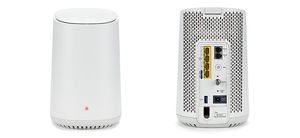
Hi, two questions: ONE: I never got around to playing with things, like I had wanted to. At this point, I'm thinking of just getting another Boost for the area of the house that the Modem currently covers, but when I called, they said it's $130 for one more! I got a pair on promo 6 months ago for maybe $50, so that was ok. But I can't justify $130 for just one more... Any ideas how to get one more Boost at a cheaper price? Are they for sale anywhere else? Craigslist? TWO: Lodaka / Anyone else: Do you know what brand and model the white "Wi Fi hub" is? Can't find any data on it, unlike the router.45KViews0likes2CommentsRe: Is it possible to set your Boost Wi-Fi network name the SAME as the main Telus modem network name?
Lodaka wrote: I am not 100% certain if this is the issue but I wanted to convey my understanding of this. From what I was told by the Telus installer, Actiontec T3200M may not support the "mesh" wifi network. However, Telus's new "Wi-Fi Hub" does. I believe its name is something like Arcadyan. I have this modem installed along with boosters and, in my experience, it natively supports the "mesh" network, i.e. one SSID for all by default. It's the white one from this page: https://www.telus.com/en/bc/support/interstitial/reset-your-wi-fi-modem I am not sure why it says "Quebec only", as I am in BC and it was available and installed for me. The Telus installer did say that this modem was quite new. I hope this helps. Interesting... I was going to ask if it has any ports in the back, as it looked like it was just for WiFi use, but I found a picture of it on this tech page, and it has 4 ports like the T3200M! https://www.telus.com/en/bc/support/article/all-my-devices-cannot-connect-to-the-internet-telus-wi-fi-hub How did you manage to get it? What issues did you have that allowed them to switch out the T3200M for that? ================================= Does noone know though HOW YOU CAN TEST if the T3200M broadcasting the same SSID as Boosts causes issues? We've just been talking theoretically what should work / not...50KViews0likes1CommentRe: Is it possible to set your Boost Wi-Fi network name the SAME as the main Telus modem network name?
superdaddyco wrote: The one main issue I see is that if you connected to the router wifi, your device will stay locked on to that even if the signal becomes weak. Since it is not part of the mesh network, there is no hand-off to the ap with a stronger signal. That's a good point sadly, and I hope you're wrong. :-) superdaddyco wrote: I have the exact same question. 1. Actiontec T3200M 2. 2 pack telus boost mesh kit Unplugged the older actiontec wifi extender since it did not share the same wifi ssid name as the main router. I have the mesh network setup with my routers original ssid name and password, but for now I have disabled the router wifi signal since no one has a definite answer about using the same ssid name and whether or not it can act like a 3rd mesh ap. I even contacted telus support and the tech told me it's the first time he was ever asked this question. His answer was that Telus would not provide equipment that would not be incompatible with each other.........BWAHAHAHAHAHAHAHAHH!!!!! Helloooo......what about the previous wifi extenders that auto generated a similar ssid like my router one.....but added "2.4G" and "5G" with both names it created? It caused soo much confusion with some of my users at home. For now, I am keeping my router wifi off, but it really would be a nice bonus if it is confirmed that the T3200M can act as a 3rd mesh ap. You're right on so many levels... The worst part is that they are silent in their instructions. They could have easily said - since it's all their own equipment after all! - A - you can have both the router and Boosts broadcasting, using the same SSID, and that they will not interfere with each other and the handoff will happen, or B - turn off the router's radio. It's not complicated. It's a binary situation. It's even more ironic if they don't work with each other, because Telus calls this a "mesh network" solution. By definition, that means that you should be able to have all of it running, and the handoff is done... Is there no one here who can actually come up with a test we can do to verify? And to tell us what to look for if they are interfering with each other? FWIW, I've had both my router broadcasting as well as my two Boosts (which are on the main floor, where the router is, but on the opposite side of the house), and have not seen any issues. I'm pretty sure a few times when I've been upstairs (with no Boosts), I saw 2 bars of wifi out of 3 on my iPhone X, and then it all of a sudden it went to 3 bars / full signal. And I hadn't moved. If I'm not imagining that, I am hopeful that means the handoff is working. :-)50KViews0likes3CommentsRe: Is it possible to set your Boost Wi-Fi network name the SAME as the main Telus modem network name?
I see. And if that's the case, having two networks broadcasting with the same SSID and password with signal cross coverage, what can go wrong? What issues will I experience? Is there a way for me to tell?51KViews0likes6CommentsRe: Is it possible to set your Boost Wi-Fi network name the SAME as the main Telus modem network name?
rc wrote: Sounds like a reasonable plan, but turning on the boost devices may not be enough to trigger the phone switching from the gateway to the boost. Some devices when they see a higher powered signal will transfer the connection, some will only transfer when the signal level becomes unusable. This is the problem that mesh networks solve. Let's see, but to your second paragraph, I think that's exactly what I'm trying to prove... If the Boost packs end up operating like a true mesh network, as Telus claims, then I would think my phone should switch, no?51KViews0likes8CommentsRe: Is it possible to set your Boost Wi-Fi network name the SAME as the main Telus modem network name?
rc wrote: Agree that telus could do a better job explaining the issues surrounding having the actiontec router and the boost devices sharing the same ssid. The boost devices form a mesh network but the actiontec router does not participate in the mesh. The resulting network functions like a old fashioned wifi network with two access points sharing a ssid. Depending on the type of devices connecting to the network and the locations of the access points you may not experience any issues, but not gain the benefits that come from the mesh. Interesting... So with two networks being broadcast under the same SSID, I don't know which one I'm connected to because both have the same name... Right? They're only like 70 feet apart from each other. Is there a way to test to see if I'm having issues using the same SSID with Boost and the Gateway? What about this? As I go from one part of the house to the other (where the Gateway's signal is weak, but Boost is strong), what would happen is I'd get one bar of signal on the Gateway's network. Not enough for the phone to drop it, but quite weak. Then I'd manually grab the old Extender's. So now, if I do the same and the mesh is NOT working, if I'm connected to the Gateway's network and go to that part of the house, the signal would still get weaker, right? But if it doesn't, maybe then the mesh IS working... I could even test it by turning off the Boost first, to make sure I'm definitely connected to the Gateway. Then go to that part of the house, see what my signal is like, turn on the Boost, and if the wifi signal improves, then Voila! Thoughts on this master testing plan? =)51KViews0likes10CommentsRe: Is it possible to set your Boost Wi-Fi network name the SAME as the main Telus modem network name?
NFtoBC wrote: Lotus99 wrote: Right now my TV is connected to my T3200M via an ethernet cable. But if I was to run it off WiFi, why would it matter? If the above setup doesn't cause conflict for any other device connecting wirelessly? To my knowledge, and experience, the Boost devices do not have multicast technology, needed for Optik over Wi-Fi. Thus, if one's OptiK receiver were to connect to the Boost device, rather than the main router, then you will encounter problems with the Optik Signal. That would be good news. To be clear, if my T3200M network name is MAIN let's say, I can change the network name on my two Boost packs to MAIN also, with the same password, without causing any interference / conflict by both broadcasting? Yes. This is actually the only option with Telus' most recent router. NFtoBC wrote: Lotus99 wrote: Right now my TV is connected to my T3200M via an ethernet cable. But if I was to run it off WiFi, why would it matter? If the above setup doesn't cause conflict for any other device connecting wirelessly? To my knowledge, and experience, the Boost devices do not have multicast technology, needed for Optik over Wi-Fi. Thus, if one's OptiK receiver were to connect to the Boost device, rather than the main router, then you will encounter problems with the Optik Signal. That would be good news. To be clear, if my T3200M network name is MAIN let's say, I can change the network name on my two Boost packs to MAIN also, with the same password, without causing any interference / conflict by both broadcasting? Yes. This is actually the only option with Telus' most recent router. Thanks for clarifying. So the first issue you mentioned, as I suspected, is a non-issue for me because I don't have Optik TV. The second issue though, I don't think you're correct. First of all, if it's the only option, as you claim (that the Boost network name and password must be the same as the Gateway's) then why isn't it mentioned in a single piece of literature / their website / in the app? Especially considering it's supposed to be a DIY solution by the user! How would we know??? Secondly, that's not what happens by default, which makes point 1 even more important. That's the whole reason for my post in fact... My Boost packs, once I set them up, started broadcasting a totally different SSID, and the app asked me to connect my phone to them by scanning the barcode on the back, which contained the new SSID and password to them. Third, if that was true and it didn't cause a conflict, then why would Telus as part of the Boost Troubleshooting guide ask you to Disable the Gateway's network? LOL. https://www.telus.com/en/bc/support/article/troubleshoot-boost-wifi-actiontec-t3200m You CAN later change the network name and password to match the Gateway's on the Boost packs, which is what I did anyway since as you can see, half the answers here say Yes, it causes conflict, and half say No. It seems to be working ok, so I'm going to conclude for now it does not cause any conflict, and it would be stupid to call this a "mesh" solution, if it requires you to keep two different SSID's. It's just really crappy and conflicting instructions on Telus' part for what would be a simple line in the guide / app to tell users what to do and what NOT to do. Hope they're listening.51KViews1like12CommentsRe: Is it possible to set your Boost Wi-Fi network name the SAME as the main Telus modem network name?
PS So why do they "explain how to disable the Wi-Fi network running in the background of your Boost Wi-Fi network through your Wi-Fi modem"? They don't actually say what the issue is they're trying to fix... Nor do they clearly just say that the main gateway conflicts with the Boost network. Why else would they provide these instructions then? https://www.telus.com/en/bc/support/article/troubleshoot-boost-wifi-actiontec-t3200m51KViews1like0Comments