Forum Discussion

vangirl604
6 years agoFriendly Neighbour
Outlook 365 - problems with migration to gmail
After the migration to gmail, my outlook account would not open. I am using Office 365. I removed and reinstalled outlook, which opened the program. However, all emails, folders and notes are gone...
 6 years ago
Migrated this morning as scheduled. Experience was, well…, from easy to difficult!
I use IMAP to access email from multiple devices including Apple Mail on MacBook (Mojave), iPhone (iOS 13) and Outlook 365 on Windows 10, and wanted to continue using them all for the “new” Telus email. So the migration was completely painless on the Mac and iPhone. Followed the steps to activate my Telus email on Google (easy), then setup the Mac and iPhone (also easy) (https://www.telus.com/en/bc/support/article/set-up-email-iphone-ipad-google). Up and running with all folders intact within a half hour or so.
Then came Outlook 365, what a pain! Took several hours including a lengthy but helpful Telus chat session. Wasn’t clear what directions to follow but turns out Outlook 2016 directions are (mostly) applicable: https://www.telus.com/en/bc/support/article/set-up-telus-email-on-your-computer-using-outlook-2016-google. Be sure to follow all the steps including the Gmail web interface and the Outlook 2016 set-up. Outlook wouldn’t let me add a new account with the same email address (telus.net) so I had to remove my old “telus.net” email account from Outlook, then add it back as a new account following the steps for Outlook 2016 as above. You have to manually put in the Incoming and Outgoing server settings (lame, because it was seamless on Apple products). Couple notes, I got stuck in a loop at Step 11 trying to connect to the server – you have to hit Cancel to get to the next step (12) “Something went wrong..” screen, which is what you want, then you get the option to “Change account settings”. Also I did not get the checkbox for “My outgoing (SMTP) server requires authentication”, turns out that is on by default in Outlook 365. Eventually Outlook connected and all my IMAP folders appeared. Note, this takes some time if you have a bunch of them. Also, the Received time in Outlook is now messed up for many downloaded messages. (It was fine on Mac and iOS mail).
So good luck to anyone using Outlook 365. Save yourself a full morning to get through it!

RonAKA
6 years agoRockstar
vangirl604 said "while my emails and folders transferred to gmail, my notes, calendar and contacts did not."
Have you opened the Google Contacts app, and the Google Calendar app with your browser to see if the lost information is there? Not sure where Google would put notes though...
Tony1000
6 years agoOrganizer
Migrated this morning as scheduled. Experience was, well…, from easy to difficult!
I use IMAP to access email from multiple devices including Apple Mail on MacBook (Mojave), iPhone (iOS 13) and Outlook 365 on Windows 10, and wanted to continue using them all for the “new” Telus email. So the migration was completely painless on the Mac and iPhone. Followed the steps to activate my Telus email on Google (easy), then setup the Mac and iPhone (also easy) (https://www.telus.com/en/bc/support/article/set-up-email-iphone-ipad-google). Up and running with all folders intact within a half hour or so.
Then came Outlook 365, what a pain! Took several hours including a lengthy but helpful Telus chat session. Wasn’t clear what directions to follow but turns out Outlook 2016 directions are (mostly) applicable: https://www.telus.com/en/bc/support/article/set-up-telus-email-on-your-computer-using-outlook-2016-google. Be sure to follow all the steps including the Gmail web interface and the Outlook 2016 set-up. Outlook wouldn’t let me add a new account with the same email address (telus.net) so I had to remove my old “telus.net” email account from Outlook, then add it back as a new account following the steps for Outlook 2016 as above. You have to manually put in the Incoming and Outgoing server settings (lame, because it was seamless on Apple products). Couple notes, I got stuck in a loop at Step 11 trying to connect to the server – you have to hit Cancel to get to the next step (12) “Something went wrong..” screen, which is what you want, then you get the option to “Change account settings”. Also I did not get the checkbox for “My outgoing (SMTP) server requires authentication”, turns out that is on by default in Outlook 365. Eventually Outlook connected and all my IMAP folders appeared. Note, this takes some time if you have a bunch of them. Also, the Received time in Outlook is now messed up for many downloaded messages. (It was fine on Mac and iOS mail).
So good luck to anyone using Outlook 365. Save yourself a full morning to get through it!
 SkylerJones5 years agoNeighbour
Thanks for this solution. It worked fine but like many other users, my contacts do not show up in Outlook. I did back them up in an Excel file and they do show up in Gmail. Guess I'll have to manually import them into Outlook. My Personal folders is another story!
 LMB5 years agoNeighbour
Hi, I'm going thru the same thing i.e. encountering problems with the migration when it comes to Outlook 365. I've done the migration so am able to access my email thru TelusGmail (or whatever it is called now). Now I want to set up access to email thru Outlook which is what I've been using forever. I've run into the problem that you mentioned which is that you have to delete your account and then add it. I am worried that if I delete my account, I am going to lose all the emails in my folders, etc. Somewhere I read that I won't lose my contacts or calendar. May I ask you if you lost your emails on Outlook when you deleted your account in order to re-add it? Thanks!
 BigBen1215 years agoAmbassador
It is not really a case if of deleting your account if you are on a pc you will need to create a new profile and then if you use the G-sync application tool the migration goes well. On a Mac you just set up Telus as a new account. There are some issues with contacts but before I migrated I exported them all to a csv file and re-imported them.
If you have not delete Telus from your Outlook as yet you can still use theG-sync migration tool to move everything into a new profile in OUtlook 365
 vangirl6046 years agoFriendly Neighbour
Thank you so much! It worked.
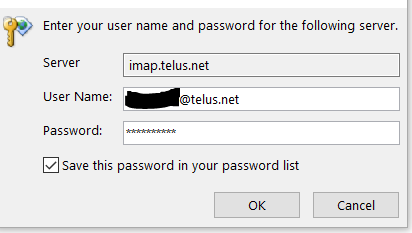
I was stuck at the step that said "We're getting things ready" window that prompts you to Enter your user name and password for the following server.
It took about 20 minutes to get past this step before it advanced to the next screen. However, it is all set up. I am grateful for your input. Thank you!
- BigBen1216 years agoAmbassador
Yes it does take that long as it is syncs all your mail folders, contacts and calendars - mine took 45 minutes
- RonAKA6 years agoRockstar
This all brings back memories of my frustration with using Outlook, and eventually abandoning it for Thunderbird. Thunderbird was easy to migrate except for the Lightning calendar, which I eventually solved with an add on that lets me view the Google Calendar from within Thunderbird.
- BigBen1216 years agoAmbassador
Hi Tony1000, I am like you in that I have a mac, iphone and ipad. From what you are saying that migration should all be smooth. I also have Windows 10 pc which is using Outlook 365 and I have four profiles one of which is Telus. So it seems what you are saying is that it may save me some time by creating a new Telus Profile and start it from scratch once the migration is complete and that may save me some grief in the long term even though the Outlook 365 may be somewhat painful


