Forum Discussion

vangirl604
6 years agoFriendly Neighbour
Outlook 365 - problems with migration to gmail
After the migration to gmail, my outlook account would not open. I am using Office 365. I removed and reinstalled outlook, which opened the program. However, all emails, folders and notes are gone...
 6 years ago
Migrated this morning as scheduled. Experience was, well…, from easy to difficult!
I use IMAP to access email from multiple devices including Apple Mail on MacBook (Mojave), iPhone (iOS 13) and Outlook 365 on Windows 10, and wanted to continue using them all for the “new” Telus email. So the migration was completely painless on the Mac and iPhone. Followed the steps to activate my Telus email on Google (easy), then setup the Mac and iPhone (also easy) (https://www.telus.com/en/bc/support/article/set-up-email-iphone-ipad-google). Up and running with all folders intact within a half hour or so.
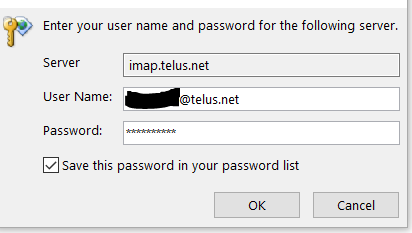
Then came Outlook 365, what a pain! Took several hours including a lengthy but helpful Telus chat session. Wasn’t clear what directions to follow but turns out Outlook 2016 directions are (mostly) applicable: https://www.telus.com/en/bc/support/article/set-up-telus-email-on-your-computer-using-outlook-2016-google. Be sure to follow all the steps including the Gmail web interface and the Outlook 2016 set-up. Outlook wouldn’t let me add a new account with the same email address (telus.net) so I had to remove my old “telus.net” email account from Outlook, then add it back as a new account following the steps for Outlook 2016 as above. You have to manually put in the Incoming and Outgoing server settings (lame, because it was seamless on Apple products). Couple notes, I got stuck in a loop at Step 11 trying to connect to the server – you have to hit Cancel to get to the next step (12) “Something went wrong..” screen, which is what you want, then you get the option to “Change account settings”. Also I did not get the checkbox for “My outgoing (SMTP) server requires authentication”, turns out that is on by default in Outlook 365. Eventually Outlook connected and all my IMAP folders appeared. Note, this takes some time if you have a bunch of them. Also, the Received time in Outlook is now messed up for many downloaded messages. (It was fine on Mac and iOS mail).
So good luck to anyone using Outlook 365. Save yourself a full morning to get through it!

vangirl604
6 years agoFriendly Neighbour
A search yielded no .pst files

RonAKA
6 years agoRockstar
It is possible there are no backups for your mail etc, if you have not gone out of your way to do it yourself. But, you may want to check again for .ost files instead of .pst. I found one reference that indicates Outlook 365 uses ost instead of pst. Also this link seems to have some information on where to look, and if you can find the files how to recover them.
Backup and Restore All Outlook Data
As I said, it has been a long time since I used outlook, and it has obviously gone through many iterations that I have not followed.
Good luck!


