router
6 Topics
Internet connection then drops then connects
My wife and I have iPhone 16 pro and pro plus. They work flawlessly on any other wifi but our Telus home wifi we can watch them go from 5g to wifi and back and forth. I reached out to Telus and since my laptop has no issue connecting they think it’s our phones Apple can’t find any issue and thinks it’s the wifi since our phone connect and have no other issues on other networks. we have a telus provided t3200m router that is 7 years old.119Views0likes7Comments
Extreme Packet Loss / Late Packet Issues every few days?
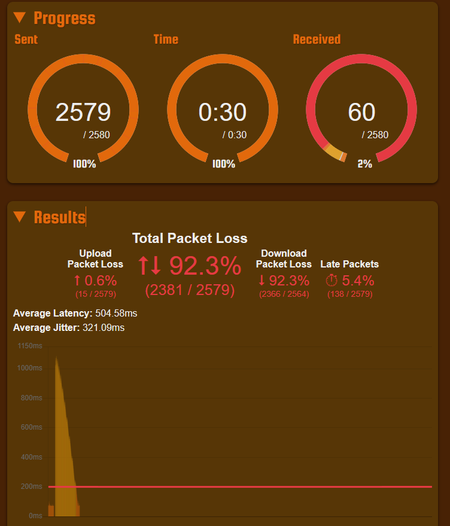
Hi all, Every few days (sometimes multiple times a day), packet loss will go through the roof. This affects things like Facetime, Zoom, and even games and has been extremely inconvenient. A reboot of the router fixes the issue, but only temporarily. I haven't been able to try over ethernet, but the problem definitely happens across multiple devices all at the same time. It also tends to resolve itself a few hours later? See attached images for packet issue examples. Have plenty more... I recently upgraded to the PureFibre X Internet 3G plan from my 1G plan before. Have been with Telus for close to 10 years now and never had issues like this... In the upgrade, technician upgraded me to the new Wifi 7 Router (B30A) from the Telus Wifi Hub Router. He also made some changes to my Fibre Connection outside, I believe. What can be done to fix the issue? What is even the issue? Is this a router problem? A This has been driving me crazy. I've resorted to restarting the router on a daily basis using a timed plug, but even that is not resolving things fully. Thank you in advance... Things I have tried: Disabling the AP Steering, Band Steering, Legacy Steering Getting a replacement B30A Router Changing DNS to 1.1.1.1 on devices235Views0likes8Comments
TELUS routing issue to game servers VPN should not be necessary
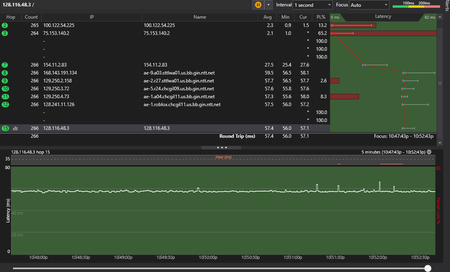
Hi TELUS, I believe I am experiencing a routing/peering issue on my connection. My local network is stable, but latency to many servers including game servers is higher than what other TELUS users report. Across multiple users on the same ISP I see two routing outcomes: Some users get: ~18 ms Seattle ~33 ms Chicago Others including me get: ~1 ms Edmonton ~5–7 ms Calgary ~56 ms Seattle ~57 ms Chicago ~75 ms Los Angeles ~78 ms Dallas I confirmed this with 2 users on each path, suggesting this may be due to IP pools or upstream routing differences. Using a VPN reduces Seattle latency to ~18 ms, matching the lower latency users. The VPN routes through Zayo, suggesting a better path exists but is not used by default. Traceroutes show TELUS is stable (~1–26 ms), but latency increases by ~30 ms at a Seattle transit hop (e.g. NTT). I have tried basic troubleshooting (rebooting router) with no change. Setup: TELUS fibre, wired Ethernet, TELUS NAT Testing: in-game latency, ping, traceroute Seattle, WA (128.116.115.0/24) → ~56 ms Los Angeles, CA (128.116.116.0/24) → ~75 ms Chicago, IL (128.116.48.0/24, 128.116.84.0/24) → ~56 ms Dallas, TX (128.116.95.0/24) → ~78 ms Ashburn, VA (128.116.102.0/24) → ~74 ms Location: Edmonton, Alberta Here are some images of Traceroutes.230Views0likes1Comment
ASUS Router - Instant Guard Complaining no public IPV4 + PF Issues
Hey folks, I recently got a 1.5GBPS upgrade to my home and the TELUS team took away the 3200M and replaced it with the cylinder white ones that everyone has now. The problem is that before, the 3200M gave me a lot of control over my network and the new one - basically very little control. I have an ASUS router and here are the issues: Port forwarding doesn't forward anything, nothing connects (checked with a port opener). Instant Guard complains that I dont have a public IP address and that I need to contact my ISP for help. Every time I try the 'bridged mode' button, I get internet dropout, and really bad speeds. (Basically 30s on - 30s off repeating) Here are a couple things I've tried: Resetting modem and routers Asking the tech team that came to upgrade for help (they did nothing) Here is some information: Router: ZenWifi AX XT 8 LAN (on router): 192.168.50.1 (this doesn't seem right - not sure) WAN: 192.168.1.66 Firmware: 3.0.0.4.388_24621 I use IPV6 passthrough to TELUS.Solved4KViews0likes4Comments
Ethernet Switch down of Router not allowing ethernet connection
I Recently installed a new unmanaged ethernet switch (TP-Link Model TL-SG1016) and anything connected is periodically allowing connection but keeps disconnecting (This can range between seconds or hours). The current setup goes from an Nokia ONT to a TELUS T3200M Router than is connected into the TP Link TL-SG1016 Ethernet Switch. Anything still directly connected to the T3200M Router has perfect connection and has no issues, with the only issues are directly from the TP Link Ethernet Switch. The Power supply is stable indicated with a solid green light, the Link/Act is green flashing indicating it is running and is transmitting or receiving. Not sure what would be causing the ethernet to be fluctuating on devices as they source ethernet cable and port from the router has been verified by connecting it to a laptop. Is there something within the TP-Link Ethernet Switch itself not allowing proper connection?4.4KViews0likes2CommentsAdding a router
Hey, I need help adding a router to my modem. I need a VPN-enabled router so I got an Asus router that supports Open VPN. I have tried using bridge mode although I get no connection to my router when enabled. Why is this? What should the connection type be on the router and am I missing a configuration step? This page has all the WAN setups that Asus supports. [WAN] How to set up an Internet Connection? | Official Support | ASUS Global I have also tried turning off bridge mode and can get full traffic and service from LAN 1, however, this does not help me as I need a public IP address for the VPN server. Any help would be truly appreciated. I can also provide more details if need be.Solved9.5KViews0likes3Comments