port forwarding
5 Topics
Port Forwarding Issues
Hello all, Long story short - I run a Minecraft (and sometimes other games) server for my friends/family, and have been for some time. I recently moved into a new townhouse and finally got the opportunity to set up my server machine this weekend. I completed the port forwarding only to have my friend tell me he could not connect. After checking, and then double checking I discovered there are 2 different IPs. One shows up in the NH20T access portal as 100.83..., and the other is what shows up in the Telus Connect app as 75.159... Neither of these worked for external connection and upon looking into the issue I discovered the problem might be something called CGNAT? How do I go about getting this removed? It's fairly inconvenient to my dweeby personal projects to not be able to connect to my machines externally... I did call Tech Support, but unfortunately the topic seemed a bit outside their knowledge base. I know I saw a TELUS_Support account in a couple posts about this topic, maybe they can connect to a tech who knows a bit more about this area? Any help appreciated!38Views0likes1Comment
Trying to port forward a game server on Telus Wifi Hub with no sucsess
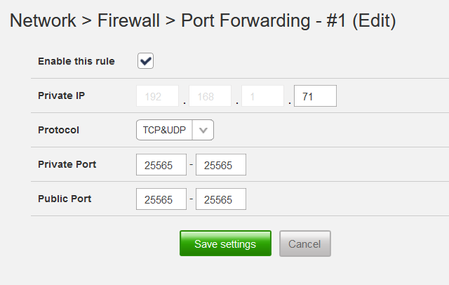
I am trying to forward the port 25565 (the game is minecraft if that helps) I have checked that the private IP is correct and the public ip is the ipv4 i grabbed off of www.whatismyipaddress.com. i have hosted servers like this before and was very familiar with port forwarding on my old router but for some reason this one doesn't seem to allow me to do so as i am timed out every time. I'm unsure if this has to do with using ipv4 instead of ipv6 but i cant seem to get a public ipv6. If i could get some help that would be appreciated4.3KViews0likes2Comments
Port Forwarding - Port not opened
Hi, I'm trying to a host Minecraft server with my ASUS router behind the T3200M modem (provided by Telus) Here's what it looks like: T3200M -> ASUS Zen Wifi -> PC All of these are wired. When I try to host my Minecraft server, people not on the same network cannot connect. I have enabled port bridging on the modem and port forwarded on my ASUS router. As a debugging step, I even connected to the modems network (wirelessly) and proceed to port forward on there, same result. All of this I was checking on a port checker and a friend connecting. Locally, I can connect to my server just fine using localhost. I can also connect to it using my public ip and even my reverse proxy ran through cloudflare! I have checked on other devices to verify this just wasn't my friend. For info: Port: 25565 Windows firewall: Configured for server Any ideas?16KViews0likes19Comments
Newbie - Port Forwarding
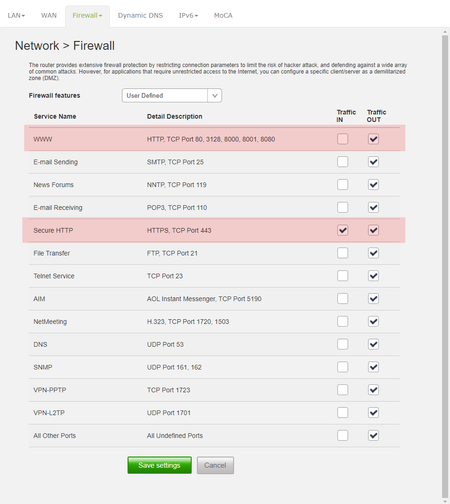
Hi all, sorry in advance for my lack of knowledge on the subject, but I'm hoping someone here will be willing to try to walk me through port forwarding. I've been researching all morning and am stumped. I have a RainMachine irrigation controller that I am trying to set up for direct/remote access. I am not sure what kind of router I have... All I can tell is that it is the Telus Wi-Fi Hub serial #: ARCA1337704B I have reserved a fixed IP address for the controller 192.168.X.XXX I tried setting this up as a DMZ, (in combination with port forwarding, not sure if that's a conflict, but no luck) I'm also not sure if this would be an appropriate solution for this problem or not. I believe that the irrigation controller uses port 8080. I see under my default firewall settings that this port does not allow traffic in, but I seem to have the ability to select to allow traffic into some, or all of these ports. I thought maybe allowing traffic in via port 443 and using that as my forwarding port would be a good, secure option? Maybe more so than just allowing traffic in through all of the ports listed in that first line with port 8080 or all other not listed ports (last option)? Either way, I still can't get it to work... I've pasted an image below, hopefully it will display correctly in this post. I have checked ports 443, 80 and 8080 on CanYouSeeMe.org and all appear to be visible. I'm not sure if that is to be expected or not based on the firewall settings to allow traffic out from these ports, but not in? I would have thought no...? I've tried multiple Private and Public port combinations under the port forwarding section with no luck, although I'm still not 100% sure I understand how to configure this page correctly. ie. should the Private port be 8080 or 443? I've also tried setting up the Special Application section using 8080 as the Trigger Port and 443 as the Public Port, again not sure if this is backward or even if this is an applicable solution for the problem I'm trying to solve...? Any advice would be VERY much appreciated! Thanks!14KViews0likes4Comments