packet loss
3 Topics
Extreme Packet Loss / Late Packet Issues every few days?
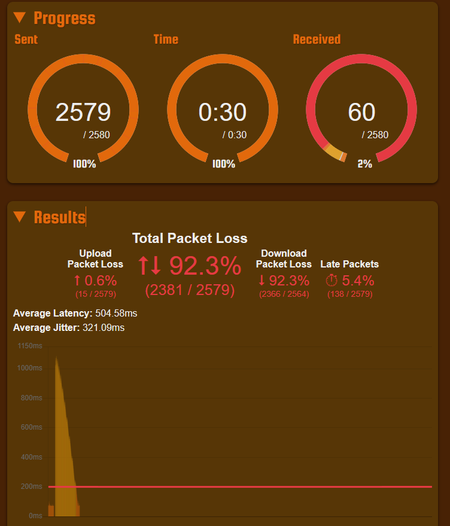
Hi all, Every few days (sometimes multiple times a day), packet loss will go through the roof. This affects things like Facetime, Zoom, and even games and has been extremely inconvenient. A reboot of the router fixes the issue, but only temporarily. I haven't been able to try over ethernet, but the problem definitely happens across multiple devices all at the same time. It also tends to resolve itself a few hours later? See attached images for packet issue examples. Have plenty more... I recently upgraded to the PureFibre X Internet 3G plan from my 1G plan before. Have been with Telus for close to 10 years now and never had issues like this... In the upgrade, technician upgraded me to the new Wifi 7 Router (B30A) from the Telus Wifi Hub Router. He also made some changes to my Fibre Connection outside, I believe. What can be done to fix the issue? What is even the issue? Is this a router problem? A This has been driving me crazy. I've resorted to restarting the router on a daily basis using a timed plug, but even that is not resolving things fully. Thank you in advance... Things I have tried: Disabling the AP Steering, Band Steering, Legacy Steering Getting a replacement B30A Router Changing DNS to 1.1.1.1 on devices523Views0likes8Comments
Intermittent Jitter on TELUS Vancouver - Seattle Backbone 154.11.15.xx
Hi everyone, I’m experiencing intermittent jitter and minor packet loss on the Vancouver - Seattle route, affecting latency-sensitive apps. Tests confirm the issue is not from my home network. Tests: Internal network clean, Hop 1–2: 1 ms, 0% packet loss Tracert, WinMTR, PingPlotter to 1.1.1.1 and 8.8.8.8 Jitter starts on backbone routers 154.11.15.xx Examples: Tracert to 1.1.1.1: Latency is stable until reaching QUBCPQAJGR00.bb.telus.com 154.11.15.73 Seattle-bound backbone router, where latency begins to fluctuate. Tracert to 8.8.8.8: Similar path, showing transition through 154.11.15.190, confirming the same segment is used. Everything before that point is stable with 0% packet loss. Request for Review: Please review the Vancouver - Seattle backbone segment, where the jitter begins. Minor fluctuations 5–15 ms have a noticeable impact on latency-sensitive applications. The goal is to identify and address potential congestion or instability, and any adjustments or actions deemed necessary by the network team are appreciated. Thank you430Views0likes5Comments
Major Packet Loss every 10-20 mins on Fibre.
I got fibre service in Ontario in February. Ever since then I've been getting fairly consistent lag spikes/packet loss multiple times per hour, approximately every 10-20 mins. It only lasts a few seconds each time. It happens on all devices connected including WiFi, Wired to the access point (Boost 6) and Wired directly to the NH20A. I've tried swapping the NH20A and the problem persists. It's not noticeable in regular browsing, but when gaming it's extremely noticeable. The problem affects all games, so it isn't game-specific servers. What can we do about this?Solved909Views0likes7Comments