data usage
4 Topics
Usage Page Errors
Since the 4.130.0 Android update and now 4.130.1, it's nothing but frustration... I have teens in the household and one oversees whom I need to manage their data and the "usage" page does not load (both on the app and web) over WiFi or their data plan/ VPN off or on. As a loyal customer since 2001, I've spent numerous hours with customer & tech support and Telus cannot resolve it... Very very frustrating for 2 weeks now.... Anyone else having issues? Thanks210Views0likes2Comments
Data Optimization Tips for Android Devices
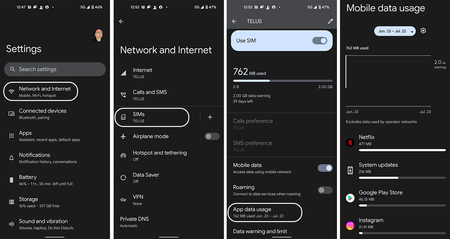
Where to Start Whether you're on an unlimited data plan and just burnt through all your high-speed data, or have a limited bucket of data and need to micro-manage your usage, these tips will help you get started. What's using my data? First, we'll want to get an overview of what is using up all that data via the following steps: Swipe down from the top of your home screen and go to Settings Select Network & Internet Tap on SIMs Select App Data Usage You should now see an overview of all the apps using mobile data on your device and adjust your usage patterns accordingly. For example, if a video streaming application is using most of your data, then restrict your streaming to only when you're connected to Wi-Fi or pre-download the shows/movies you want to watch on the go. Activate Data Saver Mode Many apps continue to use data even when you've moved on to another app. This is referred to as background data usage and can easily add up as you pile on the apps running in the background. Data Saver mode stops all that when your device is not on Wi-Fi. Here's how to activate it: Swipe down from the top of your home screen and go to Settings Select Network & Internet Tap on Data Saver Flip the switch on Turn Off Mobile Data If you can't afford to have a single extra megabyte more using up data then this will put an immediate halt on all Mobile Data usage until you say so. Swipe down from the top of your home screen and go to Settings Select Network & Internet Tap on SIMs Mobile Data - Flip the switch to the off position! A multipronged approach In addition to the above here are a few other things to consider: Disable Auto-Play for videos on your Social Media platforms (Facebook, Instagram, etc.) Pre-download your music, tv shows, or videos when on Wi-Fi Be very vigilant with your usage when using your phone as a Hot Spot! Try to close apps when you're done with them When it comes to apps & system upgrades, only update over Wi-Fi Turn off Wi-Fi Assist! Check out this article on how to go about doing that & learn more about the feature. Version FR3.6KViews0likes0Comments
How accurate is data usage in the app??
I signed my grandparents up for the internet for good wifi. It’s supposed to be 300gb a month. We just had the installation one week ago but for some reason my app is showing that I’ve exceed my monthly data limit. It shows 1.25 gb/ -1gb. I’m so confused cause my grandparents don’t use internet at all except for the newly installed Telus home security and smart tv (only watch tv, no streaming).3.3KViews0likes3CommentsData Limit is Wrong - 1TB is not 1000GB
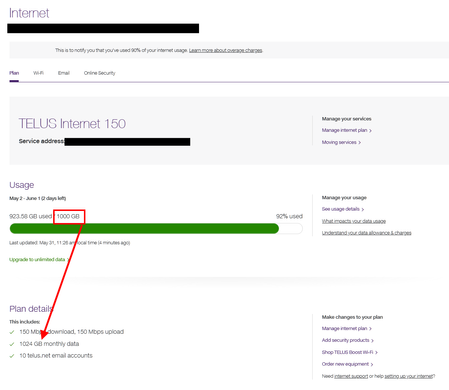
When I log into my Internet plan info, it shows my plan as Internet 150, which includes 1024GB of data as seen in the screenshot and on the Telus Support page Given this, Telus still charges me if exceeding 1000GB in a given month, when in fact I have 24GB remaining. What is going on here with these overage charges? Keep an eye on your bill and demand a refund for this trickery by Telus.6KViews1like3Comments