bridge mode
5 TopicsHow to Enable Bridge Mode on TELUS Gateway for Custom Router Setup
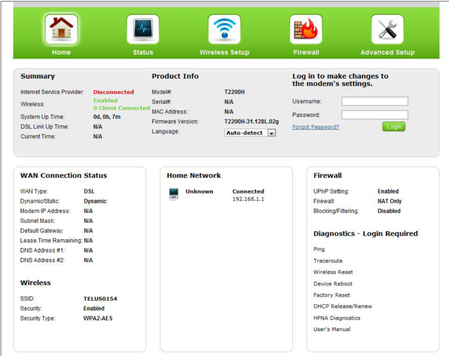
Bridge mode allows you to use your own router with TELUS internet by disabling the built-in router functions of your TELUS gateway. Follow these steps to set up bridge mode on compatible TELUS gateways. Compatible Gateways T1200H (single-line) T2200H (copper-bonded) T3200M Complete Setup Process Access your gateway settings: Open a web browser on a device connected to your TELUS network Enter http://192.168.1.254 in the address bar Log in using your gateway username and password Enable bridge mode: Click the "Wireless Setup" icon Select "Advanced Setup" Choose "Port Bridging" Enable "Port1 Bridge" Click "Apply" to save the changes Expected results after enabling bridge mode: The gateway's Wi-Fi will be disabled Your custom router will now handle network management The internet connection will remain active through the TELUS gateway If This Doesn't Work Double-check that you've selected the correct options and that your gateway model is compatible. If issues persist, try restarting both the TELUS gateway and your custom router. When to Contact TELUS Contact TELUS support if you experience any of the following issues: Login credentials for the gateway settings don't work The bridge mode option isn't visible in the gateway settings Your internet connection fails after enabling bridge mode Your gateway model isn't listed as compatible with bridge mode FR version11KViews0likes0Comments
Adding a router
Hey, I need help adding a router to my modem. I need a VPN-enabled router so I got an Asus router that supports Open VPN. I have tried using bridge mode although I get no connection to my router when enabled. Why is this? What should the connection type be on the router and am I missing a configuration step? This page has all the WAN setups that Asus supports. [WAN] How to set up an Internet Connection? | Official Support | ASUS Global I have also tried turning off bridge mode and can get full traffic and service from LAN 1, however, this does not help me as I need a public IP address for the VPN server. Any help would be truly appreciated. I can also provide more details if need be.Solved9.7KViews0likes3Comments
How do I bridge a Technicolor NH20T so I can use my own router?
I see that in this gateway's WAN UI there is a choice of Routed, Full Bridged, and Bridged Port 1 (paraphrasing from memory), which leads me to presume that bridging is possible, though I have never seen this array of options. Plus, over the years I have faced ISP gateways that also require disabling DHCP and Firewall plus other internal settings needed before being able to use a 3rd party router -- especially if I want to use a VPN with it. And then there's the issue of losing access to it on the LAN once bridged. So I'm being careful and seeking docs or first-hand advice on dealing with this particular gateway deployed by Telus.Solved4.5KViews0likes4Comments
Troubles with bridging Fibre hub to TP-Link Deco
Just moved into a new place and signed up for Telus Fibre for the first time. Got the fibre hub installed, and it came with a Boost box, but I’d prefer to run my own router to handle my wifi and hardwired devices (NAS, smart home, etc). At first it was all going great, I plugged the Deco router into one of the 1G ports, and everything worked great. Boost was still connected to the 10G port as a backup while I finalized things. Then I realized that I was getting some conflicts, particularly for Plex, which couldn’t do remote access. Realizing my mistake, I connected into the fibre hub, and set the 10G port to bridge mode, moved the Deco to the 10G port, the Boost to the 1G port, and everything worked, Plex was happy, easy. Except suddenly now the Deco is dropping internet connection every hour or so, and requires a reboot each time to get it back online. After the fourth drop out, I decide to move bridging to the first 1G port, put the Deco there and the Boost back on the 10G. Hour later, another crash. Finally turn off bridging entirely, and the system is stable. But now Plex can’t connect remotely, and the conflicts are back. Hoping someone here can help me figure out where to go next, I’m banging my head against the wall talking to ChatGPT about it and getting nowhere, and I’m at the outer reaches of my networking knowledge here. Would really appreciate any guidance! Deco model is XE75, connected to the hub via CAT5E (roughly 25-50’ of distance). Fibre hub is Arcadyan NH20A. Boost is B30A model.99Views0likes3Comments