apple
10 TopicsSoftware Update Schedule
All dates are approximate and subject to change. Please note posted dates reflect when the update is targeted for release but can take a few weeks to roll out to all devices. Device Target Date Update Apple iPhone SE (2nd Gen) Apr-22 New iOS release Apple iPhone SE (3rd Gen) Apr-22 New iOS release Apple iPhone 11 Apr-22 New iOS release Apple iPhone 11 Pro Apr-22 New iOS release Apple iPhone 11 Pro Max Apr-22 New iOS release Apple iPhone 12 Apr-22 New iOS release Apple iPhone 12 mini Apr-22 New iOS release Apple iPhone 12 Pro Apr-22 New iOS release Apple iPhone 12 Pro Max Apr-22 New iOS release Apple iPhone 13 Apr-22 New iOS release Apple iPhone 13 mini Apr-22 New iOS release Apple iPhone 13 Pro Apr-22 New iOS release Apple iPhone 13 Pro Max Apr-22 New iOS release Apple iPhone 14 Apr-22 New iOS release Apple iPhone 14 Plus Apr-22 New iOS release Apple iPhone 14 Pro Apr-22 New iOS release Apple iPhone 14 Pro Max Apr-22 New iOS release Apple iPhone 15 Apr-22 New iOS release Apple iPhone 15 Plus Apr-22 New iOS release Apple iPhone 15 Pro Apr-22 New iOS release Apple iPhone 15 Pro Max Apr-22 New iOS release Apple iPhone 16e Apr-22 New iOS release Apple iPhone 16 Apr-22 New iOS release Apple iPhone 16 Plus Apr-22 New iOS release Apple iPhone 16 Pro Apr-22 New iOS release Apple iPhone 16 Pro Max Apr-22 New iOS release Apple iPhone Air Apr-22 New iOS release Apple iPhone 17e Apr-22 New iOS release Apple iPhone 17 Apr-22 New iOS release Apple iPhone 17 Pro Apr-22 New iOS release Apple iPhone 17 Pro Max Apr-22 New iOS release Apple iPad (8th Gen) Apr-22 New iPadOS release Apple iPad (9th Gen) Apr-22 New iPadOS release Apple iPad (10th Gen) Apr-22 New iPadOS release Apple iPad A16 (11th Gen) Apr-22 New iPadOS release Apple iPad Air (3rd Gen) Apr-22 New iPadOS release Apple iPad Air (4th Gen) Apr-22 New iPadOS release Apple iPad Air (5th Gen) Apr-22 New iPadOS release Apple iPad Air 13" M2 Apr-22 New iPadOS release Apple iPad Air 11" M2 Apr-22 New iPadOS release Apple iPad Air 11" M3 Apr-22 New iPadOS release Apple iPad Air 11" M4 Apr-22 New iPadOS release Apple iPad Air 13" M3 Apr-22 New iPadOS release Apple iPad Air 13" M4 Apr-22 New iPadOS release Apple iPad mini (5th Gen) Apr-22 New iPadOS release Apple iPad mini 6 Apr-22 New iPadOS release Apple iPad mini (A17 Pro) Apr-22 New iPadOS release Apple iPad Pro 11 (2nd Gen) Apr-22 New iPadOS release Apple iPad Pro 11 (3rd Gen) Apr-22 New iPadOS release Apple iPad Pro 11 (4th Gen) Apr-22 New iPadOS release Apple iPad Pro 11" M4 Apr-22 New iPadOS release Apple iPad Pro 12.9 (3rd Gen) Apr-22 New iPadOS release Apple iPad Pro 12.9 (4th Gen) Apr-22 New iPadOS release Apple iPad Pro 12.9 (5th Gen) Apr-22 New iPadOS release Apple iPad Pro 12.9 (6th Gen) Apr-22 New iPadOS release Apple iPad Pro 13" M4 Apr-22 New iPadOS release Apple iPad Pro 11" M5 Apr-22 New iPadOS release Apple iPad Pro 13" M5 Apr-22 New iPadOS release Samsung GS24 Apr-24 Security Updates Samsung GS24+ Apr-24 Security Updates Samsung GS24 Ultra Apr-24 Security Updates Samsung GS23 Apr-24 Security Updates Samsung GS23+ Apr-24 Security Updates Samsung GS23 Ultra Apr-24 Security Updates Samsung GS24 FE Apr-24 Security Updates Samsung A56 Apr-24 Security Updates Samsung A57 Apr-24 Security Updates Samsung Z Flip5 Apr-24 Security Updates Samsung Z Fold5 Apr-24 Security Updates Samsung XCover6 Pro Apr-24 Security Updates Samsung XCover7 Pro Apr-24 Security Updates Samsung A37 Apr-24 Security Updates Moto G (2026) Apr-27 Optimizations Samsung Watch5 40mm Apr-28 Optimizations Samsung Watch5 44mm Apr-28 Optimizations Samsung Watch5 Pro Apr-28 Optimizations Samsung GS23 FE May-1 Security Updates Samsung A17 May-1 Security Updates Samsung A54 May-1 Security Updates Moto Edge (2025) May-4 Security Updates Samsung GS26 May-4 Optimizations + Security Updates Samsung GS26+ May-4 Optimizations + Security Updates Samsung GS26 Ultra May-4 Optimizations + Security Updates Sonim XP Pro May-5 Security Updates Moto G 5G (2023) May-6 Security Updates Samsung GS25 May-9 Optimizations + Security Updates Samsung GS25+ May-9 Optimizations + Security Updates Samsung GS25 Ultra May-9 Optimizations + Security Updates Samsung GS25 Edge May-9 Optimizations + Security Updates Samsung GS25 FE May-9 Optimizations + Security Updates Samsung Z Flip7 May-9 Optimizations + Security Updates Samsung Z Fold7 May-9 Optimizations + Security Updates Samsung Z Flip4 May-9 Security Updates Samsung Z Fold4 May-9 Security Updates Samsung A35 May-9 Security Updates Samsung A36 May-9 Security Updates Samsung A53 May-9 Security Updates Apple iPhone SE (2nd Gen) May-11 New iOS release Apple iPhone SE (3rd Gen) May-11 New iOS release Apple iPhone 11 May-11 New iOS release Apple iPhone 11 Pro May-11 New iOS release Apple iPhone 11 Pro Max May-11 New iOS release Apple iPhone 12 May-11 New iOS release Apple iPhone 12 mini May-11 New iOS release Apple iPhone 12 Pro May-11 New iOS release Apple iPhone 12 Pro Max May-11 New iOS release Apple iPhone 13 May-11 New iOS release Apple iPhone 13 mini May-11 New iOS release Apple iPhone 13 Pro May-11 New iOS release Apple iPhone 13 Pro Max May-11 New iOS release Apple iPhone 14 May-11 New iOS release Apple iPhone 14 Plus May-11 New iOS release Apple iPhone 14 Pro May-11 New iOS release Apple iPhone 14 Pro Max May-11 New iOS release Apple iPhone 15 May-11 New iOS release Apple iPhone 15 Plus May-11 New iOS release Apple iPhone 15 Pro May-11 New iOS release Apple iPhone 15 Pro Max May-11 New iOS release Apple iPhone 16e May-11 New iOS release Apple iPhone 16 May-11 New iOS release Apple iPhone 16 Plus May-11 New iOS release Apple iPhone 16 Pro May-11 New iOS release Apple iPhone 16 Pro Max May-11 New iOS release Apple iPhone Air May-11 New iOS release Apple iPhone 17e May-11 New iOS release Apple iPhone 17 May-11 New iOS release Apple iPhone 17 Pro May-11 New iOS release Apple iPhone 17 Pro Max May-11 New iOS release Apple iPad (8th Gen) May-11 New iPadOS release Apple iPad (9th Gen) May-11 New iPadOS release Apple iPad (10th Gen) May-11 New iPadOS release Apple iPad A16 (11th Gen) May-11 New iPadOS release Apple iPad Air (3rd Gen) May-11 New iPadOS release Apple iPad Air (4th Gen) May-11 New iPadOS release Apple iPad Air (5th Gen) May-11 New iPadOS release Apple iPad Air 13" M2 May-11 New iPadOS release Apple iPad Air 11" M2 May-11 New iPadOS release Apple iPad Air 11" M3 May-11 New iPadOS release Apple iPad Air 11" M4 May-11 New iPadOS release Apple iPad Air 13" M3 May-11 New iPadOS release Apple iPad Air 13" M4 May-11 New iPadOS release Apple iPad mini (5th Gen) May-11 New iPadOS release Apple iPad mini 6 May-11 New iPadOS release Apple iPad mini (A17 Pro) May-11 New iPadOS release Apple iPad Pro 11 (2nd Gen) May-11 New iPadOS release Apple iPad Pro 11 (3rd Gen) May-11 New iPadOS release Apple iPad Pro 11 (4th Gen) May-11 New iPadOS release Apple iPad Pro 11" M4 May-11 New iPadOS release Apple iPad Pro 12.9 (3rd Gen) May-11 New iPadOS release Apple iPad Pro 12.9 (4th Gen) May-11 New iPadOS release Apple iPad Pro 12.9 (5th Gen) May-11 New iPadOS release Apple iPad Pro 12.9 (6th Gen) May-11 New iPadOS release Apple iPad Pro 13" M4 May-11 New iPadOS release Apple iPad Pro 11" M5 May-11 New iPadOS release Apple iPad Pro 13" M5 May-11 New iPadOS release Apple iPad Pro 13" M4 May-11 New iPadOS release Apple iPad Pro 11" M5 May-11 New iPadOS release Apple iPad Pro 13" M5 May-11 New iPadOS release Apple Watch SE (2nd Gen) May-11 New watchOS release Apple Watch SE3 May-11 New watchOS release Apple Watch Series 6 May-11 New watchOS release Apple Watch Series 7 May-11 New watchOS release Apple Watch Series 8 May-11 New watchOS release Apple Watch Series 9 May-11 New watchOS release Apple Watch Series 10 May-11 New watchOS release Apple Watch Series 11 May-11 New watchOS release Apple Watch Ultra May-11 New watchOS release Apple Watch Ultra 2 May-11 New watchOS release Apple Watch Ultra 3 May-11 New watchOS release Moto RAZR (2025) May-11 Security Updates Moto G 5G (2024) May-13 Security Updates Samsung A16 May-15 Security Updates Samsung A15 May-15 Security Updates Samsung Tab S9 FE May-15 Security Updates Samsung GS24 May-17 Optimizations + Security Updates Samsung GS24+ May-17 Optimizations + Security Updates Samsung GS24 Ultra May-17 Optimizations + Security Updates Samsung GS24 FE May-17 Optimizations + Security Updates Samsung Z Flip6 May-17 Optimizations + Security Updates Samsung Z Fold6 May-17 Optimizations + Security Updates Samsung A37 May-20 Optimizations + Security Updates Samsung A57 May-20 Optimizations + Security Updates Samsung Z Flip4 May-22 Security Updates Samsung Z Fold4 May-22 Security Updates Samsung Z Flip7 May-22 Security Updates Samsung Z Fold7 May-22 Security Updates Samsung Tab A11+ May-22 Security Updates Samsung XCover6 Pro May-22 Security Updates Samsung GS23 May-23 Optimizations + Security Updates Samsung GS23+ May-23 Optimizations + Security Updates Samsung GS23 Ultra May-23 Optimizations + Security Updates Samsung GS23 FE May-23 Optimizations + Security Updates Samsung Z Flip5 May-23 Optimizations + Security Updates Samsung Z Fold5 May-23 Optimizations + Security Updates Samsung A56 May-23 Optimizations + Security Updates Last updated: May 22, 2026 Get notified first about our schedule updates by clicking on the bell icon in the upper right part of this page to "Follow" this topic. Version Fr418KViews6likes0CommentsSoftware Update Life-Cycle
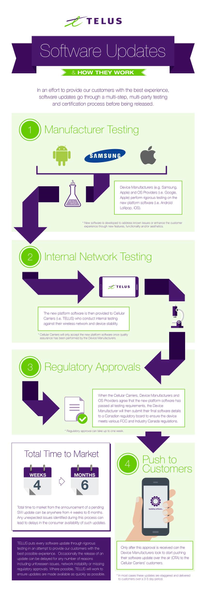
When a device is chosen to receive a software update, we make sure it's set up to deliver the best possible customer experience. To achieve this, the update goes through several steps involving multiple parties before it's released. Typically, a second version of the software is created based on feedback from TELUS and the device manufacturer. This new version is tested again to fix any issues found earlier. For a look at some of the upcoming device software releases, please see the Software Update article. Here’s a look at the life cycle of a software update: *Originally a blog by our Product Manager, MarcTELUS, we've republished the software lifecycle as an article as it still holds true today.56KViews1like0CommentsWi-Fi Assist
Wi-Fi Assist Wi-Fi Assist is a feature that optimizes the handoff between a Wi-Fi network and your carrier's cellular data network. In the past, when your device left the effective range of a Wi-Fi network, it would try to maintain connection to that network as long as it could, even when the network's signal became too weak to be effective. Then, you'd have two choices: either turn Wi-Fi off or wait until your device was completely out of range and it would switch over to the cellular data network. How does Wi-Fi Assist work? Wi-Fi Assist regularly checks your device's Wi-Fi connection to determine signal strength. If the Wi-Fi signal performance drops, Wi-Fi Assist automatically switches to a cellular data connection until the Wi-Fi signal improves. By doing so, the handoff between your Wi-Fi and cellular data connections would be automatic and smooth. How can Wi-Fi Assist impact me? As this feature may increase the amount of time spent on the cellular data network, there is potential for higher data usage, and the Wi-Fi signal may disconnect more frequently if your device's Wi-Fi connection drops below a specific strength. How to turn Wi-Fi Assist ON or OFF Wi-Fi Assist is usually turned on by default. Once enabled, it operates in the background automatically. You can turn it on or off anytime by following these steps: Apple/iOS 1. Tap Settings. 2. Tap Cellular. 3. Scroll down to find the Wi-Fi Assist toggle. 4. Tap to turn the feature ON or OFF. Android 1. Go to your Start screen and swipe up or down to open the menu. 2. Tap Settings. 3. Tap Connections. 4. Tap Wi-Fi. 5. Tap to enable Wi-Fi. 6. Choose the Options symbol and select Advanced. 7. Tap to disable Switch to mobile data. Important Notes Wi-Fi Assist does not activate for some third-party apps that might use large amounts of data. For example, apps with audio or video streaming functionality, or email apps with features such as attachment downloads. If you are data roaming outside of Canada, Wi-Fi Assist will not automatically switch to a cellular data connection. For device specific data management tips, you can also check out our articles for iOS and Android. Version FR5.2KViews1like0CommentsMobile Klinik Device Checkup Tool
Mobile Klinik Device Checkup Tool The Mobile Klinik Device Checkup app has a number of great features. Not only can you optimize and troubleshoot hardware/software issues with your Android and iOS device, you can even book repair appointments, find the nearest Mobile Klinik store, and even check out your smartphone's resale value. Here's all the info you need to get started. How to download the Mobile Klinik app 1. Ensure that you have an active cellular or Wi-Fi connection. 2. Visit the Google Play store (Android) or Apple App store (iOS) and search for 'Mobile Klinik Device Checkup'. 3. Alternatively, if you select the new Diagnostics link available in the app itself you'll either be brought directly to the Google Play store or Apple App store prompting you to install, or have the app automatically launch if it's already installed. How to run a device checkup 1. Launch the Mobile Klinik Device checkup app (once installed) by tapping the icon from your smartphone's home screen. 2. *First time users* Accept the Terms & conditions and allow data usage access to use the app. Do this by following the prompts to open Settings (you'll be brought to the Usage Data Access section), find and select the app, tap to allow usage tracking, and go back to return to the app. 3. All tests will be selected by default, though you may select/deselect which tests you wish to perform including: Battery (battery health and usage) Storage (internal/external memory usage) Connectivity (Wi-Fi, Bluetooth, SIM) Data (data usage) Device (software updates and security) 4. Click Start at the bottom of the screen. *Note: The battery drain test (unless skipped on Android) will run for approx. 30 seconds and maximize your screen brightness, flash, and vibration functions to assess battery health. 5. Results summary will be displayed and colour-coded by severity level: Device alerts and critical updates - Red or Yellow Optimization recommendations - Green 6. Select the green chevron next to a results to see specific info about the test. How to check device value and repair options Device Value Tap 'Sell Your Phone' from the app home screen. Select 'Continue'. Complete the interactive tests and questions about your smartphone. Receive the device's value *Note: New devices may not retrieve a value, and value given is an estimate and will not be confirmed until you visit the nearest Mobile Klinik store. Repair Options Tap 'Repair' from the app home screen. Select the repair journey you need: Find a store, Book an appointment, or Call for a quote. Version FR3.7KViews1like0Comments