NH20A
5 Topics
NH20A router ignoring configured DNS forwarding — confirmed with AdGuard test
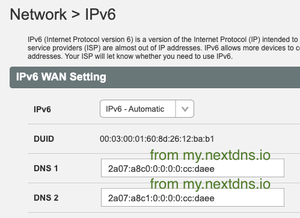
I've configured my NH20A router (logged in as admin) with specific IPv4 and IPv6 DNS addresses from AdGuard. After rebooting both the router and my laptop, I confirmed that the laptop receives the router's IP via DHCP for DNS resolution — so the router should be forwarding DNS queries to AdGuard, and clients should only need the router's IP in their DNS list. That’s the expected behavior. To verify this, I ran nslookup tests using domains that: Should not be cached by the router (never used before) Are known to be blocked by AdGuard DNS Here’s what I found: "nslookup domain AdGuard-DNS" returns NXDOMAIN or 0.0.0.0 as expected (AdGuard is blocking) "nslookup domain router-DNS" returns valid IPs, showing the router forwarded the query to Telus DNS instead of AdGuard This clearly shows that the router is not honoring the configured upstream DNS servers — it’s forwarding to Telus DNS regardless of my settings. Has anyone else confirmed this behavior? Is there a known workaround or hidden setting to force the NH20A to respect custom DNS forwarding?223Views0likes4Comments
Best setup moving forward
Moved houses and upgraded to 1 Gb PureFibre and brought along my T3200M with me. Already mounted on the wall in the new house is a Nokia ONT patched into an NH20A. I also brought with me a wired 4K PVR and wireless 4K STB which I need because my tv location has no wired Ethernet capability. Should I continue to use my T3200M or should i use the NH20A and ask Telus to provide me with a device to provide wireless in order to connect to my wireless STB?Solved174Views0likes5Comments
Network Access Hub reserved IP addresses.
I just upgraded from the 1 to 3Gbps internet plan due to the black Friday deals and my existing discount terms going away. The Telus technician replaced the Actiontec T3200/Alcatel-Lucent ONT equipment with an Arcadyan NH20A Network access hub and a Boost Wifi 6 garbage can. I'm now in the process of reassigning my internal LAN IP addresses to match my previous configurations (via Network > LAN > LAN DHCP (add)). The only existing DHCP reservation listed is the Boost wifi device. I am unable to assign many of my devices back to their previous IP addresses with the following message (The IP address 192.168.1.21 to 192.168.1.63 has been reserved.) Does anyone know where in the NAH GUI I can find the settings to remove this reservation? I have quite a few devices that I would like to assign to this range. I'm unsure how many existing configurations will be broken with them being changed. I did put in a call to Telus Technical Support. I had a hard time getting them to understand my issue was with settings for internal static IP addresses, not my external IP address (I think 90% of their calls are from residential customers that don't know the static IP abilities Telus restricts to Commercial plans). I was told their tier 1 training is based around their external network setup, tier 2 is reserved for back-end network issues and there is no one that can direct or discuss device-level things like this. I'm disappointed as this is a Telus device with Telus firmware, they are likely the only ones with reasonable control or knowledge of how it is set up. I feel my solution may be to purchase my own 3Gbps capable router, bridge this thing and just have to live with having another node in my network chain slowing things down.Solved3.7KViews0likes3Comments