Motorola
2 TopicsUltimate Guide - Transferring Content To Your New Phone
Most of us will upgrade our devices at some point and we'll all face the same dilemma: how do we transfer our info to the new device? For those of you going through this for the first time, we’ve compiled a list of resources from various manufacturers to help you get started. Apple iPhone to iPhone Apple Support has a great video HERE with some quick tips on how to transfer if you still have your old iPhone, and if you don't. For your additional reference, HERE is a handy Apple how-to guide for all things iOS. Switching over from Android to iOS Apple makes it very easy for you to switch over from your Android device. Make sure both devices are charging and connected to the same Wi-Fi network. Then download the Move to iOS app available on the Google Play Store to your Android device and you're almost there. Check out THIS link for all the steps. Google Pixel devices Switching from iOS and/or “other” devices Transferring content to your new Pixel device depends largely on the content itself. Google has put together a step by step guide on how to import your photos, music, contacts, and email/messages at their website HERE. Need to activate a new SIM card for your new device? Check out our guide on how to do that HERE. Is there an official content transfer process missing for a particular manufacturer? Leave a comment below and we’ll review it and update this article! Need more help? Contact us HERE for further assistance, or reach out to us over at our Facebook page and our team can help! FR version76KViews0likes7CommentsSoftware Update Life-Cycle
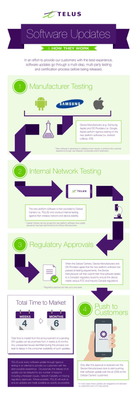
When a device is chosen to receive a software update, we make sure it's set up to deliver the best possible customer experience. To achieve this, the update goes through several steps involving multiple parties before it's released. Typically, a second version of the software is created based on feedback from TELUS and the device manufacturer. This new version is tested again to fix any issues found earlier. For a look at some of the upcoming device software releases, please see the Software Update article. Here’s a look at the life cycle of a software update: *Originally a blog by our Product Manager, MarcTELUS, we've republished the software lifecycle as an article as it still holds true today.56KViews1like0Comments