Software Update Schedule
All dates are approximate and subject to change. Please note posted dates reflect when the update is targeted for release but can take a few weeks to roll out to all devices. Device Target Date Update Moto RAZR+ (2023) Feb 10 Security Updates Moto G Play (2024) Feb 10 Security Updates Samsung Galaxy Watch4 40mm Feb 10 Optimizations + Security Updates Samsung Galaxy Watch4 44mm Feb 10 Optimizations + Security Updates Samsung Galaxy Watch4 Classic 42mm Feb 10 Optimizations + Security Updates Samsung Galaxy Watch4 Classic 46mm Feb 10 Optimizations + Security Updates Samsung A15 Feb 13 Security Updates Samsung A16 Feb 13 Security Updates Samsung Tab S9 FE Feb 13 Security Updates Samsung A17 Feb 13 Security Updates Samsung GS21 Feb 13 Security Updates Samsung GS21+ Feb 13 Security Updates Samsung GS21 Ultra Feb 13 Security Updates Moto Edge (2024) Feb 16 Security Updates Moto RAZR+ (2024) Feb 16 Security Updates Samsung Tab A11+ Feb 17 Optimizations + Security Updates Moto G (2025) Feb 23 Security Updates Samsung Z Flip5 Feb 27 Security Updates Samsung Z Fold5 Feb 27 Security Updates Samsung Z Flip6 Feb 27 Security Updates Samsung Z Fold6 Feb 27 Security Updates Samsung Z Flip7 Feb 27 Security Updates Samsung Z Fold7 Feb 27 Security Updates Samsung GS25 Feb 27 Security Updates Samsung GS25+ Feb 27 Security Updates Samsung GS25 Ultra Feb 27 Security Updates Samsung GS25 Edge Feb 27 Security Updates Samsung GS24 FE Feb 27 Security Updates Samsung GS25 FE Feb 27 Security Updates Samsung XCover6 Pro Feb 27 Security Updates Samsung XCover7 Pro Feb 27 Security Updates Samsung Watch8 40mm Mar 3 Optimizations + Security Updates Samsung Watch8 44mm Mar 3 Optimizations + Security Updates Samsung Watch8 Classic 46mm Mar 3 Optimizations + Security Updates Samsung Watch8 40mm Mar 3 Optimizations + Security Updates Samsung watch8 44mm Mar 3 Optimizations + Security Updates Samsung Watch8 Classic 46mm Mar 3 Optimizations + Security Updates Google Pixel 6 Mar 3 Optimizations + Security Updates Google Pixel 6 Pro Mar 3 Optimizations + Security Updates Google Pixel 6a Mar 3 Optimizations + Security Updates Google Pixel 7 Mar 3 Optimizations + Security Updates Google Pixel 7 Pro Mar 3 Optimizations + Security Updates Google Pixel 7a Mar 3 Optimizations + Security Updates Google Pixel 8 Mar 3 Optimizations + Security Updates Google Pixel 8 Pro Mar 3 Optimizations + Security Updates Google Pixel 8a Mar 3 Optimizations + Security Updates Google Pixel 9 Mar 3 Optimizations + Security Updates Google Pixel 9 Pro Mar 3 Optimizations + Security Updates Google Pixel 9 Pro XL Mar 3 Optimizations + Security Updates Google Pixel 9 Pro Fold Mar 3 Optimizations + Security Updates Google Pixel 9a Mar 3 Optimizations + Security Updates Google Pixel 10 Mar 3 Optimizations + Security Updates Google Pixel 10 Pro Mar 3 Optimizations + Security Updates Google Pixel 10 Pro XL Mar 3 Optimizations + Security Updates Google Pixel 10 Pro Fold Mar 3 Optimizations + Security Updates Google Pixel 10a Mar 3 Optimizations + Security Updates Samsung GS24 Mar 6 Security Updates Samsung GS24+ Mar 6 Security Updates Samsung GS24 Ultra Mar 6 Security Updates Samsung GS23 Mar 6 Security Updates Samsung GS23+ Mar 6 Security Updates Samsung GS23 Ultra Mar 6 Security Updates Samsung A56 Mar 6 Security Updates Samsung Z Flip4 Mar 6 Security Updates Samsung Z Fold4 Mar 6 Security Updates MOTO Edge (2025) Mar 10 Android 16 Update MOTO RAZR (2025) Mar 10 Android 16 Update MOTO G 5G (2023) Mar 11 Security Updates Samsung GS23 FE Mar 13 Optimizations + Security Updates Samsung GS22 Mar 13 Optimizations + Security Updates Samsung GS22+ Mar 13 Optimizations + Security Updates Samsung GS22 Ultra Mar 13 Optimizations + Security Updates Samsung A53 Mar 13 Optimizations + Security Updates Samsung A54 Mar 13 Optimizations + Security Updates Samsung Z Flip3 Mar 13 Optimizations + Security Updates Samsung Z Fold3 Mar 13 Optimizations + Security Updates MOTO G 5G (2024) Mar 17 Security Updates Samsung Watch7 40mm Mar 17 Optimizations + Security Updates Samsung Watch7 44mm Mar 17 Optimizations + Security Updates Samsung Galaxy Watch Ultra Mar 17 Optimizations + Security Updates Last updated: Mar 13, 2026 Get notified first about our schedule updates by clicking on the bell icon in the upper right part of this page to "Follow" this topic. Version Fr411KViews6likes0CommentsSoftware Update Life-Cycle
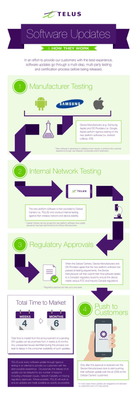
When a device is chosen to receive a software update, we make sure it's set up to deliver the best possible customer experience. To achieve this, the update goes through several steps involving multiple parties before it's released. Typically, a second version of the software is created based on feedback from TELUS and the device manufacturer. This new version is tested again to fix any issues found earlier. For a look at some of the upcoming device software releases, please see the Software Update article. Here’s a look at the life cycle of a software update: *Originally a blog by our Product Manager, MarcTELUS, we've republished the software lifecycle as an article as it still holds true today.56KViews1like0CommentsUltimate Guide - Transferring Content To Your New Phone
Most of us will upgrade our devices at some point and we'll all face the same dilemma: how do we transfer our info to the new device? For those of you going through this for the first time, we’ve compiled a list of resources from various manufacturers to help you get started. Apple iPhone to iPhone Apple Support has a great video HERE with some quick tips on how to transfer if you still have your old iPhone, and if you don't. For your additional reference, HERE is a handy Apple how-to guide for all things iOS. Switching over from Android to iOS Apple makes it very easy for you to switch over from your Android device. Make sure both devices are charging and connected to the same Wi-Fi network. Then download the Move to iOS app available on the Google Play Store to your Android device and you're almost there. Check out THIS link for all the steps. Google Pixel devices Switching from iOS and/or “other” devices Transferring content to your new Pixel device depends largely on the content itself. Google has put together a step by step guide on how to import your photos, music, contacts, and email/messages at their website HERE. Need to activate a new SIM card for your new device? Check out our guide on how to do that HERE. Is there an official content transfer process missing for a particular manufacturer? Leave a comment below and we’ll review it and update this article! Need more help? Contact us HERE for further assistance, or reach out to us over at our Facebook page and our team can help! FR version76KViews0likes7Comments
Google Play Store and Downloading Apps
When I go into Google Play Store, I can only use the search to try to find new apps, and none of the ones I am searching for are found, always says no results. I’ve tried Amazon music, Britbox… I do have a google account so unsure why this isn’t working. Any advice or support would be appreciated!Solved4.7KViews0likes2Comments
Telus Home Assistant Problems
Roughly a couple of weeks ago, my ability to use Telus Home Assistant to voice control our PVR stopped working properly. I tried unlinking and relinking the account. I tried power cycling everything. I added Alexa to the mix which didn't help. I am able to turn the PVR on and off by voice, but nothing else. I really need to change channels by voice. It's an old 4k PVR that we have had for about two years. Perhaps there was a bad update? Do I need a new PVR box?Solved9.4KViews0likes10Comments