User Profile

DustinEdm
Neighbour
Joined 2 years ago

User Widgets
Contributions
Re: Telus Wifi Hub - difficulty port forwarding with WAN
Did a bit more testing and yeah, the whatsmyip address matches the Foundry address invitation link it generates on the app. Double checked the port forwarding rules and it looks like its setup correctly with the guides in Telus forums and the Foundry support pages (https://foundryvtt.com/article/port-forwarding/). Will attempt to do a full factory reset of the modem and try again.3.8KViews0likes0CommentsRe: Telus Wifi Hub - difficulty port forwarding with WAN
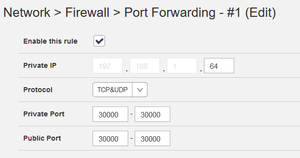
Ah good point, I didn't think about the DMZ rendering all the port forwarding settings moot. The whatsmyIP website does provide the same address that the server believes I have. I've removed the DMZ, and went back to the standard port forwarding application. I've rebooted the modem after all of these were applied and refreshed the application. But it still looks like the connection is closed. Current setup is (with screenshots): Port forwarding enabled on my public IP on port 30 000 to point at my server Special application of port 30 000 to prevent the NAT from interfering All other undefined ports enabled (I still feel this is poor practice, and may switch the server's port to be something like 8001 or a different usable port that is covered under a different firewall tab, but right now I just need to understand the mechanism for allowing access for my friends) If my research is correct, my IP address is being changed frequently due to WAN, and I should request a static IP. However I'm poorly versed in how to request a static IP in the following fields and how I should request the modem to set this up3.9KViews0likes2CommentsTelus Wifi Hub - difficulty port forwarding with WAN
Hello, I recently moved into a new building that has a new Telus Wifi Hub for my unit. I am attempting to run a local server for board games with friends on the app FoundryVTT. This application usually uses port 30 000 to direct users to a login screen on the server I host (the application itself has decent security settings and only allows interactions within a tight environment). Unfortunately all of the methods I have used and the advice I've read online still seems to fail me whenever I or a friend attempts to access the URL. I have: Set up my client PC IP address as a DMZ Enabled port forwarding to port 30 000 of my PC's DMZ'ed address Gone into firewall settings and allowed connections in via HTTP. I have tested it with the "all other ports' option allowing traffic in, but that also didn't work. I have kept it off otherwise since I figure it is poor security to allow traffic in on all undefined ports. Allowed the trigger port 30 000 and public port 30 000 with TCP method to be allowed under "Special Appliaction List" However it still doesn't seem to allow users to connect to the server... I can connect with devices uses the LAN address, so I can verify the server is up and running. I just can't access this server no matter what I enable on the modem side. Any help would be appreciated!4.2KViews0likes6Comments