User Profile

mad_academic
Friendly Neighbour
Joined 2 years ago

User Widgets
Contributions
Re: IP address issue!
Hi Nighthawk! Wow it looks like you have saved the day (again!). When I set the new router for the suite up originally, I googled WAN -v- LAN... and thought yep put the cable from the switch in the suite router's WAN. But my iphone showed no internet connection via WAN. I tried LAN... and it worked. Following your reply above... I tried again... same problem. This time, I went onto my laptop as well... and it brought up the tp-link router config page in the browser... so I ran their router setup the suite router. After doing that the suite wifi/internet now works when the cable is connected from the switch into suite router's WAN. Horray! I just tried to connect the Roku, which is now happily connected. That whole guest mode thing I assume is fixed (I've left it in guest mode and am optimistic tomorrow it will still work as opposed to "brick out"!) Phew! I hope I've cracked it now! Again thanks! I really can't say how grateful I am.3.4KViews0likes0CommentsRe: IP address issue!
OK people... I wonder if the Neighbourhood Forum is smart, and it isn't letting me show the image as it shouldn't be shared (Roku's range of acceptable IP addresses)? I've typed out the text from the image, and the post disappears also. Basically, the message from Roku says they have detected that my device is currently connected to a public IP address that is not supported. It then gives ranges of IP address that are acceptable. So my question is... how does one change the IP address of my guest suite router (which currently has an IP address outside that range) to one that is in that range?3.5KViews0likes2CommentsIP address issue!
Hi! I have a home network and a separate network in the suite (specifically, there is a switch feeding the internet to the Telus equipment for the home, and a third party router for the suite). See this post here for how I did it: (thanks Nighthawk!): Link Issue: I connected my Roku stick to the internet, it worked. Put it in guest mode. It worked. Next day couldn't exit guest mode as I had lost internet connection to the suite network. I had to factory reset the stick, then couldn't connect to the suite internet. When I opened the Roku app on my phone I saw this message (when attached to suite network): [REMOVED IMAGE] It seems the issue is the suite router has an IP address Roku doesn't like. (though why it worked the first time I don't know). How do I get my third party router in the suite to have an IP address that Roku is happy with? I appreciate this is probably a simple question. I tried calling Telus, thinking they should be able to see the IP address of both my Telus router and the third party router and maybe change it, but no luck. They suggested having a static IP address and sending me to their business department and charging me. I wasn't sure the person knew enough to be honest... Any help gratefully received!!!Solved3.7KViews0likes4CommentsRe: IP address issue!
Hi guys sorry I don't know why the image isn't showing properly. Here is the text from the image: "IP Address not supported We have detected that your device is currently connect to a public IP address that is not supported. Please ensure that both your mobile phone and deivce have an IP address in one of the following ranges: 198.18.x.x - 198.19.x.x or 192.168.x.x or 172.16.x.x - 172.31.x.x or 100.64.x.x - 100.127.x.x or 10.x.x.x."3.3KViews0likes0CommentsRe: Rental Suite - bridging -v- Telus guest network -v- switch??
Thanks so much for all your help! I got it done! Following your advice I now have two separate networks. My check that it works: - on my home network my iphone can cast to my TV. On the new guest suite network I cannot see the TV. Excellent! - Both networks access internet. Just for a resource for others, here is the switch and wireless router I used: switch router Nothing fancy, but it seems to be working.4.7KViews1like0CommentsRe: Rental Suite - bridging -v- Telus guest network -v- switch??
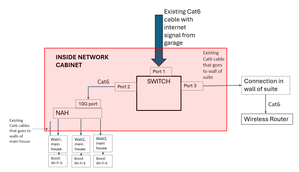
Thanks so much for this - I feel like I'm ready to make the leap - I'll try and get this done this weekend and hopefully report success! I have to say I didn't find this clarity when I was searching online - I hope this post can be useful for others! With that in mind, I've put a diagram of what you have suggested at the end of this message and summarised the instructions. I'm sure I'm not the only one with this query in mind, and with their internet coming into their 10G port! Does it look about right? Also, I wonder if you could also answer a few of follow-up queries? Query 1: You said "keep in mind anything connected to the switch has a direct outside connection". I wondered if there was some risk/issue to worry about here that you were thinking of? Query 2: Is there a "risk" to having the walled connection in the suite "live" running directly to the switch? Query 3: Similarly, if the new wireless router itself is in the suite, is this more risky as guests have physical access? I'm not sure I have a choice, but if there was a wall connection in the main house close to the suite that I could use, instead of placing the wireless router directly in the suite, is that something to consider? (this way they cannot plug directly into the router and mess with settings for e.g.) Or this this me just being over-the-top? Query 4: Would you be able to explain in simple terms why the switch might be more secure than the bridging? Query 5: What would happen if I had faster internet that Fibre 250? (I have Fibre 250, but others might have faster, and I am also curious - as I say this is super interesting!) STEPS AS I UNDERSTAND THEM: -Unplug the Cat6 cable from the 10G port onNAH (that cable brings the internet into the house) and plug instead into the Switch. -Plug a new Cat 6 cable from switch to the now vacant 10G port [House internet is now up and running] - Plug existing Cat6 cable (that goes to the wall of the suite) into the switch -Put wireless Router in suite, attaching to the wall connection that is now attached to the switch [Separate guest network now up and running]. Again, thanks a million for engaging with me on this! It has been SO helpful!4.9KViews0likes2CommentsRe: Rental Suite - bridging -v- Telus guest network -v- switch??
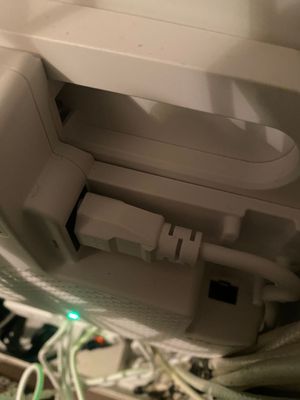
TELUS_Support Thanks so much for the info! When I read this at work I think I understood what to do for the bridging and that it was a viable option. From what Nighthawk mentioned the switch option might not be possible in any event. One other issue did crop up (maybe a non-issue I hope, fingers crossed)... I went to check my modem this evening and see what they did when they installed it. I can see no fibre cable - see photo at the end of the message. After some detective work I think they seem to have used a CAT from the garage (where the fibre enters the house) to the modem (in basement) and plugged it into the 10G port. If I unplug the 10G port, youtube streaming on my phone stops working and the red light comes on, on the router. So my understanding is the internet enters into the 10G port of the NAH, then it is routed out to the Boost wi-fi 6's in ports 1-3. I'd be super grateful if I could explore with you in a bit more detail the bridging mode, and possibly the switch, given the above info. Bridge mode: If I decided to do the bridge mode, given I have the internet coming in on a port (10G), will setting the router to bridge mode, say to port 4, still work? Will it still be secure? If yes, is it as simple as setting bridge mode, attaching the CAT cable for the suite to port 4, and buy a new wireless router for the suite and attach it to the wall in the suite, and done? (making sure wifi address/password are different to the main network.) There is nothing else to do? Switch: I worry this might be beyond my ability to comprehend the answer but here goes. Given the internet is coming in on CAT cable, can I plug that directly into a switch, say port 1 of switch, and then attach my Telus NAH (to port 2 of that switch) and the suite CAT cable (to port 3 of that switch)? I would then attach the wireless router to the wall in the suite, which would then get the signal from port 3 of the switch, which in turn gets internet from port 1 of the switch. I hope that makes sense... If this is viable, what switch should I use? I have used one type before (see the photo below for an example of a switch I already have in the house to run multiple devises in a room). Maybe I should get a fancier switch or it that OK? Thanks so much for taking the time - super super appreciated. I might be clueless, but this is actually super interesting! Picture showing no fibre cable in my house. Switch I have in the house already for another purpose:5KViews0likes4CommentsRental Suite - bridging -v- Telus guest network -v- switch??
Hey, I'm not very techy, and am a little stuck. My research has got me to the point where I can ask the question somewhat clearly... we'll see whether I can understand the answers 🙂 Any help greatly appreciated!! Our wi-fi setup: We have TELUS PureFibre 250. We have a "modem" (Network Access Hub, Arcadyan NH20A) We also have 3 Boost Wi-Fi 6's (Arcadyan Boost 2.1) Our problem: We would like to use our basement suite for short-term rentals. We would like to have as much security for our home internet as possible as a lot of different people would visit. We therefore do not want to share our wi-fi with the suite, and we want the wi-fi solution we use to be one that cannot be worked around by tech-savvy folk to access our own wi-fi. Question 1: Could I just use the Telus Guest network feature? Is this secure? Is there a better option? Question 2: I have read I can use bridge mode on our Network Access Hub, and then attach a different wireless route to that port. A good idea? How does this compare to the Telus Guest network? Question 3: I wondered if it is possible somehow to divide the internet at "source" with some sort of physical switch, and then attach our current setup to one port, and the guest wireless router to another. Is that possible/advisable? (I suspect this is a dumb question... be kind :D) Finally, a big thanks to anyone who can help remove my fog of ignorance!Solved5.3KViews0likes7Comments