User Profile

charlieloudowl
Friendly Neighbour
Joined 4 years ago

User Widgets
Contributions
Re: Port Forwarding on T3200
Yeah, I knew this was more a case of me missing something obvious than being a Telus issue. In fact, they've included a whole dropdown list in the router's applications settings of rules to allow open ports for various games. Minecraft just happens to not be included right now. Anyhow, thanks again. My kids and their friends will be pleased to be able to play together. 😊15KViews1like0CommentsRe: Port Forwarding on T3200
This is rather baffling, but I just tried, and yes, I was able to connect! So, case closed. Thank you! I knew in the end it would come down to something silly. I just ran a couple other ports through canyouseeme - ports I know are open because I'm using them for work - and they also show as closed. Strange. Thanks again.15KViews0likes2CommentsRe: Port Forwarding on T3200
Yes, and I'm able to connect to it from other computers in the same network. Just for funsies, I attempted some other diagnostics. I had a look in netstat command and found 25565 there, but it doesn't show as listening. I don't see anything else using that port either, of course, so that's not the issue. But I had the idea to configure a custom port in my server settings, 1026, and restart the server. Then, I tried to portforward 1026. I wish I could say this story had a happy ending, but it does not. Canyouseeme finds this port closed, as well. I'm confounded.15KViews0likes0Comments- 15KViews0likes2Comments
- 15KViews0likes1Comment
Re: Port Forwarding on T3200
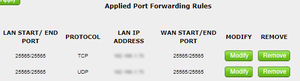
If it helps at all to see what I've done, I can post a couple screenshots: Here's how I've got port forwarding set up under Firewall>Port Forwarding, where LAN IP Address = the internal IP of the maching running my server. Here's my firwall status showing that everyting appears to be hunky dory?15KViews0likes4CommentsRe: Port Forwarding on T3200
I'm setting up a Minecraft server using AMP's game management panel. It should be relatively simple. I've done it before doing everything I've done now, but something isn't working this time. Port 25565. I've provided more information on my testing in my reply to FuzzyLogic.15KViews0likes3CommentsRe: Port Forwarding on T3200
Thanks for your reply. I've gone through the link and checked off a few other things. I am able to connect to the server from other computers in the same network. Not quite what I want, but it's a start. I've verified the server is configured with the correct default gateway. I've created custom rules in my firewall settings to allow this port. Tested again with https://canyouseeme.org/ and still no joy.15KViews0likes0CommentsPort Forwarding on T3200
Hi all, I've read through the forums, and it seems this has been asked before in dozens of iterations, but never in the same way, and never really solved. I'm trying to port forward on my T3200 router and it's not working. I've tried it two different ways. The standard way, setting up my port in the Firewall>Port Forwarding section of the router and also creating my own rules in the 'Applications>User Created Rules section. Neither works. I've assigned a static IP to my computer under DHCP Reservations. I've rebooted the router. before I began, I even factory reset it. And yes, on the router's status page, the router's IP matches my public IP. I've double checked all my numbers. I've tried turning off the firewalls in the router and on my machine and still nothing. I've even tried disabling DMZ, and still no go. Am I missing something? Any other ideas for troubleshooting?Solved15KViews0likes16Comments