telus tv
3 TopicsTELUS TV+ Is Now on Smart TVs - Your Favourite Shows, Your Way
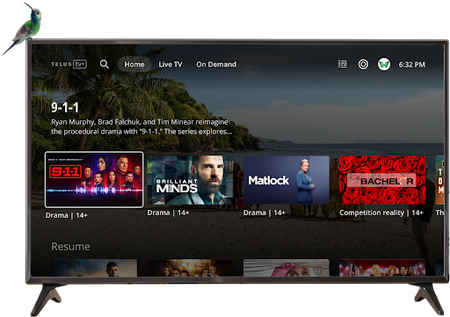
Big news! Your favourite shows, movies, and live TV channels are now just a click away on your LG and Samsung Smart TVs Streaming just got even more convenient! The TELUS TV+ experience you know and love is now available on your LG and Samsung Smart TVs, giving you yet another seamless way to enjoy entertainment right from your living room. What This Means for You No more switching between devices or dealing with complicated setups. Your entire TELUS TV+ library is now accessible directly through your Smart TV's interface. It's the same great experience, just more convenient than ever. Before You Start Make sure you have these requirements covered before diving in: Active Subscription: You'll need an active subscription to Optik TV, Stream+, or Pik TV (including live TV channels) Account Access: Have your My TELUS or Koodo login details ready Location: TELUS TV+ app is exclusively available in Canada Internet Connection: Some channels require TELUS home internet due to licensing restrictions Getting Started On your LG or Samsung Smart TV, go to the home menu and select "Apps" Use the search bar to find "TELUS TV Plus" and click to download and install Open the app, sign in with your My TELUS or Koodo credentials, and start watching! Don't have a My TELUS or Koodo account yet? No problem! You can register for a My TELUS account or Koodo account directly through the app to get started. FAQs: Everything You Need to Know Which Smart TVs are compatible? LG Smart TVs (2020 models and newer) Samsung Smart TVs (2021 models and newer) What features can I access on my Smart TV? You get the full TELUS TV+ experience: Live TV streaming On-demand content library 4K channel access Cloud recording management (local recordings require other devices) Can I purchase content directly on my Smart TV? On-demand purchases and rentals aren't yet available directly through Smart TVs. However, you can buy or rent content on another supported device and then watch it seamlessly on your TV. Are all my TV channels available? Absolutely! All 4K channels available through TELUS TV+ can be accessed on your Smart TV, giving you the complete viewing experience. Ready to Upgrade Your Streaming Experience? With TELUS TV+ now available on LG and Samsung Smart TVs, your entertainment setup just got a major upgrade. Grab your remote and start streaming your favourite content right from your living room. It's never been easier to enjoy TELUS TV+! Remember: TELUS TV+ is designed to work seamlessly across multiple devices. Explore other compatible options to enjoy your favourite shows and movies in even more ways, wherever you are!458Views2likes0Comments
Bitrate Quality on TELUS TV Plus
So, I am literally day 1 with Telus tv. I switched from old school 1080p60 Shaw boxs. It is insane how poor the bitrate is with Telus tv plus. I have 5 gig fiber with telus (and love it). I have their android boxes hard lined too. Yes, I have the right res set on each box with the best possible quality set. The poor quality is 100% due to telus brutal bitrate feed. I should have done some more research on this, there are a pile of posts on this same subject. I just assumed with such good internet the bitrate would be good too. I flipped back to one of my shaw boxs, since my service was not cut off yet, and its crazy to see the difference in quality, especially in sports. Thankfully I am within the 30 days and will be returning everything and calling shaw asking to put a hold on that cancellation. If you care about quality, hold off getting telus tv till they bump their bitrate. AndrewSolved2.1KViews1like3Comments
My Favourite Channels 💜 Heart It and Watch It...When?
Rocky3GrimmtMrSLMyoptic1 broadcastguy Telus, Your "Favorite" Digital Andriod TV+ promotional tag line is "Heart It and Watch It" As loyal, paid subscribers to your platform our "My Favorites" thing to do is choose, only, the channels we wish to watch. Remember when that was a thing? Telus TV+ My Favourites Channels has flatlined. Time to bring in the crash cart and "paddle it".845Views1like0Comments