Pixel
4 TopicsSoftware Update Schedule
All dates are approximate and subject to change. Please note posted dates reflect when the update is targeted for release but can take a few weeks to roll out to all devices. Device Target Date Update Moto RAZR+ (2023) Feb 10 Security Updates Moto G Play (2024) Feb 10 Security Updates Samsung Galaxy Watch4 40mm Feb 10 Optimizations + Security Updates Samsung Galaxy Watch4 44mm Feb 10 Optimizations + Security Updates Samsung Galaxy Watch4 Classic 42mm Feb 10 Optimizations + Security Updates Samsung Galaxy Watch4 Classic 46mm Feb 10 Optimizations + Security Updates Samsung A15 Feb 13 Security Updates Samsung A16 Feb 13 Security Updates Samsung Tab S9 FE Feb 13 Security Updates Samsung A17 Feb 13 Security Updates Samsung GS21 Feb 13 Security Updates Samsung GS21+ Feb 13 Security Updates Samsung GS21 Ultra Feb 13 Security Updates Moto Edge (2024) Feb 16 Security Updates Moto RAZR+ (2024) Feb 16 Security Updates Samsung Tab A11+ Feb 17 Optimizations + Security Updates Moto G (2025) Feb 23 Security Updates Samsung Z Flip5 Feb 27 Security Updates Samsung Z Fold5 Feb 27 Security Updates Samsung Z Flip6 Feb 27 Security Updates Samsung Z Fold6 Feb 27 Security Updates Samsung Z Flip7 Feb 27 Security Updates Samsung Z Fold7 Feb 27 Security Updates Samsung GS25 Feb 27 Security Updates Samsung GS25+ Feb 27 Security Updates Samsung GS25 Ultra Feb 27 Security Updates Samsung GS25 Edge Feb 27 Security Updates Samsung GS24 FE Feb 27 Security Updates Samsung GS25 FE Feb 27 Security Updates Samsung XCover6 Pro Feb 27 Security Updates Samsung XCover7 Pro Feb 27 Security Updates Samsung Watch8 40mm Mar 3 Optimizations + Security Updates Samsung Watch8 44mm Mar 3 Optimizations + Security Updates Samsung Watch8 Classic 46mm Mar 3 Optimizations + Security Updates Samsung Watch8 40mm Mar 3 Optimizations + Security Updates Samsung watch8 44mm Mar 3 Optimizations + Security Updates Samsung Watch8 Classic 46mm Mar 3 Optimizations + Security Updates Google Pixel 6 Mar 3 Optimizations + Security Updates Google Pixel 6 Pro Mar 3 Optimizations + Security Updates Google Pixel 6a Mar 3 Optimizations + Security Updates Google Pixel 7 Mar 3 Optimizations + Security Updates Google Pixel 7 Pro Mar 3 Optimizations + Security Updates Google Pixel 7a Mar 3 Optimizations + Security Updates Google Pixel 8 Mar 3 Optimizations + Security Updates Google Pixel 8 Pro Mar 3 Optimizations + Security Updates Google Pixel 8a Mar 3 Optimizations + Security Updates Google Pixel 9 Mar 3 Optimizations + Security Updates Google Pixel 9 Pro Mar 3 Optimizations + Security Updates Google Pixel 9 Pro XL Mar 3 Optimizations + Security Updates Google Pixel 9 Pro Fold Mar 3 Optimizations + Security Updates Google Pixel 9a Mar 3 Optimizations + Security Updates Google Pixel 10 Mar 3 Optimizations + Security Updates Google Pixel 10 Pro Mar 3 Optimizations + Security Updates Google Pixel 10 Pro XL Mar 3 Optimizations + Security Updates Google Pixel 10 Pro Fold Mar 3 Optimizations + Security Updates Google Pixel 10a Mar 3 Optimizations + Security Updates Samsung GS24 Mar 6 Security Updates Samsung GS24+ Mar 6 Security Updates Samsung GS24 Ultra Mar 6 Security Updates Samsung GS23 Mar 6 Security Updates Samsung GS23+ Mar 6 Security Updates Samsung GS23 Ultra Mar 6 Security Updates Samsung A56 Mar 6 Security Updates Samsung Z Flip4 Mar 6 Security Updates Samsung Z Fold4 Mar 6 Security Updates MOTO Edge (2025) Mar 10 Android 16 Update MOTO RAZR (2025) Mar 10 Android 16 Update MOTO G 5G (2023) Mar 11 Security Updates Samsung GS23 FE Mar 13 Optimizations + Security Updates Samsung GS22 Mar 13 Optimizations + Security Updates Samsung GS22+ Mar 13 Optimizations + Security Updates Samsung GS22 Ultra Mar 13 Optimizations + Security Updates Samsung A53 Mar 13 Optimizations + Security Updates Samsung A54 Mar 13 Optimizations + Security Updates Samsung Z Flip3 Mar 13 Optimizations + Security Updates Samsung Z Fold3 Mar 13 Optimizations + Security Updates MOTO G 5G (2024) Mar 17 Security Updates Samsung Watch7 40mm Mar 17 Optimizations + Security Updates Samsung Watch7 44mm Mar 17 Optimizations + Security Updates Samsung Galaxy Watch Ultra Mar 17 Optimizations + Security Updates Last updated: Mar 13, 2026 Get notified first about our schedule updates by clicking on the bell icon in the upper right part of this page to "Follow" this topic. Version Fr411KViews6likes0CommentsSoftware Update Life-Cycle
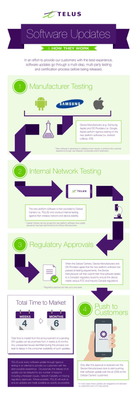
When a device is chosen to receive a software update, we make sure it's set up to deliver the best possible customer experience. To achieve this, the update goes through several steps involving multiple parties before it's released. Typically, a second version of the software is created based on feedback from TELUS and the device manufacturer. This new version is tested again to fix any issues found earlier. For a look at some of the upcoming device software releases, please see the Software Update article. Here’s a look at the life cycle of a software update: *Originally a blog by our Product Manager, MarcTELUS, we've republished the software lifecycle as an article as it still holds true today.56KViews1like0CommentsUpgrading or Changing Your Smartphone
If you've recently upgraded or changed your smartphone, there are a number of things to be sure to do. We've got some resources below to help you with your new device. Ordering Online Most flagship devices are available for preorder the week before the official launch date. This is a great way to ensure you're getting the hottest new device from the convenience of your home. We all know though that the wait for that phone to arrive can be excruciating. To help, we recommend using our handy Online Order Tracking Tool to keep tabs on your order. We've even got info on how to use it over here! Swapping Your SIM If your previous phone used the same sized SIM as your new one, it's usually as easy as removing it and inserting the SIM into the new one. If you want to swap the SIM online, we've got a handy guide for that as well. If however, your new phone requires a different sized SIM or if you're a new TELUS client, you'll need to purchase one. We always suggest ordering one at the same time as your phone but if you forgot, you can easily order one online or pick one up at the nearest TELUS store. Transferring Content Check out our extensive guide for transferring data from your old phone to your new one. Protecting Your Device Now that your new phone is ready, let's talk about protecting it. An important first step in doing that is to consider a new phone case to protect your new smartphone. Not just an accessory, they can provide peace of mind with shock-absorbing features, waterproofing, and extra grip. Always a smart move. Purchasing an extended warranty is also a good choice, as manufacturer warranties only cover hardware failure. Device Care Complete and AppleCare+ extend the manufacturer's warranty up to 2 years and add protection against accidental damage. FR version13KViews0likes0CommentsProtecting Your Smartphone
Protecting Your Smartphone It's an exciting time when a new phone arrives. We want you to make sure you're doing everything possible to keep that new device running smoothly and safely. Let's look at some handy tips for keeping your new smartphone safe. Protection An important first step to consider is buying a phone case to protect your brand new smartphone. Not just an accessory, they can provide peace of mind with shock-absorbing features, waterproofing, and extra grip. Always a smart move. Purchasing an extended warranty is also a good choice, as manufacturer warranties only cover hardware failure. Device Care Complete and AppleCare+ extend the manufacturer's warranty up to 2 years and add protection against accidental damage. Water Damage The key to preventing water damage to your smartphone is to plan and always be prepared. Not keeping your phone in your back pocket will prevent it from falling in the toilet or being sat on. Storing your phone in a sealed waterproof bag or case before you head to the pool or beach will also help. If your phone does get submerged, be sure to remove the battery if you can, and place it in a bowl or bag of rice overnight to absorb as much of the moisture as possible. If that doesn't do the trick, review your warranty guidelines or take it to the nearest TELUS store for repair options. Cracked Screen Some manufacturer warranties cover cracked screens in the first 30 days. If you're past that timeframe however, and you don't have an extended warranty, you can always visit the nearest TELUS store or try Mobile Klinik to look into your options for repair/replacement. Lost or Stolen Device Some common ways to lose your smartphone include leaving it on the rooftop of your car before getting in, or leaving it in a restaurant or store, etc. Always be aware of your surroundings and keep your phone stored safely when not in use. Ensure you have a lock code to protect it if anything should occur. Always remember, you can reach out to our Support team anytime at our Facebook page or by sending a private message to our TELUS_Support handle here if you need assistance. FR version2KViews0likes0Comments