Disable Auto-Play
1 Topic
Data Optimization Tips for Android Devices
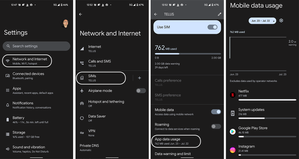
Where to Start Whether you're on an unlimited data plan and just burnt through all your high-speed data, or have a limited bucket of data and need to micro-manage your usage, these tips will help you get started. What's using my data? First, we'll want to get an overview of what is using up all that data via the following steps: Swipe down from the top of your home screen and go to Settings Select Network & Internet Tap on SIMs Select App Data Usage You should now see an overview of all the apps using mobile data on your device and adjust your usage patterns accordingly. For example, if a video streaming application is using most of your data, then restrict your streaming to only when you're connected to Wi-Fi or pre-download the shows/movies you want to watch on the go. Activate Data Saver Mode Many apps continue to use data even when you've moved on to another app. This is referred to as background data usage and can easily add up as you pile on the apps running in the background. Data Saver mode stops all that when your device is not on Wi-Fi. Here's how to activate it: Swipe down from the top of your home screen and go to Settings Select Network & Internet Tap on Data Saver Flip the switch on Turn Off Mobile Data If you can't afford to have a single extra megabyte more using up data then this will put an immediate halt on all Mobile Data usage until you say so. Swipe down from the top of your home screen and go to Settings Select Network & Internet Tap on SIMs Mobile Data - Flip the switch to the off position! A multipronged approach In addition to the above here are a few other things to consider: Disable Auto-Play for videos on your Social Media platforms (Facebook, Instagram, etc.) Pre-download your music, tv shows, or videos when on Wi-Fi Be very vigilant with your usage when using your phone as a Hot Spot! Try to close apps when you're done with them When it comes to apps & system upgrades, only update over Wi-Fi Turn off Wi-Fi Assist! Check out this article on how to go about doing that & learn more about the feature. Version FR3.5KViews0likes0Comments