User Profile

cgeisel
Friendly Neighbour
Joined 3 years ago

User Widgets
Contributions
Re: Directly connect ethernet to Nokia 7368 isam g-240g-a ONT
I set everything up as you suggested and the PC transfer rates were still slower than expected. After a bit of research, I noticed that there was a driver update for my network card. After that, the speeds are in the 900 Mbps range! Thank you for all your help. I would have been lost without your knowledge and advice. Chris12KViews1like0CommentsRe: Directly connect ethernet to Nokia 7368 isam g-240g-a ONT
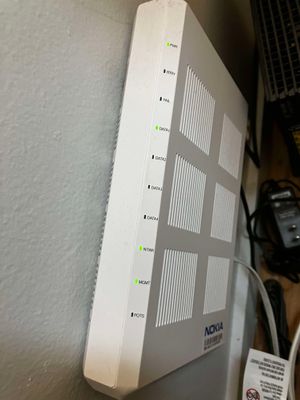
UPDATE: the data port mystery is solved. The LEDs on the top of the ONT are in reverse order from the ports on the bottom, which is mind-bogglingly bad design (see attached photo). You can disregard my first question entirely. If you're still willing, I would like to know what you think about my other question. After doing a bit more research, it looks like my plan should deliver 940 Mbps, which converts to roughly 9.4 MB/s, so I guess I'm getting close to max speeds from the PC plugged into the M5's ethernet port. I have a Telus modem as well, but I'm not currently using it (see attached photo). Do you think there is any benefit to plugging this into one of the DATA ports and giving the PC it's own connection?11KViews0likes1CommentRe: Directly connect ethernet to Nokia 7368 isam g-240g-a ONT
Thanks for the explanation about the ONT. I do not really understand networking, so I don't understand the difference between a switch and a router, or which one the Deco M5 is functioning as, but at least now I understand the function of the ONT! I did have something wrong in my original post--I thought the M5 was plugged into the NTWK port, but it is actually plugged into the DATA4 port, which strangely does not show a green LED, the LED is not lit up at all. (see attached photo). One question I had, if you are willing to take the time to explain, is why my Deco M5 is plugged into the DATA4 port on my ONT, which seems to work fine despite not showing a green LED. If I plug it into the DATA1 port, which has a green LED, it does not seem to work. My PC reports no connectivity when plugged into the Deco M5 (and my wifi network does the same). I ran the network adapter troubleshooter (Windows 10) and it reported these two errors: 1. Ethernet does not have a valid IP configuration 2. The default gateway is not available. The reason I'm investigating this is that I have a PureFibre Gigabit Internet plan, but when I download large files (e.g. Steam installations), my maximum download speed is 8 MB/s when the Deco M5 is plugged into DATA4 and the PC is plugged into the ethernet port on the M5. That also seems to take all the bandwidth away from the rest of the Deco M5 wifi network, effectively throttling all other devices in my house. I was hoping that by giving the PC a dedicated port, it would be able to download without impacting the M5 network. After doing a bit more research, it looks like my plan should deliver 940 Mbps, which converts to roughly 9.4 MB/s, so I guess I'm getting close to max speeds from the PC plugged into the M5's ethernet port. I have a Telus modem as well, but I'm not currently using it (see attached photo). Do you think there is any benefit to plugging this into one of the DATA ports and giving the PC it's own connection? Thanks in advance, Chris11KViews0likes0CommentsDirectly connect ethernet to Nokia 7368 isam g-240g-a ONT
Hi everyone, Based on the SN, I have a Nokia 7368 isam g-240g-a ONT, just like the one pictured in this post: https://forum.telus.com/t5/Internet-Home-Phone/ONT-vs-Modem/m-p/92226 I currently have a Deco M5 hub plugged into the NTWK port, wifi from the M5 works correctly. I also have a PC plugged into the M5's ethernet port. I would like to plug the PC directly into the ONT, but haven't been able to figure out if any of the 4 Data ports (or other ports) actually provide compatible connectivity. One of the 4 Data ports (DATA 1) has a green LED, but when I plug the ethernet cable into it, the PC reports no connectivity. I need some help understanding the capabilities of this ONT. I have a modem from Telus but the tech did not connect it for me because I had the Deco M5 units. Thanks, ChrisSolved12KViews0likes5Comments