User Profile

Ming
Organizer
Joined 4 years ago

User Widgets
Contributions
Weird game connection and timeout issue
Hello Everyone, I'm facing a rather unusual game connection challenge, and I'm hoping some of you might have insights or suggestions. For several years, I've enjoyed playing Honkai Impact 3rd (Chinese version mod edit - URL removed). Everything was smooth until about 2.5 weeks ago when I suddenly couldn't connect to the game's server. I initially chalked it up to a temporary server or network hiccup. Despite multiple troubleshooting attempts - from testing on both my PC and mobile phone, using ethernet, Wi-Fi, resetting switches and modems, connecting my PC directly to the modem, implementing a VPN, turning on IPv6 for the modem, and even acquiring a new public IP from Telus - my connection woes on the Telus internet persisted. On the flip side, leveraging a FIDO phone hotspot, both my PC and mobile phone were able to access the game without any hitches. Additionally, the North American variant of Honkai Impact 3rd (mod edit - URL removed) had zero issues on either network. While delving deeper into this "network issue," I noticed I could download updates, but couldn't reach the login page - hinting at potential authentication server complications. As a workaround, I tried logging in using the FIDO network first, and then transitioning to Telus. Regrettably, this approach led to a timeout. Considering that all my other online activities run seamlessly and that the game operates perfectly on alternative internet sources, I'm led to believe that there might be an inexplicable compatibility issue between the Chinese version of Honkai Impact 3rd and Telus internet. This situation is rather baffling. Any ideas or experiences you can share?2.3KViews0likes2CommentsTry to replace Nokia g-010s-a
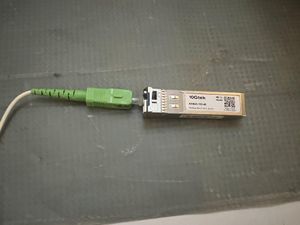
Hi Community, I tried to replace the Nokia G-010s-a with a 10G support SFP+ module. I found most 10G SFP+ modules come with 2 ports and only some SFP+ modules have 1 port. So I try some of them. The port size does not match. Is there a difference between that PureFirbre cable? like CAT5e VS CAT6. If so, what type of PureFibre cable is Telus using? What is the model of the connector (the green color part)? Thanks,Solved5.6KViews0likes3CommentsNH20A Bridge Mode and admin page not find
Hi DrPacman, Telus technician gave me the NH20A today and installed it successfully. Now the path is: PurFibre ==> Nokia SFP+ ==> NH20A (10G bridge mode) ==> RJ45 10G port ==> CAT8 ==> UDM-SE (RJ45 WAN port 2.5G supported) ==> Switch ==> My PC. My PC gets full speed and works well. Thank you for your previous suggestions. I have some more questions here and hope you can help me out again: The NH20A has four bridge modes and the Technician could not answer the difference between bridge modes. I cannot remember their name, but I pick the 10G Bridge mode in this case. Am I correct? 10G Bridge Mode. Full Bridge Mode. XXXX Bridge Mode (cannot remember). XXXX Bridge mode (cannot remember). After I set the NH20A to 10G Bridge mode, I cannot access this NH20A device anymore. I tried 192.168.1.254 and 192.168.1.1 with different ports. The technician told me to reset the NH20A to access the admin page again. So the device admin page won't allow anyone to access its admin page after it is set to Bridge mode. Am I correct? Since the RJ45 works fine, should I get the MikroTik S+RJ10? Will this SFP+ work better compared with RJ45? NH20A 10G port ==> CAT8 ==> MikroTik S+RJ10 ==> UDM-SE SFP+ 10G port Should I try the 10G SFP+ (Amazon Link) to replace the NH20A and the Nokia SFP+? The Telus technician said he don't know and I can try.Solved7.2KViews0likes2CommentsUMD-SE try to get 1.5 GbE download speed
Hi DrPacman, I am trying to get the 1.5 GbE download speed from Telus. Currently, I am stuck in 940/940 Mbps. I am using UDM-SE and it only supports 1G/10G SFP+ or 2.5G RJ45. I am looking at the Telus Modem that you mentioned in many posts. nh20a & ONT XS-250WX-A Which one is better in my case? Telus => Nokia ONT G-010S-A => ?? Modem => CAT6 cable => MikroTik S+RJ10 => UDM-SE => Enterprise switch => my PC. The second question is about the Nokia ONT G-010S-A transceiver. It supports 1/2.5 GbE and I think this is how Telus provide 2.5 GbE support to its customer. Would that possible to replace the transceiver on my end with SFP-10G-BX20D-I Fiber Single Strand(Amazon Link)? Then I ask Telus to change the 10G signal on the Telus side. In this case, I would get the speed without any bridge Modem. Correct me if I am wrong. Really appreciate.Solved2.3KViews0likes1CommentRe: PureFibre 1.5 GB but speed remains 1GB
DrPacman Thank you for your solution. It is really helpful. I also did some homework on Unifi forums and learns a lot from your first post. Start with the Unifi OS version, all of my Unifi devices are up to date and my UDM SE is 3.0.13. Those devices are rebooted. UDM SE treats the WAN port (Port 11 SFP+ port) as 1 GbE port. So, the current version of Unifi OS won't fix the problem. I hope Unifi can fix this problem by releasing a new OS version. I want to upgrade to 2.5 GbE from Telus in the future. Since the UDM SE only accepts 1 GbE / 10GbE at port 11(SFP+) or 1GbE/2.5 GbE at Port 10 (RJ45), I think the best solution, for now, is to ask Telus to get the NH20A. The idea connection is: Pure Fibre ==> SFP+ ==> NH20A(Bridge mode) ==> 10GbE RJ45 port ==> Cat8 ==> 10 GbE RJ45 transceives (Amazon) ==> UDM SE(port11) ==> Enterprise 24 ports (2.5GB) ==> my PC In this case, I should get 1.5 GbE download speed. Correct me if I am wrong. PS: here is my Unifi post: PureFibre 1.5 GB but speed remains 1GB | Ubiquiti Community Some people also have the same issue/question.8.7KViews0likes1CommentPureFibre 1.5 GB but speed remains 1GB
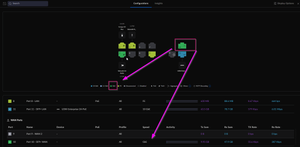
Hi Community, I upgraded my home network to 1.5GB and all my hardware to get the 1.5 GB download speed, but no success. I reviewed some posts on the internet (Reddit, Telus, Unifi), but haven't found the solution. Ideally, the internet should work the following way. Telus => Pure Fibre => SFP+ => TELUS Wi-Fi Hub => Cat 8 => 2.5G PC ethernet port (my PC). There is a problem with this setup. The TELUS Wi-Fi Hub only supports 1GB ethernet output. 1.5G only for multiple devices try to download content. So I have the new setup below: Telus => Pure Fibre => SFP+ => DreamMachine SE => SFP(10GB) => Enterprise 24 ports (2.5GB) => Cat 8 => 2.5G PC ethernet port. I tested my PCs and data can be transmitted at 2.5GbE internally. I think the problem is from Telus's side. The reason is DreamMachine SE shows the SPF+ is 1GbE connection only. Please see the below screenshot. Solutions would be to ask Telus to upgrade the cable or their side connection to 2.5 GbE or 10GbE to get 1.5 GB of download speed. Am I correct?Solved8.9KViews0likes4CommentsTelus Fiber with Ubiquiti Dream Machine
Hi everyone, I have the Telus fiber coming into the Arcadyan Router and I am planning to get the Ubiquiti Dream Machine Pro(UDM). The UDM has 1 SFP+WAN port(10GbE), 1 SFP+ LAN Ports, and 1 RJ45 WAN Port. Click here for the UDM specifications. I am looking for 1.5 or 2.5 GIGA speed Telus network, how to get the full speed networking? Fiber -> Arcadyan Router -> UDM which port? Which ports should be used in the case above? Can I get away the Arcadyan Router with a special device to achieve the full speed? Fiber-> Unknow Fiber to SFP+ devices? -> UDM SFP WAN port -> full speed devices.Solved8.8KViews1like1Comment