User Profile

Achristine1427
Friendly Neighbour
Joined 5 years ago

User Widgets
Contributions
Re: Cloud Network Technology (Samoa) Limited device on my wifi?
We have a doorbell camera and 2 other security cameras that we had installed by Telus 3 months ago. I have one Smart TV that is not even connected right now as it is packed up to move and there are 4 smart devices including 1 ps4 that is on our wifi and my sons ihome mini. But like i said i have checked all of these devices and all cameras, router, our wifi boosters mac addresses and nothing matches that one that keeps connecting when my ex comes by the house... Maybe im overly paranoid lol98KViews0likes0CommentsCloud Network Technology (Samoa) Limited device on my wifi?
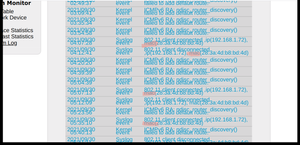
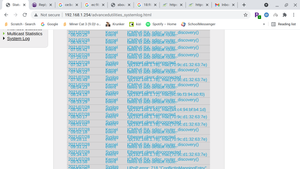
Cloud Network Technology (Samoa) Limited Can someone please help me out to identify what this device is and why it continues to connect and disconnect from my home WiFi throughout the day and night. I know that when my ex has shown up it has connected minutes after his iPhone connects to our WiFi. He did used to live here and does know the WiFi passwords and has had access to our Ethernet and router... and also has a history of hacking and using "backdoor" to hack into my accounts and get information. He has know said somethings that are very concerning regarding my bank account activity and also deposits i have received in my account etc.. I will attach my system log to show the activity and how often it has logged on and off and even doing so when he is not around but is at work and i am the only one at the house and know all of the devices that are connected to our WiFi. I may be completely paranoid but given that he has now shared information about my finances, I do feel uneasy doing anything online anymore.. I colored in pink where the device has connected and disconnected, just a few of the times and there are a lot more throughout just today.. 28:3a:4d:b8:bd:4d is the mac of what comes up under Cloud Network Tech (Samoa) ? I am just looking for clarity as I have searched the mac and also have written down all devices that connect to our WiFi. Including our security cameras, WiFi booster from Telus, PS4 and so on.. and this does not link up to anything we have in our home... Please help.. Thank youSolved98KViews0likes5CommentsRe: System log with weird Mac addresses
The mac address that you said would have been a PC or something that is Intel Corp ... We actually do not have any laptops in our home.. only 2 ps4's and i already checked the macs of both of them and no match... He was the only one with a laptop but has taken it to his parents but he is still over here daily after work for a few hours.. and when shows up... usually 3 devices connect and when i asked him if he has anything on the wifi other than his cell he said no... but he has a past of doing weird stuff like this.. as I was told from Telus a couple years ago that there was a wireless network adapter or something connecting to the network but it had its own server or something ( lol im not techy at all sorry if it doesnt make sense) but he said that devices that were connected to my wifi were disconnecting and connecting to the wireless network adaptor. He also said it had to be in the house somewhere but would have to be within a 1 block radius from the house to connect.. or he said it must be hidden. Does this make any sense lol?8KViews0likes1CommentRe: System log with weird Mac addresses
So I took your advice and I blocked the mac addresses that i couldnt match with any devices in my house. But since then, around midnight last night a new mac connected to the wifi and I did try to search it but couldn't figure it out... maybe you could help me find out what kind of device it would belong to? And there was nothing that would have connected at that time that would have been one of my devices or my kids.. as we were all in bed asleep. Just creeping me out.. And we do have a wifi booster that my ex set-up before he moved out a month ago which is connected via ethernet.. Just creepy 92:5d:18:c7:25:5e8KViews0likes0CommentsRe: System log with weird Mac addresses
This is my sytem log.. hopefully you can read the mac addresses that are connecting and disconnecting. This is just from tonight when I left my house with our kids and my ex was left home.. Just odd because some of the devices only connect when he is here but others connect and disconnect throughout the day while he is at work..8.1KViews0likes6CommentsSystem log with weird Mac addresses
Can someone help me identify what tyor of devices these mac addresses that keep connecting and disconnecting from my router throughout the day. When I search tbrm they come up with things I'm not understanding. Help please. As I believe my recent ex has been monitoring our network traffic. TIA f2:be:da:44:63:58 192.168.1.71 mac12:3a:42:73:1d:cd. Then one min later disconnected then reconnected with a different IP same Mac 192.168.1.65. mac 12:3a:42:73:1d:cd 8c:49:62:e5:ca:aa - another one Thank you.Solved8.3KViews0likes8Comments