User Profile

cpantelis
 TELUS Team Member
User Widgets
Contributions
Re: Can't access Google Maps any more!
Hey everyone! I posted a thread on how to solve the "Please contact your Organization Administrator" issue yesterday. Hopefully it could help anyone still experiencing issues. https://forum.telus.com/t5/Internet-Home-Phone/Gmail-Migration-quot-Please-contact-your-Organization/td-p/11841463KViews1like1CommentGoogle Maps - How to solve Organization Administrator issue
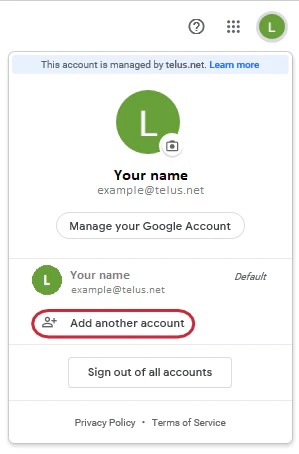
Hey everyone! We’ve noticed a few threads pop up from customers having trouble getting access to their Personal Google account data (Google Drive, Docs, Sheets, Photos, YouTube, etc.). This issue is typically caused by an error known as “conflicting accounts” (otherwise known as the “Please contact your Organization Administrator” issue. It happens when the TELUS email was used as the login to the personal Google account. Each account must have its own unique login or else the system wouldn’t know which account you’re trying to access. Not to worry though, this can easily be resolved by following the steps below on how to rename your personal Google account. Step 1: Add another account From your TELUS email inbox, on the top right corner, click on the button that has your initial Select Add another account Step 2. Sign in to your account On the sign-in page, you will have to enter an email address with the domain @gtempaccount.com. Follow these steps: Take note of your TELUS email address: [email protected] Replace the @ sign with the % sign. You now have: example%telus.net Enter that information in the username field and add @gtempaccount.com at the end to complete it, as shown in the image Select Next Step 3: Enter your Google account password Enter your Google account password and select Next Note: This is not the password you recently created for your TELUS email powered by Google. This is the password you used in the past to access your Google services. Forgot password? If you don’t remember when or why you created a Google account, chances are you don’t remember your password. Select Forgot password? and follow the various prompts from Google to recover the account. Step 4: Change your password You will then be asked to enter and re-enter a new password. Step 5: Sign out of your account On the Google account homepage, click on your initial at the top right and sign out of your account Step 6: Sign in again Sign in again with the same credentials you just created Step 7: Choose an email address to access your account This is where you choose an email address to use going forward to access your Google services. Select An account with Gmail and New Gmail address and click Continue. Note: If you already have another Gmail account, unfortunately, you will not be able to use it to complete this step. You will have to create a new account If you do not wish to create an email address with Google (ending in gmail.com), you can choose the option “An account that uses a non-Google email address you already own.” This includes any other email address you have that isn’t a Gmail address or a telus.net address. This email address will then become your username when signing in to Google service not connected to your TELUS email Step 8: Choose your Gmail address Enter your name Choose your Gmail address Enter mobile phone and your current email address Select Submit Note: The information you enter in the field “Your current email address” will be used as a way to retrieve this account in the future. You may use your TELUS email address in this field. Step 9: Access Google services Access your Google services Once you complete the previous step, you will land on the Gmail page Select the 9-dot icon on the top right corner to see the list of Google services you have access to with your new account Note: If you’re unsure as to which Google services you had created this account for, go to myaccount.google.com/dashboard How to toggle between both accounts Google makes it easy to toggle between accounts. Simply click on your initials on the top right-hand corner. You will then be able to select the account you want to use. Note: If you sign in with [email protected] you will now have access to your TELUS email, calendar, and contacts If you sign in with [email protected] you will have access to any other Google services you were previously using with your TELUS email address. You no longer need to use the temporary email address (example%[email protected]) For more tip & tricks related to the migration to Google visit our TELUS email setup & help with migration support page75KViews4likes21CommentsRe: telus gmail migration: can't access my google groups:contact Organization Administrator for access
Hey there! I created a 9-step guide on how to resolve the "Please contact your Organization Administrator" issue. Hopefully it could be of use to those who are experiencing the error. https://forum.telus.com/t5/Internet-Home-Phone/Gmail-Migration-How-to-solve-Please-contact-your-Organization/td-p/11841421KViews1like1Comment