User Profile

Ben3
Friendly Neighbour
Joined 6 years ago

User Widgets
Contributions
Re: TELUS Wi-Fi Hub - Port forwarding
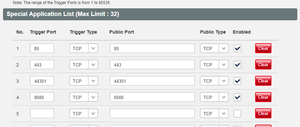
Sorry. It posted before I finished. Network > Firewall > Port Forwarding - I have tried several different combinations. - I tried: - Public (44301) -> Private (443) This works fine with IIS (verified with a local hosts file) - Public (44301) -> Private (44301) This works fine with IIS (verified with a local hosts file) - Public (443) -> Private (443) (I know this should not work because it is blocked) All and all, it all seems to set up correctly, it is just the port forwarding that does not seem to be working.10KViews0likes3CommentsTELUS Wi-Fi Hub - Port forwarding
In short, I have a local web server that I use for testing. It is not used publically. I am trying to run this on port 44301 (SSL) so basically, I want https://www.MYDOMAIN.com:44301 to go to my local web server (IIS on Windows 10). The SSL cert is valid by the way. IIS will accept https://www.MYDOMAIN.com:44301 and run correctly. I can verify this by setting up a local hosts file. I am using Telus pure fiber. I understand them blocking port 80 and 443. The DNS is correct. The port is open with a port scanner. I have turned off all firewalls for testing (Wi-Fi hub and PC). PC is hardwired to the router. Seting on the Wi-Fi Hub (192.168.1.254) Network > Firewall : Off Network > Firewall > DMZ (enabled with the correct client IP Network > Firewall > Special Applications : - Network > Firewall > Port Forwarding - I have tried several different combinations. - I tried: Public (44301) -> Private (443)Solved11KViews0likes4CommentsRe: New Fibre Install Cabling Requirements
Hey, just had install of fiber. There was 2 visits. First one was to run the fiber to the house. They don't need to come in for that. You may already have that done! 2nd visit (to do the actual install). The guy drilled through from the outside of the house. He gave me a fiber line (through the window!) I pushed it through from the inside to the outside. I then screwed down the wall plate (they provided attached to the fiber he gave me). It was all pretty easy to do. The rest of the install (setting up the modem, TV, etc) was done by me, but the guy was outside doing stuff too. Seeing as I could just open the window and talk to him, it was really easy. On the phone would be a bit tougher, but possible. Hope that helps.2.5KViews1like0Comments