User Profile

Glenstr
Friendly Neighbour
Joined 9 years ago

User Widgets
Contributions
Re: Connecting my own router - which unit do I connect to?
Thanks for the reply Since the OP I did some more research and I did see mention of putting a switch between the ONT and modem/router & running 2 networks with 2 different public IP's, but it didn't mention if that was a Nokia unit or not. If my router won't work properly inline with the NH20A then I will look at getting an pfSense appliance to use instead, assuming it will work with the Nokia unit. If not then I guess my only option would be to ask for different hardware from Telus.8.5KViews0likes1CommentConnecting my own router - which unit do I connect to?
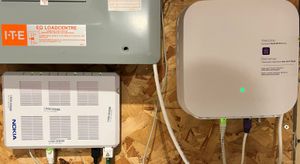
When my purefibre was installed a few days ago I asked the installation tech which unit should connect to if I decide to use my own router, which I have decided to do so I can create my VLANS ect for new IoT connected devices, keep using my existing customizations in my dd-wrt router etc. He said to connect it to my NH20A unit and not the Nokia unit the fibre is plugged into, but I am not sure if he understood my intent clearly. Right now I have the Cisco (linksys) just operating as a switch and ethernet goes from the NH20 to my nearest switch, but I'd like to swap that switch with my router and have the router first in line. Can I run ethernet from the Nokia unit direct to my router & bypass the NH20A unit? Or if I keep it connected, would this be just like using two routers on my home LAN, which would give me the ability to have two physically different LANS? Thanks in advanceSolved8.8KViews0likes3CommentsPurefibre users, general questions from new user & what are your real speeds?
First time purefibre user here - Just recently got purefibre connected after getting by with wireless for years, signing up with the 300 package. I also got the boost wifi-6 router with the installation For now I just ran a cat6 cable from the modem to my nearest switch, bypassing my usual dd-wrt linksys router (converting it to a switch) My main desktop, all my TV's, blu-rays, media players etc. are all ethernet connected, with just phones, ipads an a couple of laptops using wifi. I had my wireless ISP connecting to my router, and from my router connections went out to 2 NAS drives, and one switch, from that switch connections went out to 4 more switches & an Apple airport time capsule, one of these switches is what I connected the fibre to for now. Because I have existing connections (google hub) that use it, I may put my linksys router where that switch was & convert it back to router/AP, and I need to move the boost wifi6 to a better location as it's in the basement corner still & plugged directly into the modem. The install tech recommended that I don't use my existing router as I'll get much better performance from the boost unit. He also said I could plug the boost unit into any switch in my house, but if it is a router/AP then should it not be the first thing in the LAN that the modem connects to? If not, can I just not use it like I do my Apple airport & have it connected to a switch? Also, running speed tests from my go-to speedtest site https://testmy.net/ I am getting a HUGE discrepancy in speeds from a site like Telus or speedtest.net. Both of these show my speeds in excess of 300Mbps for both up and down, but on testmy.net I am getting just over 100 down but less than 10Mbps up, sometimes in the Kbps range, with a hard wired connection. I don't totally trust the results from sites like speedtest.net because they use multithreaded connections, toss out the bottom 30% and top 10% - which doesn't really show real life speeds. I also tried speedof.me which shows just over 100Mbps each way. My wireless ISP usually gave me between 20 & 30 Mbps down & 10-15Mbps up, and the difference between a site like speedtest.net & testmy.net would be within a few Mbps of each other, with the ratio staying about the same. Curious how other purefibre users speeds are when comparing an HTML5-PHP test like testmy.net to a site like Telus or speedtest.net2.2KViews0likes0Comments