User Profile

BJM2014
Helpful Neighbour
Joined 12 years ago

User Widgets
Contributions
Re: MAC will not connect to Canon Pixma Printer
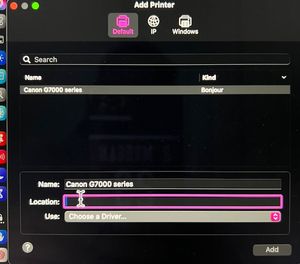
Thanks and yes I am aware it is AirPrint compatible. However, after reading numerous forums and watching YT videos, that could be part of the problem, as many are saying that is the wrong driver for a Mac. I dont care now about printing from an iPad or iPhone and in fact deleted the Canon app from my phone to try eliminate possible problems. I was able to set it up once this way, using the driver that I think said Canon G7000 series and it worked fine that night but then was gone again the next morning. When you say setup the printer on the network first, I assume you mean adding it manually by adding the wifi password. I have done this numerous times, as the Canon Wifi setup never works. when I enter it manually it accepts it but the next day after the printer goes to sleep, I think the password is not saved but I am not sure. When I go to System settings>Scanners>Add printer is it never there to add? This has been an ongoing issue. Not sure why this is tough. I follow all Canon install installation instructions and processes, with the latest drivers etc but still never installs. As well, at the very end it asks for drive info and I see other brands like Epson etc but never Canon, not sure why.2.5KViews0likes0CommentsMAC will not connect to Canon Pixma Printer
Hi, running a MAC with Sequoia 15.3.2 and a Canon Pixma Pinter Model G7020, recently purchased. Also have the Telus Router white cone shaped large one, which is also fairly new. I have fibre optic network and super high speeds upstairs and down. The Router and the Printer are no further than 2 feet from each other, so really close. I could not connect via Wifi so even tried a LAN wired cable form the router to the printer and still nothing. I am a long time Windows user but new to MAC. Some suggested to assign the printer a static IP address on the network, but I have no idea how to do that. (also reading MAC's are famous for not playing well with printers...) I tried everything using the latest software and tools from Canon. Interesting I can use the Canon app on my iPhone which works perfect everytime. Anyway, any straight forward help would really be appreciated. Thanks in advance!2.7KViews0likes10Comments