User Profile

InternetUser_01
Friendly Neighbour
Joined 9 months ago

User Widgets
Contributions
Re: Intermittent connection
This is the reply I received from a senior networking employee at Telus: "Our current configuration limits CGN to up to 512 simultaneous ports for translation through our NAT infrastructure. It seems you are among a very small number of customers that are likely hitting that threshold. I would like to get you support to move your service to Public IP. You can call in to support and ask to be moved from CGNAT to Public IP." Normally, this limit would not affect most customers, but I had an Android phone and an iPad that were each making 150 outgoing TCP connections, leaving the rest of the household with a very diminished connection pool. I was unable to determine what application on these devices was consuming so many TCP connections. My interim solution was to use an open-source router that was capable of redirecting all network traffic through a VPN service. This resulted in speed limitations and increased ping times, but did restore web browsing ability. My final solution was to fight the uphill battle with Telus and have their support team change my account from CG-NAT to a Public IP. I would warn others that trying to have these changes made by Telus support is excruciating, and may take many, many calls to get it accomplished.988Views0likes0CommentsRe: Intermittent Connectivity, Server Misconfigured
Factors that contributed to this issue: 1) Telus selecting a low (512) TCP connection limit, below industry norms. 2) Telus having no way to inform subscribers that they are experiencing connection issues due to hitting this limit 3) The intermittent nature of the issue, related to the number of TCP connection and not the number of users or data throughput. 4) The difficulty of replicating the issue to aid in troubleshooting. 5) The 100% complete lack of knowledge by Telus support related to CG-NAT and Public IP's 6) Certain user devices consuming large amounts of TCP connections. 7) The TCP connection limit only applying to TCP IPv4 connections, while leaving UDP and IPv6 connections unaffected.1.6KViews0likes0CommentsRe: Intermittent Connectivity, Server Misconfigured
This is the reply I received from a senior networking employee at Telus: "Our current configuration limits CGN to up to 512 simultaneous ports for translation through our NAT infrastructure. It seems you are among a very small number of customers that are likely hitting that threshold. I would like to get you support to move your service to Public IP. You can call in to support and ask to be moved from CGNAT to Public IP." Normally, this limit would not affect most customers, but I had an Android phone and an iPad that were each making 150 outgoing TCP connections, leaving the rest of the household with a very diminished connection pool. I was unable to determine what application on these devices was consuming so many TCP connections. My interim solution was to use an open-source router that was capable of redirecting all network traffic through a VPN service. This resulted in speed limitations and increased ping times, but did restore web browsing ability. My final solution was to fight the uphill battle with Telus and have their support team change my account from CG-NAT to a Public IP. I would warn others that trying to have these changes made by Telus support is excruciating, and may take many, many calls to get it accomplished.1.6KViews0likes0CommentsRe: Intermittent Connectivity, Server Misconfigured
This person is having the same issues: https://forum.telus.com/t5/Internet-Home-Phone/Intermittent-connection/td-p/153369 I have narrowed it down to a Telus CGNAT router somewhere in their infrastructure that is likely exhausting it's available pool of port/ip pairs during times of heavy load and then denying new TCP connections. Only TCP-SYN packets are being rejected, and only during peak times (7-11pm), but that is enough to make the internet completely useless during those times. Someone higher up in Telus's networking team needs to be looking into this.1.9KViews0likes1CommentRe: Intermittent connection
I am experiencing the exact same issue. I have narrowed it down to a Telus CGNAT router somewhere in their infrastructure that is likely exhausting it's available pool of port/ip pairs during times of heavy load and then denying new TCP connections. I have been unable to find anyone at Telus who is capable of understanding this problem. Did you end up with a solution aside from switching to a better ISP? Here is my post and packet captures showing the denied connections. https://forum.telus.com/t5/Internet-Home-Phone/Intermittent-Connectivity-Server-Misconfigured/m-p/1687151.2KViews0likes0CommentsRe: internet fail suddenly and sporadically
I am experiancing the exact same issue (Communication Administratively Filtered) during peak evening times. https://forum.telus.com/t5/Internet-Home-Phone/Intermittent-Connectivity-Server-Misconfigured/td-p/168483 Could you kindly share publicly what the solution to the problem was?1.4KViews0likes0CommentsRe: internet fail suddenly and sporadically
I am experiancing the exact same issue (Communication Administratively Filtered) during peak evening times. https://forum.telus.com/t5/Internet-Home-Phone/Intermittent-Connectivity-Server-Misconfigured/td-p/168483 Could you kindly share publicly what the solution to your problem was?1.4KViews0likes1CommentIntermittent Connectivity, Server Misconfigured
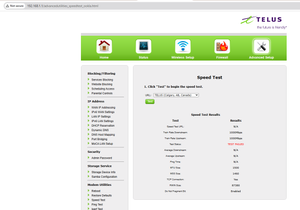
TELUS_Support I’ve been experiencing intermittent HTTP/HTTPS connectivity issues for about a month, primarily in the late evenings. Approximately 80-100% of TCP connections (ports 80 and 443) fail during these periods, rendering the internet nearly unusable. Wireshark captures show a Telus-owned IP (209.121.229.0 or 209.121.229.128) responding with ICMP "Destination Unreachable (Communication Administratively Filtered)" errors. Additionally, the T3200 router’s built-in speed test (using Telus servers) fails during these times, ruling out customer-owned equipment as the cause. Interestingly, using a WireGuard VPN restores full connectivity when the VPN successfully connects, suggesting a misconfiguration in Telus’s network, possibly on a load-balanced server that rejects connections during high-traffic periods. Another Telus user reported similar issues recently: forum.telus.com/t5/Internet-Home-Phone/internet-fail-suddenly-and-sporadically/td-p/167582. Troubleshooting Steps Completed: Single PC connected via Ethernet to T3200 router. Tested with different Ethernet cables. Power cycled ONT and router. Factory reset T3200 router. Tested with a different router. Tested multiple devices (PCs, phones) via Wi-Fi and Ethernet—issue persists across all. Confirmed MTU is 1472 (normal for PPPoE). Ping, nslookup, and traceroute work fine, but TCP connections fail. Attached is a Wireshark capture showing TCP and ICMP traffic during a failure, highlighting the ICMP errors from 209.121.229.x. and a screenshot of the T3200 router's internal speedtest failing. Please investigate potential firewall, proxy, or routing misconfigurations on Telus’s network, particularly for the IP 209.121.229.0/209.121.229.128. I’m happy to provide further details or assist with diagnostics. Thank you!2.2KViews1like9Comments