installation
3 TopicsReturn Your TELUS Equipment in 3 Easy Steps
Have you recently moved, cancelled, or upgraded your services? You may have unused TELUS residential equipment sitting at home. If so, here's what you can do: PACKAGE THE EQUIPMENT - Find any appropriately sized box. - Include the first page of your most recent bill if you have it. If not, just grab a piece of paper and clearly write the following info on it: First and last name of the account holder. TELUS account number and full service address. Phone number associated with the service(s) (if applicable). - Seal the box securely. TAKE THE PACKAGE TO ANY CANADA POST OUTLET - Visit any Canada Post outlet and let the clerk know you're returning residential equipment to TELUS. - Quote the Return ID number PR142924. - Canada Post will provide you with a prepaid waybill, with the TELUS address already printed on it (no charge). (PLEASE NOTE: For any TELUS Mobility and wireless equipment returns, including the TELUS Smart Hub, please call our team directly at 1-866-558-2273 to arrange a return.) KEEP TRACK OF THE WAYBILL NUMBER - Please keep track of the waybill number you received from the Canada Post clerk until the package is successfully returned to our warehouse. - For convenience, take a picture of the waybill so you have it easily accessible on your phone! If you have any further questions, please comment below or reach out to us over at our Twitter/X or Facebook pages and we'll be there to help! FR version5.7KViews0likes0CommentsHow to View and Change Your TELUS Technician Appointment
Manage your upcoming TELUS technician appointments through your My TELUS account. Available for Alberta and BC clients using a desktop browser. Viewing Your Appointment Access your appointment details: Log into My TELUS account Select "My Profile" Click "View and manage your appointments" View appointment information: Scheduled date Arrival time window Service address Contact number Appointment type (install, move, repair) Managing Your Appointment To reschedule: Click "Reschedule" Select new date and time Click "Reserve" To cancel: Click "Cancel" Confirm cancellation To update contact number: Select "Change your contact number" Enter new number Confirm update After Making Changes You'll receive a confirmation email Changes will appear in Appointment Manager Review details page for verification Important Notes Service available only for Alberta and BC customers Must use desktop browser (not available on My TELUS app) Some appointments may require calling TELUS or using Live Chat When to Contact TELUS Contact TELUS support if: You can't reschedule online The cancellation option isn't available You need immediate assistance You're outside AB or BC EN version1.7KViews0likes0CommentsTELUS PureFibre Installation: Property Impact Guide
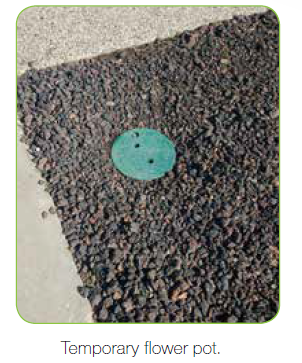
Learn what to expect during TELUS PureFibre installation and how it affects your property. Installation Overview Work zone parameters: Limited to 2-metre utility right-of-way Temporary equipment installation required Includes underground conduit and exterior terminal box Equipment installed: Underground 'flower pot' conduit connection 18mm underground conduit pipe Small terminal box on home exterior Underground Installation Process Installation method: Small plow or compact drilling machinery Minimal ground disturbance Service box installation where required Driveway considerations: Small 'coring' holes may be necessary Concrete filling for repairs Individual assessment for repair needs Aerial Installation Process Connection details: Fibre cable runs from pole to house Small exterior termination box Fire-resistant interior cabling installed Property Restoration TELUS ensures complete property restoration: Area cleanup after installation Grass seed replanting where needed Paint markings naturally dissolve Property returned to original condition Important Notes Utility markings are temporary Water-based paint dissolves with weather Contact local municipality for right-of-way questions When to Contact TELUS Contact TELUS support if you have: Questions about installation timeline Concerns about property damage Issues with restoration work Need clarification on installation method FR version1.4KViews0likes0Comments