home server
3 Topics
Lets encrypt certificate renewal
I was Rogers home internet customer for a while and less than month moved to Telus. I run some home server setup with Proxmox. My Letś encrypt certificate renewal used to work fine. Now it's failing. I have no clue whatś happening. I am sure someone have similar setup like me with Telus home internet. Any help greatly appreciated. Thanks in advance.106Views0likes4CommentsHow to Set Up TELUS TV+ on Amazon Fire TV
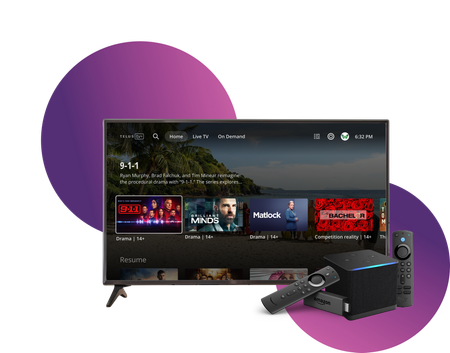
Stream TELUS TV+ content on your Amazon Fire TV devices. Follow these setup instructions to get started. Requirements Active subscription to one of: Optik TV Stream+ Pik TV with live channels Additional requirements: My TELUS or Koodo account Canadian region settings FireOS 6 or higher Installation Steps On your Fire TV device: Open Amazon app store Search for "TELUS TV Plus" Select Install Launch app Sign in using your account credentials Compatible Devices Firestick Fire Cube Fire TV-enabled television sets Available Features Main features: Live TV streaming On-demand content Cloud recordings (with subscription) 4K channel support Service Limitations Some channels require TELUS home internet No On Demand rentals or purchases No Pay Per View events Service available only in Canada Note: For On Demand purchases, use other supported TELUS TV+ devices and watch on Fire TV. When to Contact TELUS Contact TELUS support if you experience: Installation issues Login problems Content accessibility questions Streaming quality concerns Subscription verification needed Version FR3KViews0likes0Comments
Cannot access Nextcloud server locally via domain and external IP
Hello everyone, I'm encountering an issue with my Nextcloud server setup that I hope someone can help me troubleshoot. Here are the details of my setup and the problem I'm facing: I have successfully set up a Nextcloud server on my home computer running Linux Mint, using a LAMP stack. I registered a domain with Hover and pointed the DNS records to my correct Telus external IP address. In my Telus router (NH20A), under Network > Firewall > Port Forwarding, I configured two port forwarding rules: TCP&UDP forwarding for the internal (server) IP address for private and public ports 80. TCP&UDP forwarding for the internal (server) IP address for private and public ports 443. I initially tried setting them to TCP only, but that did not resolve the issue. Despite these configurations, I am unable to access the Nextcloud server using my domain or external IP when connected to my home network. However, I can successfully access the server using "localhost" on any computer connected to my Telus internet. I can access the Nextcloud server on external devices. Restarting the router did not resolve the issue, and Telus support was unable to provide a solution. I would greatly appreciate any guidance on what I might need to adjust or update to enable access to my Nextcloud server using the domain or external IP within my local network. Thank you for your assistance!Solved6.5KViews0likes6Comments