dns
7 Topics
Secondary DNS Server not working
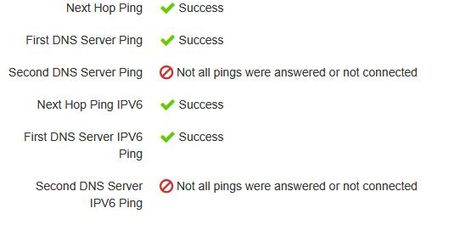
Hello, the secondary DNS servers pushed to the router by DHCP are not working, both for IPv4 and IPv6. This has been ongoing for a while. The above is captured from the router. Pinging 75.153.171.116 with 32 bytes of data: Request timed out. Request timed out. Request timed out. Request timed out. Ping statistics for 75.153.171.116: Packets: Sent = 4, Received = 0, Lost = 4 (100% loss), Pinging 2001:568:ff09:10a::116 with 32 bytes of data: Request timed out. Request timed out. Request timed out. Request timed out. Ping statistics for 2001:568:ff09:10a::116: Packets: Sent = 4, Received = 0, Lost = 4 (100% loss), Telus should not push DNS servers that are not working. Roger406Views0likes4Comments
NH20A router ignoring configured DNS forwarding — confirmed with AdGuard test
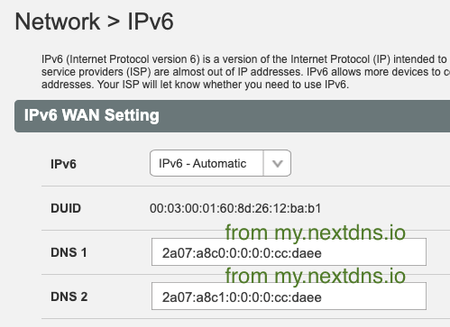
I've configured my NH20A router (logged in as admin) with specific IPv4 and IPv6 DNS addresses from AdGuard. After rebooting both the router and my laptop, I confirmed that the laptop receives the router's IP via DHCP for DNS resolution — so the router should be forwarding DNS queries to AdGuard, and clients should only need the router's IP in their DNS list. That’s the expected behavior. To verify this, I ran nslookup tests using domains that: Should not be cached by the router (never used before) Are known to be blocked by AdGuard DNS Here’s what I found: "nslookup domain AdGuard-DNS" returns NXDOMAIN or 0.0.0.0 as expected (AdGuard is blocking) "nslookup domain router-DNS" returns valid IPs, showing the router forwarded the query to Telus DNS instead of AdGuard This clearly shows that the router is not honoring the configured upstream DNS servers — it’s forwarding to Telus DNS regardless of my settings. Has anyone else confirmed this behavior? Is there a known workaround or hidden setting to force the NH20A to respect custom DNS forwarding?680Views0likes9Comments
Loss of Connection
After no changes that I can recall, I started to get loss of connection. I've restarted the internet access point several time; has no effect. I am connected to the AP by Ethernet, not wifi. I discovered that if I type the following list of commands and then restart, connection works for some time and I experience my usual internet access. But then it is lost again. I would like a permanent solution. Windows 11 version 23H2 with current updates. Commands: done as administrator netsh winsock reset netsh int ip reset ipconfig /release ipconfig /renew ipconfig /flushdns278Views0likes2CommentsHow to fully disable IPv6 on NH20T
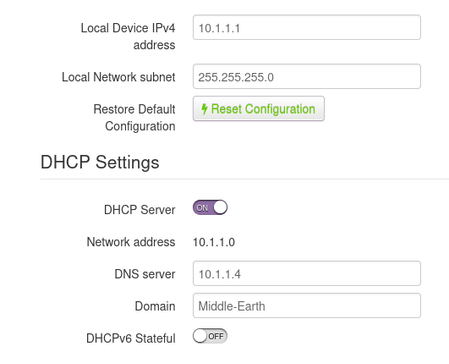
I received my new NH20T and 'Wifi 6 Booster' today. While this is a nice big upgrade from the old Actiontech I had before, there is one issue I'm trying to resolve. I have a PiHole on my network which has worked amazingly up until today. While I do have DNS set for my LAN, I still seem to be getting an IPv6 address on my devices, including DNS6. IPv6 is 'off' in the 'Local Network' section. Yet on my PCs, I'm seeing IPv6 addresses. This is from my laptop running Linux Mint, but my Windows 11 desktop and even my Pixel 8 show similar things (Don't worry about the speed or security on the laptop, it's an older notebook). How do I fully disable IPv6? This defeats the purpose of my PiHole as all my devices end up using the DNS6 address. If possible, I'd like to avoid using the PiHole as my DHCP server as well.3.1KViews0likes6Comments
user configured DNS in Telus not working - disconnect then starts working
Hi I am experiencing an issue with DNS. After few weeks the DNS stop working; quick fix is I can log into the Telus Hub - go to Network Status Press Disconnect and then Reconnect - that fixes the issue (see info after the ping). However I am not using Telus default DNS. Does anyone know why DNS will stop to work after a week or so? There is DNS flush on this router or any way to get any diagnostics or logs. Any suggestions to how to debug this issue? Also I included ping information - this is how I am narrowing this down to DNS issue. C:\Users\raghb>ping yahoo.ca Ping request could not find host yahoo.ca. Please check the name and try again. C:\Users\raghb>ping 1.1.1.1 Pinging 1.1.1.1 with 32 bytes of data: Reply from 1.1.1.1: bytes=32 time=6ms TTL=60 Reply from 1.1.1.1: bytes=32 time=6ms TTL=60 Reply from 1.1.1.1: bytes=32 time=7ms TTL=60 Reply from 1.1.1.1: bytes=32 time=5ms TTL=60 Ping statistics for 1.1.1.1: Packets: Sent = 4, Received = 4, Lost = 0 (0% loss), Approximate round trip times in milli-seconds: Minimum = 5ms, Maximum = 7ms, Average = 6ms C:\Users\raghb>ping 1.1.1.1 Pinging 1.1.1.1 with 32 bytes of data: Reply from 1.1.1.1: bytes=32 time=6ms TTL=60 Reply from 1.1.1.1: bytes=32 time=6ms TTL=60 Reply from 1.1.1.1: bytes=32 time=6ms TTL=60 Reply from 1.1.1.1: bytes=32 time=6ms TTL=60 Ping statistics for 1.1.1.1: Packets: Sent = 4, Received = 4, Lost = 0 (0% loss), Approximate round trip times in milli-seconds: Minimum = 6ms, Maximum = 6ms, Average = 6ms <After disconnecting and reconnecting> C:\Users\raghb>ping yahoo.ca Pinging yahoo.ca [13.248.158.7] with 32 bytes of data: Reply from 13.248.158.7: bytes=32 time=5ms TTL=250 Reply from 13.248.158.7: bytes=32 time=6ms TTL=250 Reply from 13.248.158.7: bytes=32 time=5ms TTL=250 Reply from 13.248.158.7: bytes=32 time=7ms TTL=250 Ping statistics for 13.248.158.7: Packets: Sent = 4, Received = 4, Lost = 0 (0% loss), Approximate round trip times in milli-seconds: Minimum = 5ms, Maximum = 7ms, Average = 5ms C:\Users\raghb> Overview > Network Status Current Time: Sat, 06 Apr 2024 16:10:03 Connection Status WAN MAC: (removed) WAN Protocol WAN IP Gateway DNS Automatic IP (removed) 108.172.208.1 1.1.1.1 8.8.8.8 Disconnect2.9KViews0likes2Comments