booster
26 Topics
Telus Boost Wi-Fi 7 paired with Boost 6E Lite
I recently upgraded to Telus 1.5 Gig internet along with the Telus Boost Wi-Fi 7, paired with 2 Boost 6E Lite units. The technician told me there is currently no Boost Wi-Fi 7 Lite. Is that correct? Also, am I right in understanding that I only get Wi-Fi 7 coverage near the main Boost Wi-Fi 7 unit, while the areas covered by the two Boost 6E Lite units are limited to Wi-Fi 6E? I am trying to understand the setup for future device upgrades.Solved142Views0likes1Comment
Should the TELUS boosters connect to B20T or NAH
Hello: I currently have TELUS Purefiber 250 subscription and our existing set up is a Wifi Hub B20T connected to a Network Access Hub which is then connected to a Nokia ONT where the fiber optic goes in. I am getting a pair of TELUS WIFI boosters (white round disks with ethernet cord and power cords) to enhance the WIFI strength in the basement area of our townhouse. Can you advice where should the first TELUS booster disk be connected to, the B20T, or the NAH? I hope to use our existing Wifi and its password without having to create a new set of WIFI and password. Watching the video, I am still unsure what is appropriate. I still do not have the boosters yet (will get them tomorrow) Thank you.Solved225Views0likes6CommentsCan a TELUS B20T hub serve as a wifi extender?
Hello: I am new to this forum and after having read some posts here I realized that I actually have no idea most of the terms people use so I hope my question is not too naive: I have a TELUS B20T modem and for some unknown reason none of the ethernet jacks in our new home is working (building issues, not network issue since none of our neighbours' ethernet jacks works) so we 100% rely on Wifi. I want to enhance the wifi strength in our basement (the modem sits one floor up) and wonder if I could use an additional B20T as a wifi extender? Does that create more work for me than simply getting some TELUS boosters and what benefits does this have over simply using boosters? If I do choose to use a second B20T as the wife extender, do I need to connect this second B20T to the primary hub's network access hub with an ethernet? Any comments or suggestions will be much appreciated. Thank you.Solved114Views0likes3CommentsExtreme Packet Loss / Late Packet Issues every few days?
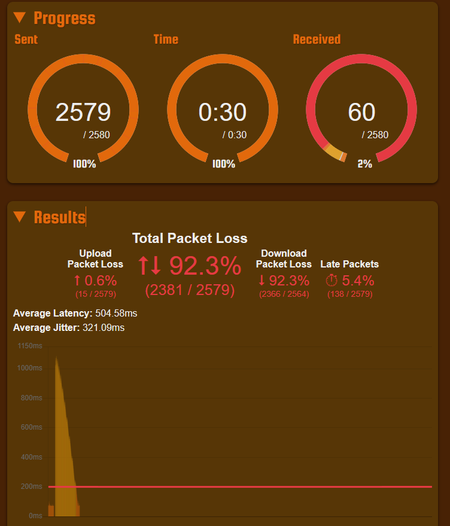
Hi all, Every few days (sometimes multiple times a day), packet loss will go through the roof. This affects things like Facetime, Zoom, and even games and has been extremely inconvenient. A reboot of the router fixes the issue, but only temporarily. I haven't been able to try over ethernet, but the problem definitely happens across multiple devices all at the same time. It also tends to resolve itself a few hours later? See attached images for packet issue examples. Have plenty more... I recently upgraded to the PureFibre X Internet 3G plan from my 1G plan before. Have been with Telus for close to 10 years now and never had issues like this... In the upgrade, technician upgraded me to the new Wifi 7 Router (B30A) from the Telus Wifi Hub Router. He also made some changes to my Fibre Connection outside, I believe. What can be done to fix the issue? What is even the issue? Is this a router problem? A This has been driving me crazy. I've resorted to restarting the router on a daily basis using a timed plug, but even that is not resolving things fully. Thank you in advance... Things I have tried: Disabling the AP Steering, Band Steering, Legacy Steering Getting a replacement B30A Router Changing DNS to 1.1.1.1 on devices235Views0likes8CommentsWiFi Boost 7 Restarting Everyday Around 1AM
Hello, I've been encountering an issue which seems to have only started recently. The WiFi boost 7 I got as part of upgrade to 1.5G on Jan 2026 has recently been restarting itself around 1AM-1:30AM (this morning was around 1:25AM). I can't remember when it started, maybe a week ago? My first thought was some sort of scheduled restart but I don't think that's possible to setup, at least not on the user's side I'm assuming and it hasn't been doing this for a while. Tried troubleshooting with technical team but wasn't able to complete call as I had to leave. However, they were very fixated on the fact that the boost 7's 10G port had orange LED light. I recall asking the technician that came over to install my 1.5G upgrade that it was normal so not sure who's right. Anyone encountered this before?Solved629Views1like24Comments
192.168.1.254 login.
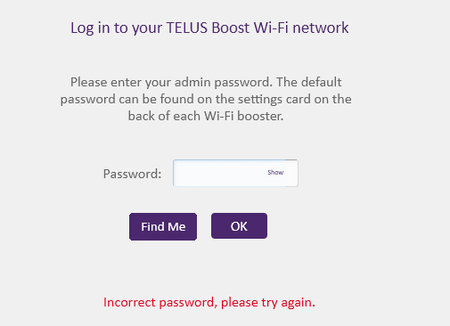
hello, I am trying to port forward, but the problem is that I cannot access the 192.168.1.254 site as I do not have the admin password for my the access hub. Going into 192.168.1.41 just brings me to my boosters options and I have no way of port forwarding. I am wondering how I am able to find the admin password of the access hub. should I try taking the plastic covering off? Is the password for the access hub hidden inside of it? What other option to retrieve the password do I have?214Views0likes1Comment
Multiple Telus Wifi Boost 7 setup
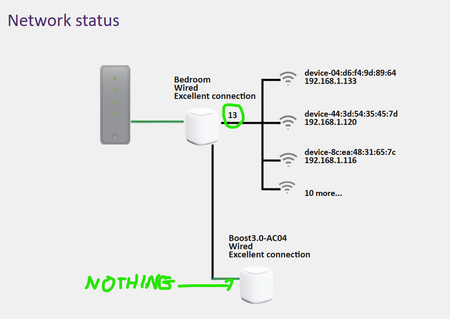
I got upgraded to new Telus setup with NAH and Wifi Boost 7 booster. Everything is working great except that my 2nd Wifi boost 7 wont work. Its connecting fine and forms a mesh network with the Primary but none of my wireless devices will connect to it. I have tried multiple ways of connecting: Primary-boost and Secondary-boost connected to NAH. Both boost-7 are green and show excellent connectivity and zero issues. Primary-boost connected to NAH and Secondary-boost connected to Primary-boost 2.5G port. Both are green and show excellent connectivity and zero issues. However, none of my laptops, phones, tablets, other IOT devices will connect to the secondary-boost. I called Telus and this is what i am told Telus has upgraded their systems which does not allow them to add a 2nd boost-7 devices for their customers anymore. so if the customer has 2x Telus-Wifi-Boost-7 and even if they form a mesh network and are green, the 2nd one wont work. Customers are now being pushed to use Telus Wifi Plus to get better coverage and pay $10/month for that service. Very disappointed in this. See screenshot of my connectivity below.833Views0likes7CommentsTelus Wifi Boost 7 - Can't Change SSID/Password without settings reverting
Hi All, I just upgraded to the 3G XGSPON plan and was provided an NH20A and a Telus Wifi Boost 7. Everything works, but I want to change the SSID and password to my old network so all of my old devices auto connect. I am connecting to it through the web GUI, and whenever I change the SSID and password, it changes and all of my old devices connect. However, if I go back to the web GUI or the Telus Connect app, it shows the default SSID. Any changes I then make in the web GUI reverts the SSID back to the default settings. A power cycle also resets everything back to default settings. If I try and change the SSID/Password in the Telus Connect app, it immediately says "Unable to change Wifi-Name, Please try again". Enabling the Guest network and changing the guest network SSID/Password works and the settings persist. Note that I am using another router on the 10G port and bridging only that port. I want to use the Telus boost 7 purely for IOT devices on the 2.4ghz channel, but I can't even disable 5ghz/6ghz as no settings are being applied. Thanks in advance!152Views0likes1CommentTELUS Boost Wi-Fi 7 Buggy?
I recently upgraded to PureFibre 3G and needed a couple of TELUS Boost Wi-Fi 7 in my setup. The goal of the secondary Boost 7 is to replace my old Netgear router, which created a secondary Wifi network to manage the signal conflicts I previously had. I was hoping to just renamed the SSID to my old and all should be working as previously (in theory). The main Boost 7 worked as expected, but setting up the additional one was not intuitive as the "magic" of auto-configuration for meshing does not work and there is no visible WiFi signal. I ended up searching the Boost IP address by logging into the NAH and once in, I was NOT able to see the general settings around "SSID" (or anything else that I could possibly configure for that matter). I tried the alternative method of using the TELUS Connect or Smarthome+, but neither of them had a option or visibility into the Boost 7. It's all very confusing as what I search in Google or in this Neighborhood seems to be inconsistent. Has anyone else solved this or are you all in the same boat? At this point, I may have to purchase a new router instead and go back to my original setup...1.5KViews0likes4Comments